Initializing and managing the password of a Web user
When in MEGA authentication mode, to allow a Web user to define their password and security question, you must initialize their Web account.
Initializing a user Web account
Prerequisites
Before initializing the Web account of a user:
• ensure the e-mail of the person is specified.
• check that the following options relating to Web applications are specified:

These options can be specified at installation, see the installation document
MEGA Web Front-End Installation Guide.
To initialize the Web account of a user:
1. Access the User Management pages.
2. Select the Persons sub-folder.
3. In the Persons list, select the person concerned.
4. Click Initialize the Account.
An e-mail is sent to the person concerned with a limited life link (48 hours by default), allowing the person to define a password and the reply to a security question.

In the characteristics of the person, if the e-mail address is not specified, the person cannot receive the message.
Modifying the life of the first connection link
To modify the life of the first connection link:
1. Connect to the MEGA Administration desktop (Web Front-End).
2. In the edit area, click Environment Options.
3. In the options tree, expand the Installation folder and select User Management.
4. In the right pane, modify the value of the Life of first connection link option.
Modifying password management configuration
To modify configuration linked to password management:
1. Connect to the MEGA Administration desktop (Web Front-End).
2. In the edit area, click Environment Options.
3. In the options tree, expand the Installation folder and select User Management.
4. In the right pane, you can modify default configuration of options:
• Number of tries before password invalidation.
Default value: 3
• Password expiry
Default value: 40 days
Modifying password definition rules
To modify password definition rules:
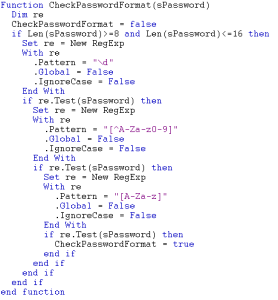
1. Edit the CheckPasswordFormat macro.
2. Overload the macro CheckPasswordFormat with your definitions.
By default this macro imposes that the password should comprise:
• between 8 and 16 characters
• at least one letter
• at least one figure
• at least one special character