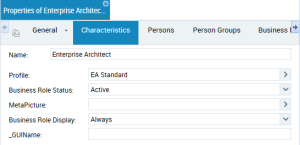
Defining Business Role Characteristics
To define characteristics of a business role:
1. (Web Front-End) Access the user management pages and select the Business Roles sub-folder.
(Windows Front-End) Open the Business Roles and Profiles and select the Business Roles tab.
2. In the list of Business Roles, select the business role.
3. In the toolbar, click
Properties 
.
The Properties dialog box of the business role appears.
5. (Optional) In the MetaPicture field, click the arrow and select Connect MetaPicture.
• In the query field, enter the characters you want to find and click Find.
• In the results list, select the icon and click OK.
6. (Optional) In the Business Role Status field, modify the attribute value.

By default, the business role is active.
7. (Optional) In the Business Role Display field, click the arrow and modify default behavior of business role display at connection.
8. (Optional) In the _GUIName field, enter the business role name displayed in the interface.
9. Click
Save 
(Web Front-End) /
Apply (Windows Front-End).