Managing Log Size
To reduce the log size, you can:
• delete or consolidate all the log commands earlier than a selected date
• (SQL Server) select and delete log elements, earlier than a selected date
• modify MetaClass loggability
Log size management frequency
You must reduce the log size:
• every month, for configurations of less than 50 users.
• every week, for configurations of more than 50 users.
Deleting a log or reducing the log size
To delete a log or to reduce its size:
1. Connect to MEGA Administration.
2. Connect to the environment in which the repository is referenced.
3. Expand the Repositories folder.
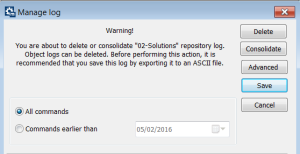
4. Right-click the repository and select Repository Log > Manage Repository and Object Log.
The Manage Log dialog box opens.
5. Before deleting your log (complete or partial deletion), MEGA recommends that you back up your log.
• Click Save.
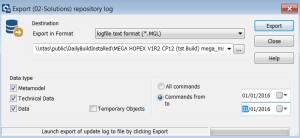
The Export repository log dialog box opens.

Select the option
Commands from "selected date"
to "selected date".
There is no duplication of backup and you save backup time and size.
Select a starting date (From) corresponding to the end date of your last backup, and select the ending date (To) you require.
• Click Export.
The log backup is performed.
6. In the Manage log window, define the commands to be deleted. Select either:
• All commands or
• Commands earlier than and select the date using the drop-down menu calendar.
7. Click either:
• Delete to delete all the commands contained within the selected time interval.

(GBMS, Oracle) If you did not follow the recommendation regarding log management frequency, this action may take a very long time, see
"Log size management frequency".
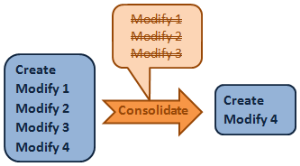
• Consolidate to delete only the intermediate commands contained within the selected time interval.
You can consolidate the latest information.
Deleting log elements to reduce the log size (SQL server)
With an SQL Server repository storage, you can delete log elements more specifically: you can delete only log elements relating to specific MetaClasses, earlier than a selected date.
To delete log elements regarding specific MetaClasses:
1. Connect to MEGA Administration.
2. Connect to the environment in which the repository is referenced.
3. Expand the Repositories folder.
4. Right-click the repository and select Repository Log > Manage Repository and Object Log.
The Manage Log dialog box opens.
5. Click Advanced.
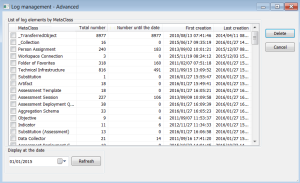
The Log Management - Advanced window shows the log element number by MetaClass and specifies the first and last creation date.
6. In the Display at the date pane, select the date until which you want to delete the log elements.
7. Click Refresh.
The Number until the date column shows for each MetaClass the log element number until the selected date.
Click the
Number until the date column header to sort the MetaClasses, with the most populated at the top.
8. In the MetaClass column, select the MetaClass for which you want to delete the log elements until the selected date.
You can select several MetaClasses.
9. Click Delete.
Log elements are deleted.
Modifying MetaClass loggability
To reduce the number of objects generated in logs, you can modify logging of MetaClasses you do not want to track.
To modify MetaClass loggability:
1. From MEGA, open the MetaStudio navigation window and expand folders MetaClass > MetaModel.
Or you can click
Explore 
, and from the explorer find the
MetaClass or
MetaAssociation object.
2. Open the properties dialog box of a MetaClass or MetaAssociation.
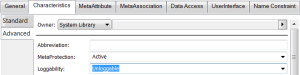
3. In the Characteristics > Advanced tab, for the loggability attribute, select Unloggable value.
Occurrences created, updated or deleted in a private workspace are dispatched, but certain commands are not available in object histories or in repository activity.