Introduction to the Windows Front-End Interface
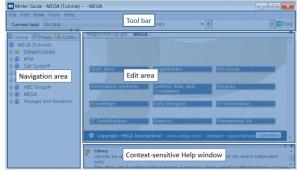
By default, the Enterprise Architecture desktop available in Windows Front-End comprises:
• A toolbar for executing the main actions available from the desktop.
• A navigation area for navigating in the repository and accessing main objects.
• An edit area for opening and editing diagrams.
You can also display:
• the context-sensitive Help window, which provides information on the selected object.
• the Properties window, which is used to consult and define properties of the selected object.
• The Comment window, which is used to specify and modify information associated with an object.

The object types available depend on the
MEGA products you have at your disposal.