Introduction to Profiles
A user access Hopex with a specific profile that determines the Hopex application and its associated desktop(s).
Profile definition
A profile defines the function of a person or person group in the enterprise.
E.g.: EA Functional Administrator, Enterprise Architect
The profile defines:
• the products accessible
 The command line of each profile is also described in the Platform - Concepts > Profiles documentation.
 If a user already has restricted access rights to products (see Viewing the Characteristics of a Login), the products accessible to this user are at the intersection of the values of the Command Line attribute of the user login and profile.
• the desktops to which the user can access
 See Connection diagram.
• the UI access rights (permissions) of the user
• the same options for all the users logged in with this profile
See Options.Profile assignment
The Hopex Administrator (or an Hopex Administrator of a Solution) must assign each person at least one profile so that this person can access Hopex.
Assigning a profile to a person or a person group defines:
• the repository concerned by the assignment
• the data (reading, writing) access rights of the person with this profile assignment
• (optional) the validity period of the assignment
Connection diagram
Using a Working Environment Template (WET) enables to homogenize the display of the desktops.
For detailed information regarding the WET creation, see Versatile Desktop documentation.To access Hopex, a person must have:
• a login
• at least one profile assigned
The WET assigned to the profile defines its associated desktop.
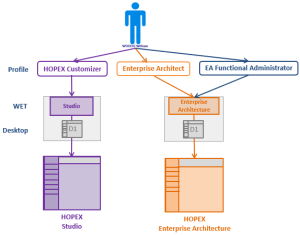
In the above example, William WOODS has an active login. He can access:
• Hopex Studio with the Hopex Customizer profile.
• Hopex Enterprise Architecture with the Enterprise Architect profile or with the EA Functional Administrator profile.