Configuring a Profile

Profile customization is restricted to
Hopex Customizer profile.
Characteristics
In the Characteristics page of the profile you can define:
• the products accessible to users with the current profile (Command Line)
As a
Hopex Administrator you can also modify the
Command Line definition.
• whether the profile is
• available at connection (Profile Display)
• active or not (Profile Status)
As a
Hopex Administrator you can also modify this
Profile Status value.
• Assignable or not
• an Administrator Profile or not

As a
Hopex Customizer you cannot modify the
Administrator Profile field. This action is restricted to a profile with
Administrator Profile value set to "Yes", like
Hopex Administrator profile.
• Interface
• the profile display name in the interface (_GUIName)
• the profile icon in the interface (MetaPicture)
• Options
• the options at profile level
• Homepage
• the Homepage defining the homepage blocks for the current profile
• the homepage header definition: Covered Domain (can be used by several profiles)
• the default Homepage Report displayed on the homepage associated with the current profile
Desktops
• the Working Environment template (WET) page defines the desktops to which the users of the profile have access.
Objects
• (If needed) the Terminology page defines the Terminologies associated with the profile.
• object types available.
You can also:
• customize profile UI access
• check that the profile complies with the connection regulation
Configuring profile characteristics
To configure a profile characteristics:
1. Access the properties of the profile.
The Characteristics page displays.
2. (Optional) In the Command Line field, enter the command defining products that can be accessed by users with the current profile.
3. (If needed) In the Profile Display field, modify the value.
By default, the profile is provided at connection only if not included in another profile.
4. (Optional) In the Profile Status field, modify the attribute value.
By default, the profile is active.
5. (If needed) To modify the
Administrator Profile field value, ask
Hopex Administrator to perform the action, see
Configuring a Profile.
By default, the profile is not an administrator type profile.
6. (If needed) In the Assignable field, modify the attribute value.
By default, the profile is not assignable.
7. (Optional) In the Homepage Report field, connect a report to the profile homepage.
8. (Optional) In the _GUIName field, enter the profile name displayed in the interface.
9. (Optional) In the MetaPicture field, click the arrow and select Connect MetaPicture.
• In the search field, enter the characters you want to find and click Find.
• In the results list, select the icon and click Connect.
Assigning a WET to a profile
For more details on the WET creation and its use with profiles, see
Platform - Customization (Windows) > Customizing the user interface > Versatile Desktop.
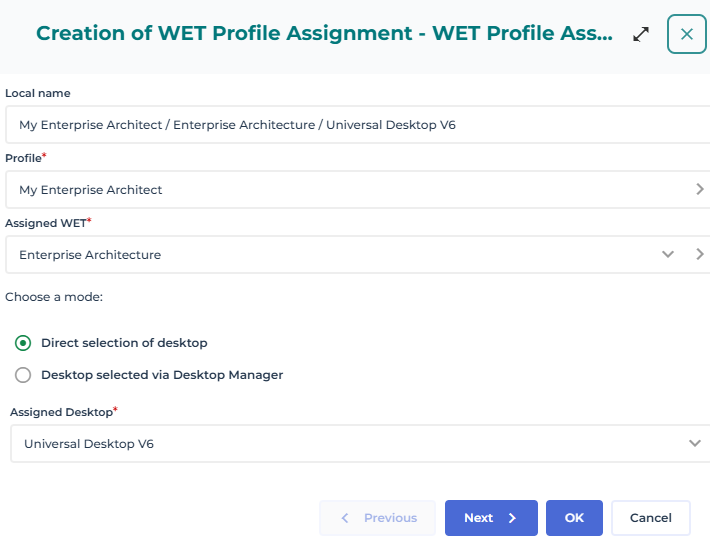
To complete the profile configuration, you must assign a WET to the profile and define the desktop associated with this WET assignment:
• the desktop ("Universal Desktop V6") defines the layout of the desktop (containers)
• the WET defines the content of the desktop
The Local name of the WET assignment to the profile is automatically filled according to your configuration in the following format:
<Profile name>/<WET name>/<Desktop name>
You may define a Name to this assignment.
To assign a WET to a profile (standard version):
1. Access the properties of the profile.
2. Display its Working Environment Template Assignments page.
3. Click
New 
.
4. In the Assigned WET field, select the WET you want to assign to the profile.
The assigned WET is automatically added to the Local Name.
5. In the Assigned Desktop field, select the desktop you want to assign to the profile.
E.g.: Universal Desktop V6
The assigned Desktop is added to the Local name.
6. Click OK.
The selected WET is assigned to the profile and its associated layout is defined.
Modifying options for a profile
To modify a profile options:
1. Access the Profiles management page.
2. In the edit area, select the profile concerned.

You can use the list filtering tool to find the profile.
3. In the list menu bar, click Options.
The profile Options window pops up.
4. In the Options tree, expand the corresponding folder and in the right pane modify the option concerned.
5. Click:
• Apply to validate your modifications and keep the Options window open.
• Ok to validate your modifications and close the Options window.
Options are modified for this profile.
Defining a default report on the homepage
You can define a default report on the homepage associated with the profile, for all the users connected with the current profile.
Each user can change this report.
To define a default report for a profile homepage:
1. Access the properties of the profile.
2. In the Characteristics page, click the Homepage report arrow and select Connect.
3. Select the report and click Connect.
The report is linked to the profile desktop homepage.
Associating a terminology with a profile

A Terminology defines a set of terms used in a specific context instead of the standard term.
To associate a terminology with a profile:
1. Access the properties of the profile.
2. Display its Terminology page.
3. Click
Connect 
.
The terminology search tool appears.
4. (Optional) In the second field, enter the characters to search for.
5. Click
Find 
.
6. In the search results, select the terminology you want to connect.
You can select several terminologies.
7. Click Connect.
The terminology is associated with the profile.
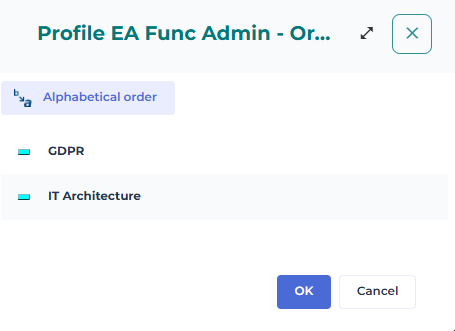
If you associate more than one terminology with the profile, you must define an order of priority for them.
To define the priority of the terminologies of a profile:
1. Access the properties of the profile.
2. Display the Terminology page.
3. In the toolbar, click
Reorganize 
.
4. Drag and drop the priority terminology at the top.
In the example above, the terms of the IT Architecture terminology are used when they are not defined in the GDPR terminology.
Defining the object available for a profile
You can define which specific object are available for a profile:
• Business Document Pattern
• Document category
• Report DataSet Definition
• Widget
To define the object available for a profile:
1. Access the properties of the profile.
2. In the Available Objects page, expand the folders.
3. In the toolbar, click
Connect .
4. The object type search tool appears.
5. (Optional) In the search tool, in the first field, select the object type category.
6. (Optional) In the second field, enter the characters to search for.
7. Click
Find .
8. In the search result, select the object types to make available for the profile.
9. Click Connect.
The object types selected are made available for the profile.