Building Concept Diagrams
A concept diagram is a graphical representation of the concepts used in the context of a concept domain, as well as the links that exist between these concepts.
A concept domain can be described by a number of concept diagrams.
A conceptual object belongs to a business dictionary from which it was created but can be used/referenced by a concept domain of a different business dictionary.
Creating a concept diagram of a concept domain
To create the concept diagram of a concept domain:
1. In the edit area, move the mouse over the relevant concept domain and click Create a Diagram.
2. Select Concept Domain Diagram.
3. Click OK.
The concept diagram opens in the Edit window.
The components of a concept diagram
A concept diagram describes the information architecture. By default, you see in the concept diagram concepts, variations and individuals only.
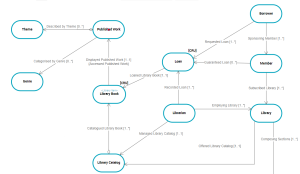
The following concept diagram partially describes the “Media Library” business dictionary.
The diagram is initialized with objects that belong to the domain. It can also contain objects that do not belong to the domain.
Activating the views window
The Views and Details window presents an extended list of views (object types to be displayed).
To activate the Views and Details window:
1. In a diagram, click
 Views and Details
.
The list of views (object types to be displayed) appears.
2. Select or clear the views you want to display or not.
The views available for a concept domain are:
• Concepts,
• Concept types,
• State concepts,
• Event concepts,
• Concept properties
• Individuals,
• Individual states,
• Individual events,
• Concept Views

A concept view enables representation of the semantic scope covered by a business object. A concept view is based on the selection of several concepts specific to the view.
Adding a concept diagram element
For example, to add an existing concept to a concept domain:
1. In the concept diagram object toolbar, click
 Concept
.
2. Click in the diagram.
The add concept dialog box opens and asks you to select a concept.
3. Select the concept that interests you.
4. Click Add.
The concept appears in the diagram.

For more details on concept creation, see
Concept.
Using the object insert toolbar
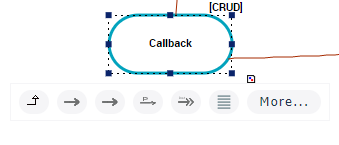
An insert toolbar available on each object simplifies object creation by proposing object selection help. It only suggests the objects that can be connected to the current object.
To create, for example, a concept from a diagram concept:
1. Click on the concept of the diagram that interests you.
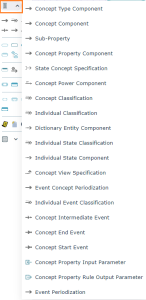
A bar containing the objects you can insert appears.
2. Select the desired object type.
For example: Concept component
3. Click in the graph at the point where you wish to place the object.
The object is created, with the link to the previous object.
Overview of links between objects
In each concept graph, relationships between concepts, concept types and concept individuals are represented by links.
The link direction provides a natural mechanism for reading and deducing the scope defining "the business object".
Link Details
Link type | Definition and Comment |
|---|
Concept type component | A concept type component enables specification of the relationship between two concept types. |
Concept component | A concept component enables representation of a dependency relationship between two concepts. This relationship is directional. |
Dictionary state of | A dictionary state enables connection of a concept to a concept state, and specification of the state nature. With "State concept" view. |
Concept Power Component | A concept power component enables connection of a concept to concept type to characterize a property of the concept. |
Concept classification | A concept classification enables connection of a concept to the concept that characterizes it. |
Individual classification | An individual classification is used to connect an individual to the concept that characterizes it. |
Dictionary entity component | An entity component is used to connect an individual to a dictionary element. |
Individual state classification | An individual state classification enables connection of an individual state to the state concept that characterizes it. This link is available with "Individual State" view. |
Individual state component | An individual state component is used to connect an individual to an individual state. This link is available with "Individual State" view. |
Individual event classification | An individual event classification is used to connect an individual to the event concept that characterizes it. This link is available with "Individual State" view. |
Concept intermediate event | An event concept represents an event occurring during concept life, for example a change of season. An event concept marks the impact on a concept of a phenomenon internal or external to the concept. Concept events can be distinguished as concept start events, end events and intermediate events. These links are available with "Event Concept" view. |
Concept end event |
Concept start event |
Accessing link properties in a concept diagram
In a concept diagram, links are directional and access the properties of both the link and the link target object.
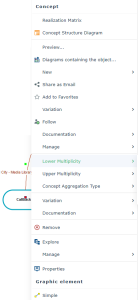
The pop-up menu of a Concept Component link type for example presents:
• commands specific to the object type used by the component (the concept)
• commands relating to the component itself
for example Multiplicity
• commands relating to the graphics.
To access properties of a link of "component" type:
for example Concept Component
1. Right-click the link to open its pop-up menu.
2. Select the link and click Properties.
The link properties dialog box opens.
In the Characteristics page of the link property window, the last Component section indicates:
• The Name of the link, which corresponds by default to the target dictionary element or term associated with the link.
• The Composed Concept targeted by the link.
• The Owner who is the dictionary element at the origin of the link.
• The Minimum Multiplicity is the number of origin elements that can access the same target elements.
For example, how many "Works" can belong to the same "Work Category".
• The Maximum Multiplicity is the number of target elements that can be connected to the same origin elements.
For example, a "Work" can only belong to only one "Work Category".
• The Abstract Concept check box, which enables specification of the concrete or abstract character of a concept,
• The concept aggregation Type which can be one of the following:
• "Referencing”: to indicate that the target concept is referenced by a link,
• "Embedded": to indicate that the target concept exists in its own right, but is included in the concept that is the source of the link,
• "Composite": to indicate that the target concept is a component of the concept that is the source of the link; if the target concept is destroyed, the composite is also destroyed.
• The Designation of the link and the Definition Text field enable association of a term and a definition to the link.
For more details on defining concepts, see
Concept.
Graphic appearance of diagram objects
To change the graphic appearance of diagram objects:
1. Select the object in question in the diagram (open in edit mode).
2. To the right of the diagram, click the Open the aspect page arrow.
The properties panel appears. Under the Aspect tab, commands allow you to customize the text and shape of the selected object.