Concept
The concept is the basic element of a business dictionary.
A concept expresses the essential nature of a being, an object, or a word through its properties and characteristics or its specific qualities.
A concept is associated with one or more terms that designate the concept in a given language. See Consulting the Business Glossary.
Accessing the List of Concepts
To access concepts:
 Click the Glossary > Concepts navigation menu.
The list of concepts appears.
The Browse  button displays the card of each concept, with its description and usage contexts.
button displays the card of each concept, with its description and usage contexts.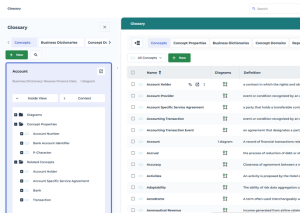
Creating Concepts
To create a concept:
1. See Accessing the List of Concepts.
2. Click the New button.
3. Specify the name of the concept. You have two possibilities:
• Enter the Name of the concept (in this case a new term with the same name is created), or
• Select an existing term in the list that appears.
4. Specify the Owner business dictionary.
5. Enter the Definition of the concept.
6. Click OK.
The concept also appears in the tree structure of the holding business dictionary.
See also Renaming Concepts.
Concepts and Terms
A term is a word (or group of words) used to designate a conceptual object in a given language, especially in a specialized field.
Synonyms
Connecting an existing term to a concept
Accessing the list of terms
Creating terms in multiple languages
Hypernyms and Hyponyms
Hypernymy describes a relationship between conceptual objects:
• An hypernym
 An hypernym is a generic conceptual object which allows to generalize several specific conceptual objects.
Hypernym example: an animal
• An hyponym
An hyponym is a conceptual object which allows to specialize another conceptual object (the hypernym).Hyponym examples: cat, dog, rabbit
In Hopex, this relationship is implemented through variations.
• the hypernym is the variant
• the hyponym is the varied object
Renaming Concepts
The name of a concept is derived from the associated term. To rename a concept, you need also to modify the associated term.
To modify the term associate to a concept:
1. Open the concept properties.
2. Click the Characteristics page.
3. At the right of the Name field, click the right-facing arrow arrow then Rename the existing term
4. Modify the current name or select another existing term.