EA Desktop Description
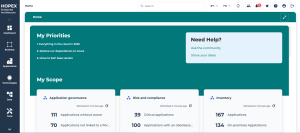
Homepage of the EA Desktop
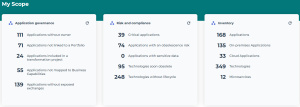
The My Scope section displays indicators about application assets. It enables you to access the list of corresponding objects.
Application governance
• Applications without owners: displays a list of applications to which you can connect responsible users.
• Applications not linked to a portfolio: displays a list of applications to which you can connect portfolios.
• Applications without exposed exchanges: applications that neither receive nor send flows.
• Applications included in a transformation project: these are the applications that are part of the deliverables of a transformation project.
• Applications not mapped to business capabilities: displays the list of applications which don't cover any business capability.

To request application owners to connect applications to business capabilities, select the applications and click
Request Application Update. A notification is sent to owners.
Risk and compliance
• Critical applications: all applications that cover a strategic business capability, in other words, whose Business Value is "Significant”.
• Applications with an obsolescence risk: applications whose risk of obsolescence is between “Medium” and “Very high”.
The risk of application obsolescence corresponds to the highest risk of the technologies linked to it. See the obsolescence risk in the
Overview of a technology.
• Applications with sensitive data: applications linked to data stores containing data (classes, MD entities, data views) or Concepts in the "Sensitive data" category.
• Technologies soon obsolete
• Technologies without lifecycle
Inventory
• Applications
• On-premises Applications
• Cloud Applications
• Technologies
• Microservices

A microservice is a software component that can be deployed autonomously, but which does not directly provide an end user service. It can interact with other application services, applications or application systems.
EA Navigation Menus
Dashboard
The Dashboard menu gives access to two dashboards dedicated to enterprise architecture.
Business function
The Business menu is dedicated to strategic transformation.
Applications
The Applications menu displays:
• All the applications of the repository
• Application portfolios
Technologies
The Technologies menu lets you manage application-related technologies.
Data
The Data menu allows you to make an inventory of the conceptual and logical data exchanged within the application assets.
You need
Hopex Data Architecture to be able to access the
Data navigation menu.
Tools
The Tools menu gives access to the following tools:
• Business Information Realization (Matrices and Realization Reports)
• Assessment and data call.
• Technopedia (BDNA technology types, BDNA vendors, BDNA software technologies)
Reports
The Reports menu provides a search tool for all report templates and saved reports.
For more information on data reports, see: