1 Versatile Desktop Overview
The Versatile Desktop functionality enables creation and customization of the work environment of HOPEX users. A user can access different desktops adapted to his/her requirements and to the actions he/she must execute as a function of a given role.
1.1 Public concerned
Desktop creation and definition is intended for:
Functional developers, for HOPEX desktops supplied as standard.
Product Engineers or Administrators, for customized desktops for client accounts.
1.2 Diagram
A user can connect to MEGA Applications via customized desktops according to the actions to be performed.
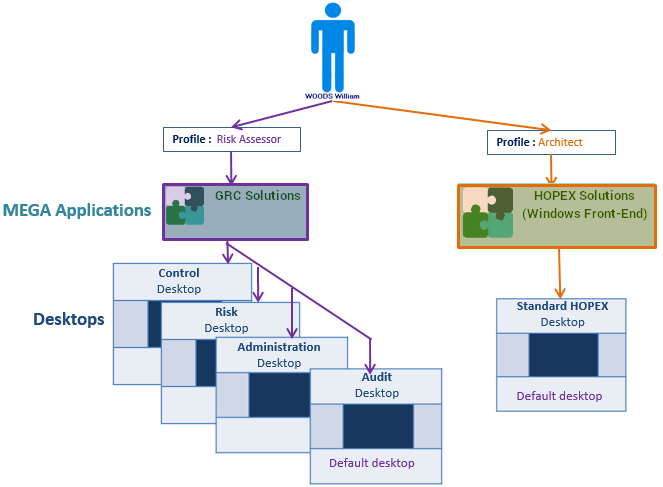
The properties defined on each desktop of a MEGA Application define:
• the session access mode for this desktop:
o Public Workspace: the application opens in the current state and data can be modified. All updates are visible to all users using the application at the same time.
o Private Workspace: the application opens in the current state and data can be modified. All updates made by the user are kept in the private space of the user until he/she decides to dispatch them.
• (when the session access mode is Public Workspace) the Session Connection Mode for this desktop:
o Single session: end users do not share the same process. They might not have the same view of the repository.
o Multi-session: end users share the same process. They must have the same view of the repository.
1.3 Elements of a work environment
To customize the work environment of users, the following elements are available:
• a desktop, which can contain one or several containers
• containers, which can contain other containers or desktop components
• desktop components, which are:
o tools associated with a configuration (MEGA Parameterized Tools)
E.g.: tree, list, menu, HTML formatters.
o tools (MEGA Tool)
E.g.: Query, Properties pages, Wizard, Widget, diagram editors and HTML.
 |
A desktop cannot directly contain a MEGA Tool.
The desktop contains a MEGA Parameterized Tool which contains the MEGA Tool.
|
1.4 Metamodel
The following Metamodel schema shows architecture and links between:
• Application
• Desktop
• Container
• Desktop components
• Tools
To see another Metamodel using a Working Environment Template (WET) combined with Desktops, see WET metamodel.
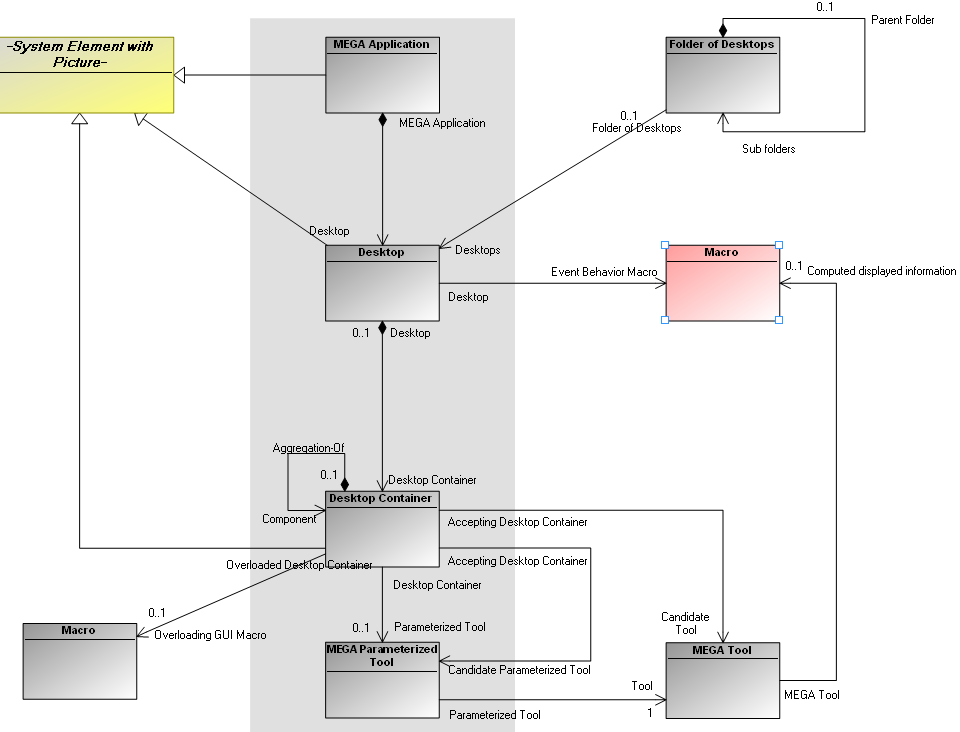
Principle:
A user can connect to one or several desktops depending on his/her profile and authorizations. The user passes from one desktop to another by logoff/login or by using the MEGA Tool Desktop Switcher.
A desktop comprises one or several containers, in which are defined tools that will be displayed.
|
|
A container can contain only a single tool.
A tool must be hosted by a container.
|
To create and customize the desktop of an application, you should follow these steps: