2. Virtual Reports with Report Edition
2.1. Identifying the macro to edit
These reports are defined in Property Pages which define a specific informal query and use the Report Edition generic subpage:

The report formatter macro must be updated. It is defined in the informal query _Parameterization attribute:
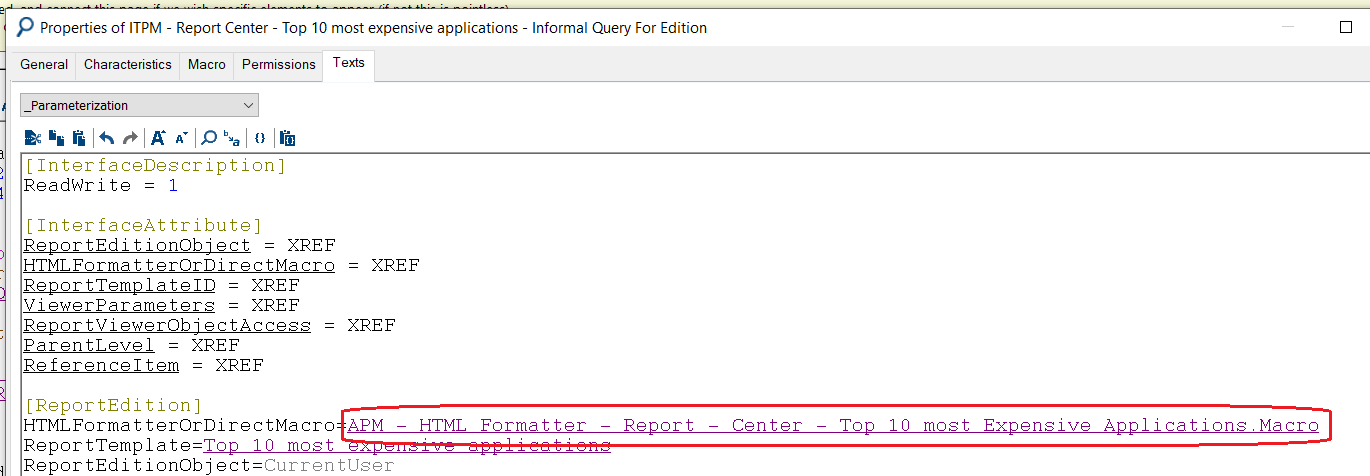
2.2. Updating the macro
Perform the following two changes to this macro:
• After the report creation part, add the following code :
…
Set oAnalysisPlugin = oRoot.CurrentEnvironment.GetMacro("~9MuFp4qmBD40[Analysis Plugin]")
…
Set oAnalysis = oAnalysisPlugin.newAnalysisFromXMLString(oRoot, oXmlAnalysisBuilder.xmlAnalysis)
…
'Report tool parameterization
dim sUserData
sUserData = oGenerationContext.UserData
if sUserData <> "" then
oAnalysis.setReportCmpId(oAnalysisPlugin.getReportCmpId(sUserData))
end if
• Remove the HTML Header and Body added to the string returned at the end of the Generate sub.
sout = sout & "<!DOCTYPE HTML PUBLIC ""-//W3C//DTD HTML 4.01 Transitional//EN"" ""http://www.w3.org/TR/html4/loose.dtd""><html><head>" _
& oRoot.CurrentEnvironment.GetMacro("~gu3rWUjw4D70[Html Complete Analysis]").getCssAndJsReferences (oRoot, oGenerationContext) & oAnalysisPlugin.getCssJs(oRoot,oGenerationContext) _
& "</head><body class=""nae"">" _
& oAnalysis.Generate("HTML",oGenerationContext,null) _
& "</body></html>"
You get now :
sout = oAnalysis.Generate("HTML",oGenerationContext,null)