2. Logical Application Architecture
2.1. HAS Server
HOPEX Application Server, shortly named “HAS”, is based on a 3-tier web architecture principle including:
• a presentation tier: representing the web user interface. This layer is packaged as a Front-end module of web type. There might be several web front-end modules depending on the use case.
• an application tier: representing the business logic of the HOPEX platform. This layer is packaged as a Back-end module. The main module for the platform is called HOPEX Core.
• a Data tier: representing the persistence mechanisms of the data. This layer is provided by a market RDBMS.
As web application, the HOPEX solutions can be navigated using modern web browsers. The device used to browse the solutions depends on the Front-End module used and its compatibility with laptops, tablets, and mobiles.
The overall architecture of HAS is described in the following architecture view:
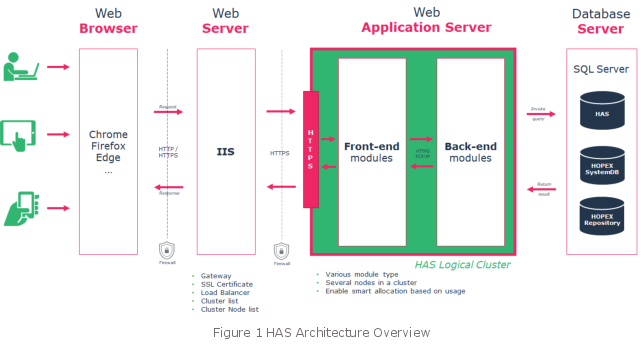
The Web HOPEX Application Server provides its own web server based on Kestrel ASP.Net Core
The technical name of HAS as a Windows process is HAS.server.exe.
2.2. HAS Modules
2.2.1. Module overview
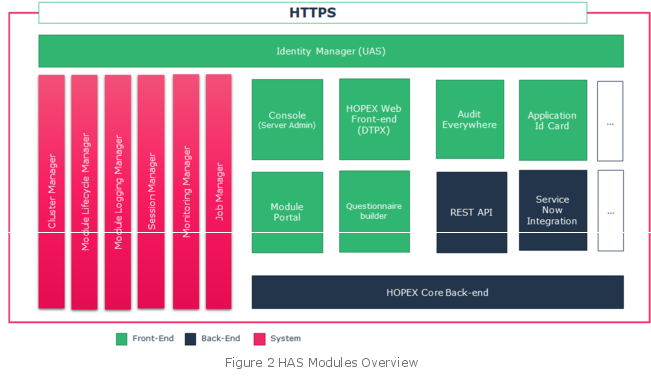
The embedded application web server is organized to work with a group of modules that deliver technical or business services.
Technical Classification | Purposes |
System | These modules are the required system modules for the service to be up and running. They include authentication, clustering, monitoring… |
Back-end | These are the modules that perform all the business logics and interact with the database to store information. These modules are called by the front-end modules. |
Front-end | These are the modules that expose web front-end part. After identification, these modules can be accessed by the user web interface or by API. |
HAS embeds all the modules in its web architecture. It will manage:
• Start/Stop: to Start or Stop the required modules and ensure the application is up and running.
• Restart: to avoid failover HAS manages the restart of the appropriate modules.
2.2.2. System modules
These modules are technical and are a prerequisite for the application to run. They can appear as dedicated modules or as part of HAS Server.
Module | Process Name | Purposes |
Identity Manager | HAS.Modules.UAS.exe | Based on Identity Server 4 this module manages the authentication workflow. This module can be configured to support various SSO configurations. |
Console | HAS.Modules.Console.exe | It allows to manage the server installation from a web portal. |
Cluster Manager | HAS.Server.exe | Ensures the synchronization of the physical installation across the logical cluster. |
Job Manager | HAS.Server.exe | Ensures the treatment of the scheduled jobs and their execution in the appropriate node of the cluster. |
Lifecycle Manager | HAS.Server.exe | Enables updates of the modules based on available version from the HOPEX Store. |
Session Manager | HAS.Server.exe | Ensures the opening and closing of the session when people request an HOPEX connection. |
Monitoring Manager | HAS.Server.exe | Exposes supervision metrics to diagnostic health of the deployment. |
Logging Manager | HAS.Server.exe | Provides the appropriate logs for each module with consistent naming convention and content. |
2.2.3. Back-end modules
These modules expose the core treatment of the platform and can access a database to store data.
Module | Process Name | Purposes |
HOPEX Core | HAS.Hopex.BackEnd.exe | This is the main process to run all the business logic of HOPEX. |
… | … | … |
All the other Back-end modules are available online on the HOPEX Store.
2.2.4. Front-end modules
These modules expose a web front-end and can be called by the user to access the platform.
Module | Process Name | Purposes |
HOPEX Web | HAS.Modules.Dtpx.exe | This is the main process to expose the web front-end of HOPEX. |
… | … | … |
Other Front-End modules like Application ID Card, Audit Everywhere… are available online on the store and can be installed on an HAS Instance.
2.3. HAS Instance Manager
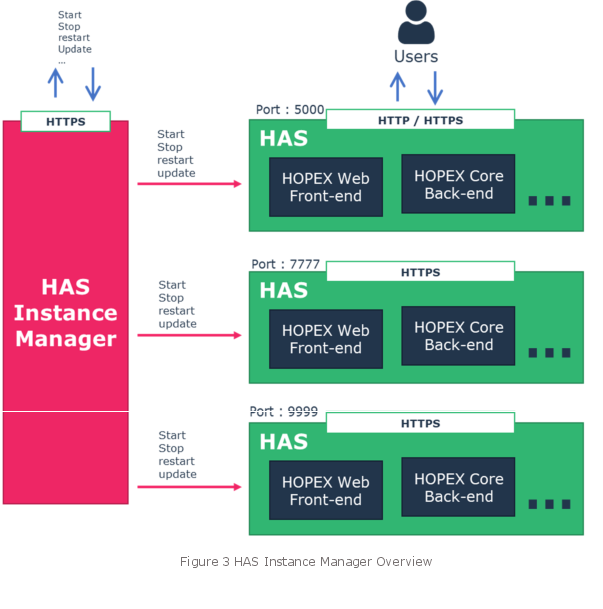
When deploying the solution, a Windows service named “HAS Instance Manager” is created. It handles:
• Fail-over: HAS Instance Manager start/restart HAS instance.
• Remote control: to request start, stop, restart, and even update from a web or through REST API.
The HAS Instance Manager embeds its own web server to expose a web front and REST API to perform the mentioned actions.
Moreover, with HOPEX Application Server it is possible to manage multiple instances on the same physical infrastructure. In that case the HAS Instance Manager ensures that all the HAS instances are up and running.
2.3.1. Use case of Multiple HAS instance
In some situations, you may want to have multiple instances of HOPEX Application Server on the same server. The major use cases are:
• Multiple HOPEX environments: to manage in a different way the lifecycle of the database environments (SystemDb) and HOPEX customizations.
• Development, Pre-production, Production on the same server for small deployments to reduce infrastructure cost.
• SaaS multi-tenant deployment proposed by MEGA International.
Each instance is launched by HAS Instance Manager and is executed with the same user account.
2.3.2. Security
HAS Instance Manager must not be available from the web. It must be used in local host mode only.
2.4. HAS Bundle
A HAS Bundle is a collection of modules that represent a given version. For instance, you can find the following bundles: V5, V6, V7…
Each bundle contains:
• a version of the HAS Server
• a version of the HAS Instance Manager
• a collection of system Back-end and Front-end modules: HOPEX Core, HOPEX Web…
After the bundle installation, the modules can be updated individually regardless of the initial bundle.
2.5. HAS Installer
The installer is an executable program that eases the installation and deployment of the different components.
The component is built in .Net Framework 4.6 which is by default installed in recent Windows server operating systems without prerequisites. This executable embeds an MSI setup built with WIX.
The installation process can be scripted with PowerShell script to ease deployment across several servers. The installer can be downloaded from the HOPEX Store. The installer supports 2 modes for different use cases:
• Online installation
When going through the installation steps, the installer will download from the online store the needed modules.
• Offline installation
At some point in the installation process, the installer will create an offline package to continue the installation in a server that does not have access to the Internet.
2.5.1. Limited internet access?
To benefit from the best experience, when using HAS, we recommend you to allow access from the server to the https://store.mega.com.
We understand that in some context HAS might be installed in a secured network area where internet is not available.
In that situation you will need to use the offline installation procedure and download required modules and update prior to install them on the server.