Defining a Person Group
A Person Group is a list of persons belonging to the same group.
 For detailed information on:
- the characteristics of a person, see Person Properties.
- the characteristics of a person group, see Person Group Properties.
- the characteristics of a login, see Login Properties (Person Group).
- the types of person groups, see Person group types.
A person group can be created:
• statically
• dynamically
To configure a person group, you must:
• assign a profile to the person group
You can also:
• define a default connection group.
• connect the person group with access to a reading area
• connect the person group with access to a writing area
• define the data language of the person group
• modify the properties of the person group
Adding persons to a static person group
Case of a person group created statically.
To connect one or more persons to a Person Group:
1. Access the property pages of the person group you want to configure.
2. Select Characteristics.
3. In the Persons pane, click Connect  .
.
.
4. (Optional) In the query field, enter the characters to search for.
5. Click Find  .
.
.6. In the result list, select the persons you want to connect.
These persons must have a login.
 A person belonging to a group connects to the application with its login. A person without a login cannot connect to an application.Use the [Ctrl] key to select more than one person at the same time.
7. Click Connect.
The person(s) are connected to the person group.
Defining a dynamic person group (SSO)
 A dynamic group is a group that computes group users on the fly (see Connection request and user created on the fly).For information on person group types, see Person group types.
In the case of a person group created dynamically, the Authentication group attribute enables to define the authentication group (SSO) that defines this person group. The persons belonging to this group (SSO) use the configuration defined on the person group.
Prerequisite: the SSO authentication group is already created.
To define a dynamic Person Group (SSO):
1. Access the Properties pages of the person group.
2. Select Characteristics.
3. In the Authentication Group field, click the arrow and connect the required authentication group.
4. Click OK.
The dynamic person group is configured with SSO.
Defining a dynamic person group with a Macro
A dynamic group is a group that computes group users on the fly (see Connection request and user created on the fly).For information on person group types, see Person group types.The Computed Persons attribute enables definition of a macro defining a list of persons connected to this person group. Persons defined by the macro use the configuration defined on the person group.
To define a dynamic Person Group with a macro:
1. Access the properties pages of the person group.
2. Select Characteristics.
3. In the Computed Persons field, click the arrow and connect the required macro.
Example of macro with login "sec" belonging to group "dev":
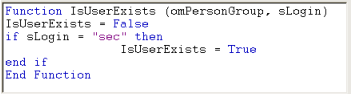
omPersonGroup represents the person group object executing the query.
sLogin represents the authentication login of the person.
4. Click OK.
The dynamic person group is configured with a macro.
Defining a default connection group
For information on person group types, see Person group types.A default person group is required for persons with the "Belongs to a person group" attribute selected, but who are not listed in any group.
No person group is provided at HOPEX installation. See Creating a Person Group.To define a default connection group:
1. Access the Properties pages of the person group.
2. Select Characteristics.
3. Select Default connection group option.