About HOPEX Administration
HOPEX administration management is performed via the Administration application (Windows Front-End) and via the Administration desktop (Web Front-End).
The Administration application (Windows Front-End) is the HOPEX administration application accessible from the Windows desktop. This application contains the tools required to manage an environment and its repositories (workspaces, locks, repository snapshots, Scheduler). It is also used to manage data accesses (writing access as well as confidentiality using reading access management).
 To perform HOPEX administration tasks from the HOPEX Administration application (Windows Front-End), see About HOPEX Administration.
This guide is for the person responsible for administrating users and objects from the HOPEX Administration desktop (Web Front-End).
The Administration desktop (Web Front-End) is the HOPEX administration application available via an internet browser. This application is used to manage users (persons, person groups, business roles, profiles), repositories (workspaces, locks, repository, repository snapshots) and UI accesses (permissions). This application also provides access to tools (Excel import/export, Import/Export of command files, Scheduler, Exchange Rate) and is used to manage person skills.
Some actions, like user management, can be performed by functional Administrators from a restricted Administration desktop accessible from other HOPEX desktops (Web Front-End).
Most of the functions described here can be used by the User management administrator, whatever the products enabled through his/her security key. However, certain functionalities, like object management are only available with specific technical modules (HOPEX Power Studio or HOPEX Power Supervisor). These are indicated by a note.
See:
• Users: creation of users, user groups and their profiles.
• The HOPEX Power Supervisor technical module is necessary to manage profiles.
• The HOPEX Power Studio technical module is necessary to create profiles.
• Workspaces: principle of private workspaces, dispatch and refresh private workspaces, and lock management.
• Objects: Advanced administration functions available with:
• the HOPEX Power Studio technical module to extract objects
• the HOPEX Power Supervisor technical module for access management to the UI.
• Command File Syntax: description of the syntax used in command files.
• Options: access to options, user level options and language management.
• Glossary: definition of the main terms used in this guide.
HOPEX structure:
Some basic knowledge is required to understand the architecture and operation of HOPEX.
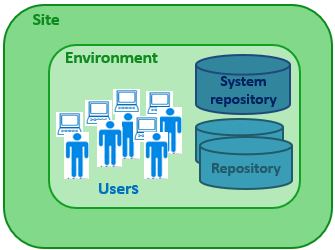
HOPEX (Web Front-End) is organized on the following levels:
• site
A site groups together everything that is shared by all HOPEX users on the same local network: the programs, standard configuration files, online help files, standard shapes, workstation installation programs, and version upgrade programs.
• environment
An environment groups a set of users, the repositories on which they can work, and the system repository. It is where user private workspaces, users, system data, etc. are managed.
• user
A user is a person (or person group) with a login and a profile. A user:
• has a specific workspace in each repository.
• has a specific configuration and is authorized to access specific product functions and repositories in the environment.