Defining Establishments
You can describe establishments in the entity property pages.
Creating an establishment
To create an establishment:
1. In the navigation menu, click Organization > Legal entities and DPOs.
2. In the properties of a legal entity, select the Establishments tab.
You can specify the following information for an establishment:
• Name of the establishment
• Country
• Transfer safeguards
 Transfer safeguards are measures taken to ensure the legitimacy of data flows towards the establishment.
 For more information see Defining Transfer Safeguards.
• Certifications if applicable
For more information, see Specifying security measures on a processing activitySpecifying the HQ establishment for an entity
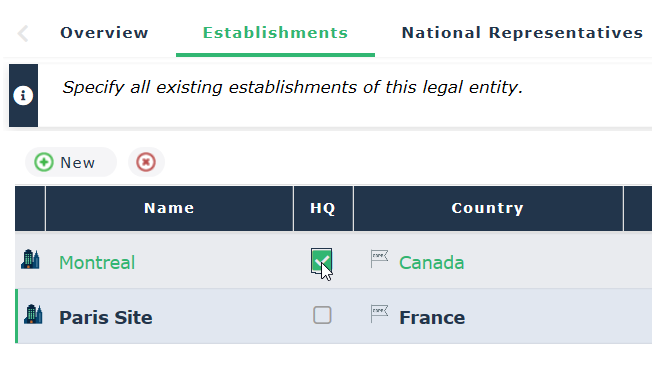
When you create several establishments, you need to define which of them represents the headquarters.
To specify the HQ establishment:
1. In the navigation menu, select Organization > Legal Entities and DPOs.
2. In the legal entity property page, select the Establishments tab.
3. Select the HQ check box.
Specifying the country of a legal entity
You can specify the country on the main (HQ) establishment of the legal entity.
To specify the country of a legal entity:
1. Open the property pages of the legal entity and select the Establishments tab.
2. Specify a Country for the establishment which was declared "HQ".
It is important to associate a legal entity with a country to illustrate transfers. For more information on transfers, see: