Useful Features
 For more information on how to use the desktop and repository, see Handling Repository Objects
Object status
The objects of the environment have statuses in HOPEX Privacy Management.
Objects of your environment can have a status, which can be:
• candidate: to be validated by a DPO / the Privacy team
• live: has been validated by the DPO / the Privacy team
• obsolete: no longer exists
You can specify the status on the top right-hand side of the object, for example a processing activity.
Collaboration features
HOPEX Privacy Management simplifies teamwork and offers different means of communication. You can:
• create and participate in review notes on objects.
• add tags.
Tags may be used with quick search to help you find a particular object. See Full-text Search.• view your activity.
• share with the other HOPEX users: add tags, like an object.
For more information, see Communicating in HOPEX.The search features
HOPEX Privacy Management enables you to perform searches in the repository. You can for example easily access a specific processing activity, data breach or data subject request.
To access a given object:
 Enter a keyword in the search bar.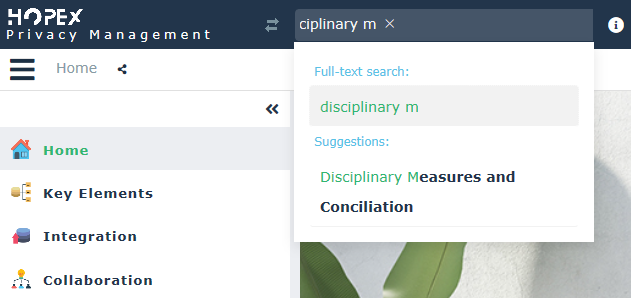
For more information, see Search.