Managing Permissions on Workflows
 You can manage permissions in HOPEX Web Front-End only.
Configuring Permissions (CRUDs) on Objects
You can configure permissions on objects according to:
• user profile
• current workflow status.
Permissions (CRUDs) concerning workflows are not taken into account in the diagram editor.To configure permissions:
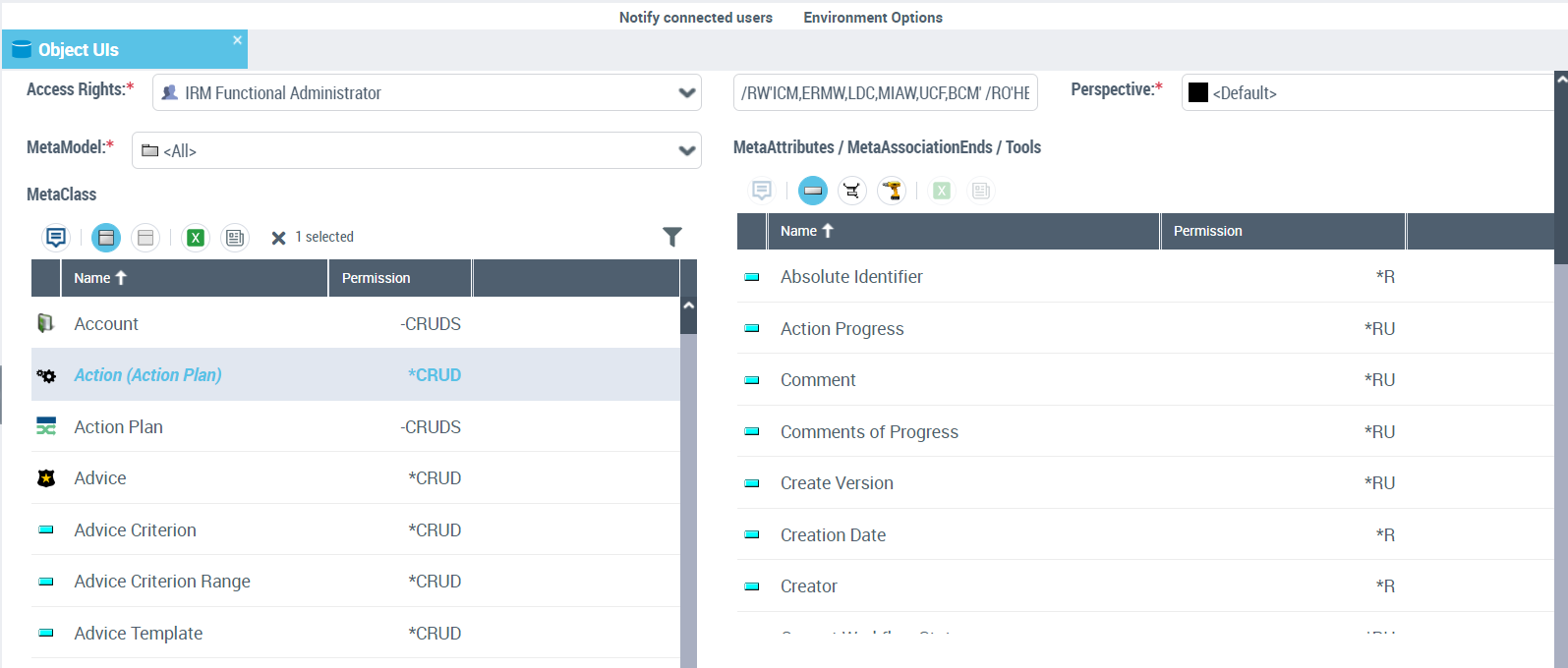
1. In HOPEX Administration, open the environment.
2. Expand the Permissions navigation pane.
3. Under CRUD Management select Manage.
4. In the UI access management dialog box, select the Object UI Access.
5. In the Access Rights field, select the Profile you want to configure.
6. In the MetaClass frame, select the workflow subject MetaClass.
Example: "Action plan"
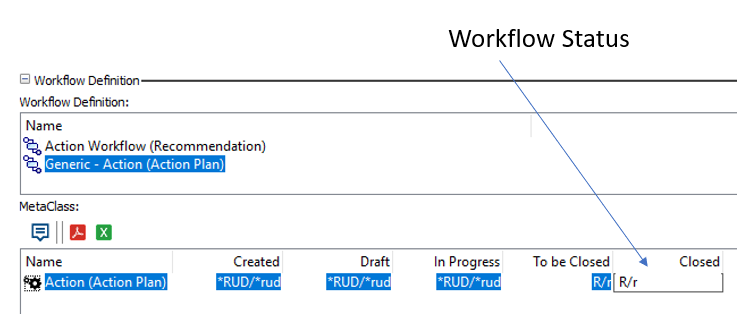
7. In the Workflow Definition section, select the workflow for which you want to define permissions.
8. Configure permissions on the MetaClass subject of the workflow according to the status reached by the workflow.
Example: The permission "R" (=Read) in status "Closed" means that you cannot modify the action plan when it is in this status.
9. Similarly configure attributes and links available on this MetaClass.
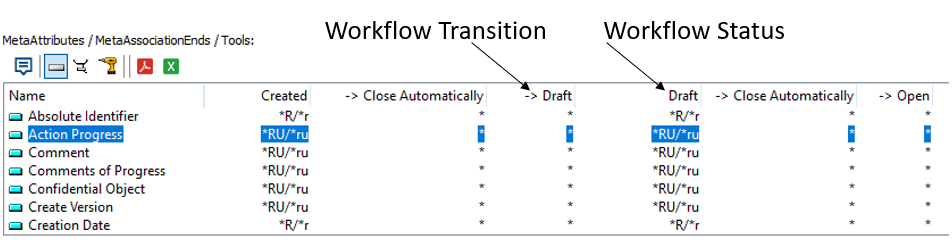
Several values are possible on workflow statuses or transitions:
• indicates that the field (attribute or link) is mandatory in this workflow status.
The user must specify this field to trigger the next workflow transition.
• " RU" (R=Read, U=Update): on a workflow transition, means that the field is proposed in edit mode in the user interface proposing the transition.
"RUM" means that the user must specify the field when triggering the workflow transition.Different permissions can be specified for workflow participants and non-participants:
• Values of permissions in upper-case, for example "RU" concern workflow participants.
• Values of permissions in lower-case, for example "ru" concern persons not participating in the workflow.
In theTransition Attributes frame, you can specify permissions on TaggedValues created on your workflow transitions. For more details, see "Information associated with workflow transition", page 39.Specifying Persons Authorized to Start a Workflow
To specify persons authorized to start a workflow, see Associating persons with participants.
Generating a Report of Permissions by Workflow Definition
A report allows you to detail permissions for a given workflow.
Parameters are as follows:
• a workflow definition
• a profile
Generating the report in HOPEX Windows Front-End
Generating the report from a profile
To generate this report:
1. In the menu bar, select Tools > Manage Profiles and Permissions > Workflow Definition Permissions Reports.
A wizard opens.
2. (Optional) In the Report File field, modify the location in which to save the report. By default this is your user folder.
3. Select By profile then the Profile of interest to you
The list of workflow definitions in which the profile can intervene appears.
You have two possibilities:
• you do not select any workflow definition: the report displays permissions of the profile on all workflows in the list.
• you select one or several workflow definitions: the report displays permissions of the profile on the selected workflows.
4. Click OK.
The report is generated.
Generating the report from a workflow definition
To generate this report:
1. In the HOPEX Windows Front-End desktop, select Tools > Manage Profiles and Permissions > Workflow Definition Permissions Reports.
2. Select By workflow definition then the Workflow definition of interest to you.
The list displays profiles that can intervene in the workflow.
You have two possibilities:
• you do not select any profile: the report displays permissions relating to the workflow for all profiles in the list.
• you select one or several profiles: the report displays permissions relating to the workflow for all selected profiles.
3. Click OK.
The report is generated.
Content of the permission report
For each workflow given as parameter, the wizard queries the MetaClass to which the workflow relates.
If you did not select any particular workflow definition as a parameter, the report generates permissions on all workflows.The generated report includes all permissions on each MetaClass:
• for each profile
• workflow status /workflow transition.
For improved readability, missing permissions are replaced by _.For example: *RU is replaced by *_RU_.
Generating the report in HOPEX Web Front-End
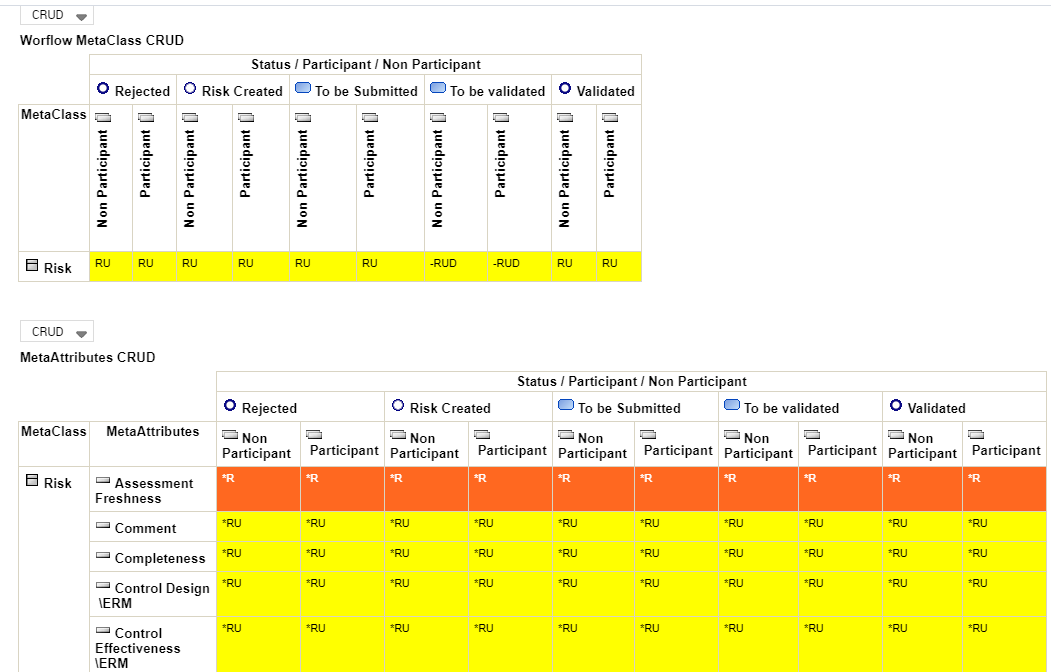
The report displays in table format the permissions (CRUD) according to the selected workflow definition and profile.