Using an export template
Using a predefined template
To export data to Excel through a predefined template:
1. In the export wizard, set the use of a template.
The export template selection wizard displays.
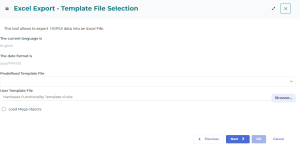
2. In the Predefined template field, open the available templates dropdown list.
3. Select the template of your choice.
4. (If needed) To re-use the objects of the existing template, select Load Mega objects.
5. Click Next.

Using a user template
To export data to Excel, you may choose to use a template that is not featured in the standard, supplied ones.
To export data via a user template:
1. In the export wizard, set the use of a template.
The export template selection wizard displays.
2. In the User template field, click Browse.
3. In your file explorer, select the template of your choice.
4. (If needed) To re-use the objects of the existing template, select Load Mega objects.
5. Click Next.