Presentation of the Deployment Diagram
The deployment diagram complements the component diagram. It describes hardware resources (computer, router, etc.) in the system, and indicates distribution of components on these hardware resources.
It also describes connections between components or nodes.
This diagram also allows specification of interfaces required and implemented for sequencing of components.
It can be illustrated and supplemented by the addition of node, component or class instances.
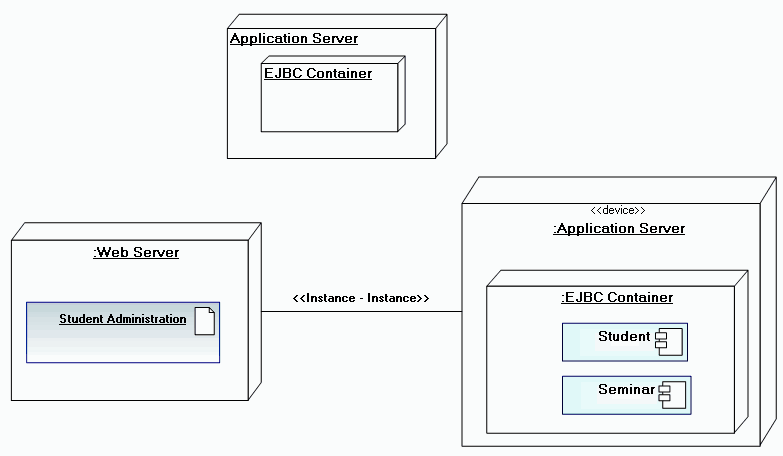
Example of a deployment diagram
Creating a Deployment Diagram
In HOPEX IT Architecture, a deployment diagram is created from a package.
To create deployment diagram with HOPEX IT Architecture from Design (UML) navigation menu:
1. Click Packages sub-menu.
2. Select the package stream that interests you and click New Diagram.
3. Select Deployment Diagram.
The new deployment diagram opens in the Edit window.
Deployment Diagram Objects
Node
A Node is a physical object representing an IT resource, generally with a memory and often with calculation capabilities, on which components can be deployed
Nodes can comprise other Nodes or artifacts. To indicate that a component is assigned to Node, either place the component in the node, or connect the component to the node by a dependency link.
See Dependency links.
You can create a node in the deployment diagram using the Node (UML) button  in the insert toolbar.
in the insert toolbar.Communication path
Connections between Nodes are represented by communication paths via which signals and messages are exchanged.
Component
A component represents a modular part of a system that encapsulates its content, and which can be replaced in its environment. A component defines its behavior by means of interfaces that it provides and requires.
One component can be replaced by another if their interfaces conform.
A component can be a software package, program, code unit, etc.
Artifact
An artifact  represents a physical information element used or produced by the software development process, or by the deployment or implementation of a system. Example: source files, scripts, executable binary files, development deliverables, word processing documents, electronic messages, etc.
represents a physical information element used or produced by the software development process, or by the deployment or implementation of a system. Example: source files, scripts, executable binary files, development deliverables, word processing documents, electronic messages, etc.Manifestation
A manifestation  is the real physical restoration in an artifact of one or several modeling elements such as components or classes.
is the real physical restoration in an artifact of one or several modeling elements such as components or classes.The source of a manifestation dependency is an artifact, the target a component or class.
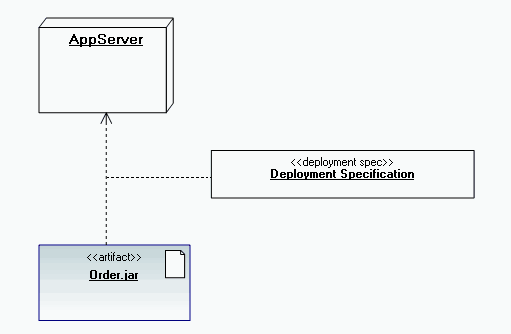
Deployment specification
Deployment specification enables indication of the characteristics that determine execution parameters of an artifact or component deployed on Node.
Configuration
The configuration button  enables creation of the link between a deployment specification and a deployment.
enables creation of the link between a deployment specification and a deployment. Example