SvcV-10c Services Event-Trace Description
SVcV-10c Description
The SvcV-10c Services Event-Trace Description is used to describe service functionality. It identifies service-specific refinements of critical sequences of events described in System Services.
|
SvcV-10c
|
SvcV-10c Services Event-Trace Description
|
One of three models used to describe service functionality. It identifies service-specific refinements of critical sequences of events described in the Operational Viewpoint.
|
For a detailed description see the DoDAF web site: SVcV-10c Services Event-Trace Description.
SVcV-10c Implementation
Hierarchy of system scenarios
This displays the hierarchical description of system scenarios and application system scenarios.
Scenarios for application system flow environments
To create a scenario for an application system flow environment:
1. In the navigation menu, click Services Viewpoint > SvcV-10c Services Event-Trace Description > Application System Flow Environments.
2. Click New.
3. Right-click the object created and select New > Application System Environment Scenario.
A diagram for the scenario opens.
Scenarios of application system flows
For more information search for Creating an application system structure diagram in the HOPEX IT Architecture documentation.
Scenarios of system flows

Scenarios of systems of resources
There are different ways to edit a scenario of system of resources.
From the scenario pop-up menu you can use:
• the flow editor
• the lifeline editor
• the diagram editor
Flow editor

Lifeline editor
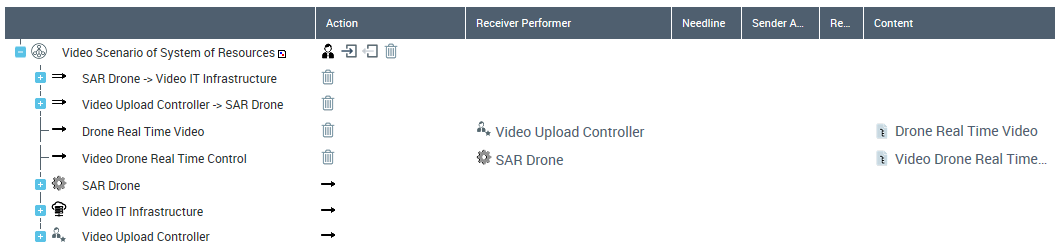
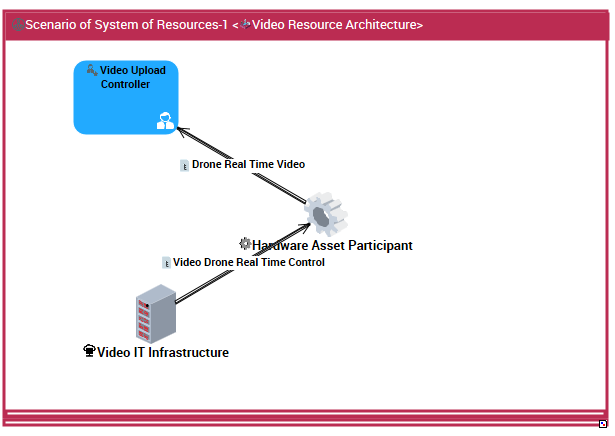
Diagram editor
In this scenario diagram, apart from the usual application input/output gates and application flow channels, you can find:
• IT infrastructure participants
• Hardware asset participants
System flow environments
You can create an application flow environment diagram from the system flow environment.
Scenarios of system of resources system
In this scenario diagram, apart from the usual application input/output gates and application flow channels, you can find:
• Human Asset Participants
• Hardware Asset Participants
• IT Infrastructure Participants
• System Interaction Roles
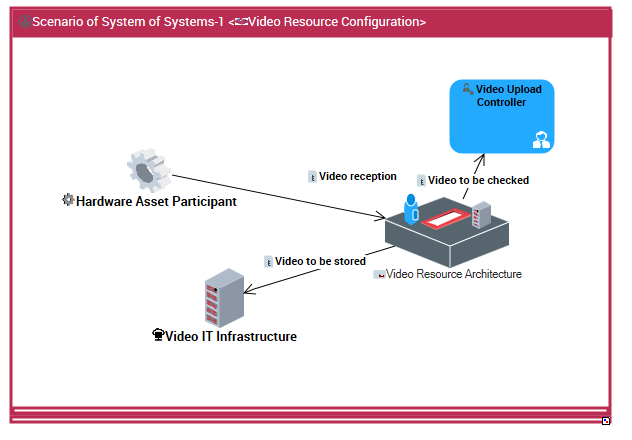
 You can also edit the scenario with the flow or lifeline editor available from the scenario pop-up menu.