Data Dictionary
A data dictionary collects and holds a set of logical data.
It can be broken down into logical data domains. See Data Domains and Logical Data Domains.
Elements of a Data Dictionary
A data dictionary is used to describe all the elements defining your logical data architecture:
• Data Domains
• Classes
• Attributes
• Parts
• etc.
A data dictionary is implemented by a package that collects data. You can create sub-packages.
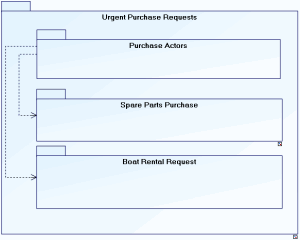
Urgent purchase requests are provided to process purchase of spare parts and boat rental requests. In both of these cases, users are actors of the purchasing domain.
 For more details on the use of packages, see the HOPEX IT Architecture guide.
Accessing the elements of a data dictionary
To access the elements of a data dictionary in HOPEX Data Governance :
1. Click the Architecture navigation menu then Data Dictionaries.
In HOPEX Data Architecture, click Data Dictionaries > Hierarchy View.2. In the edit area, expand the folder of the data dictionary that interests you.
Elements that make up the dictionary appear.
Importing logical data
You can import existing logical data into your repository using an Excel file. See Importing Logical Data from an Excel File.