Individuals
An individual represents the occurrence of a concept.
Accessing the List of Individuals
To access Individuals of your repository in HOPEX Data Governance:
1. Click the navigation menu then Glossary > Dictionaries.
 In HOPEX Data Architecture, click the navigation menu then Business Glossary > Business Information Assets.
2. In the edit area, expand the folder of the business dictionary that interests you.
3. Expand the Individuals folder.
The list of individuals of the business dictionary appears.
Creating an Individual from a Business Dictionary
To create an individual from a business dictionary:
1. Right-click the business dictionary that interests you and click New > Business Information Building Block.
The creation wizard opens.
2. Select the Individual object type.
3. Specify the Local Name and click OK.
4. In the Individual Classification section, you can click New to specify the concept to which the dictionary individual is connected.
For more details, see Creating an Individual Classification.5. Click OK.
The name of the new individual appears in the tree under the business dictionary.
Individual Properties
The individual properties window presents the following elements:
• Its main Characteristics with its Local Name and owner dictionary
• The Classifications
 An individual classification is used to connect an individual to the concept that characterizes it.For more details, see Creating an Individual Classification.
• The Individual States, which present the different states of an individual
For more details, see Describing Individual States and Events.• The Components
For more details, see Creating a Dictionary Entity Component.Creating an Individual Classification
An individual classification is used to connect an individual to the concept that characterizes it.
For example, the individual "Michel Houellebeck" is an instance of "Person" and "The Map and the Territory" is an instance of "Library Work".
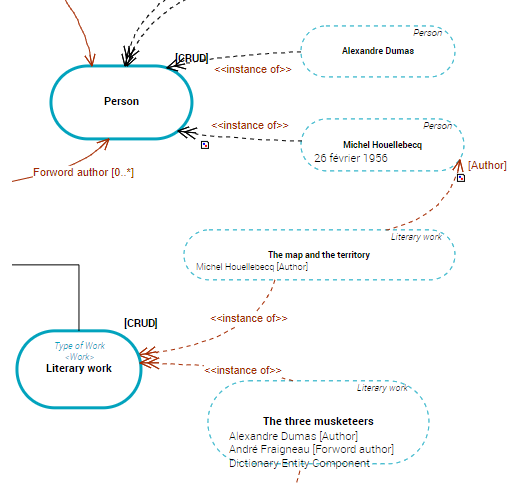
To create an individual classification:
1. Open the properties window of the individual carrying the relationship.
For example, the "Michel Houellebeck" individual.
2. Select the Characteristics tab.
3. In the Classification section, click the New button.
The individual classification creation wizard opens.
4. At the left of the Characterizing Element field, click the Connect button.
The query wizard opens.
5. Select the concept you want to connect.
For example, the "Person" concept.
6. Click OK.
The individual classification into individuals is created.
Creating a Dictionary Entity Component
An entity component is used to connect an individual to a dictionary element.
You can also connect two Individuals with a Dictionary Entity Component relationship type.
For example, you can specify that "Michel Houellebeck" is the author of the work "The Map and the Territory".
To create a dictionary entity component between two individuals:
1. Open the properties window of the individual carrying the relationship.
For example, the "Michel Houellebeck" individual.
2. Select the Components tab.
3. Click the New button.
The dictionary entity component creation wizard opens.
4. At the left of the Characterizing Element field, click the Connect button.
The query wizard opens.
5. Select the individual you want to connect.
For example, the "The Map and the Territory" individual.
6. Click OK.
The entity component is created. It appears in the individual structure diagram of the described object.
For more details, see Individual Structure Diagram.Individual Structure Diagram
The individual structure diagram describes the internal structure of the concept instance and the links between its components. This diagram is initialized from concept graph elements.
This diagram is composed of dictionary entity components used to connect two individuals.
It is then possible to specify that "Michel Houellebeck" is the author of the work "The Map and the Territory".
An entity component is used to connect an individual to a dictionary element.For more details, see Creating a Dictionary Entity Component.