Describing Individual States and Events
If a concept is associated with states, occurrences of this concept can also be associated with states. HOPEX Data Governance and HOPEX Data Architecture therefore proposes the Individual State.
 An individual state is an instance of a concept state to which the dictionary state is connected. It represents an individual state during its life cycle.
In addition, the switch from one individual state to another can be conditioned by an Individual Event.
An individual event represents an event occurring during the life of the individual. It is an instance of an event concept of the concept to which the individual is connected.For example, "John Smith" is a "Person" who can pass form one state to another on his birthday.
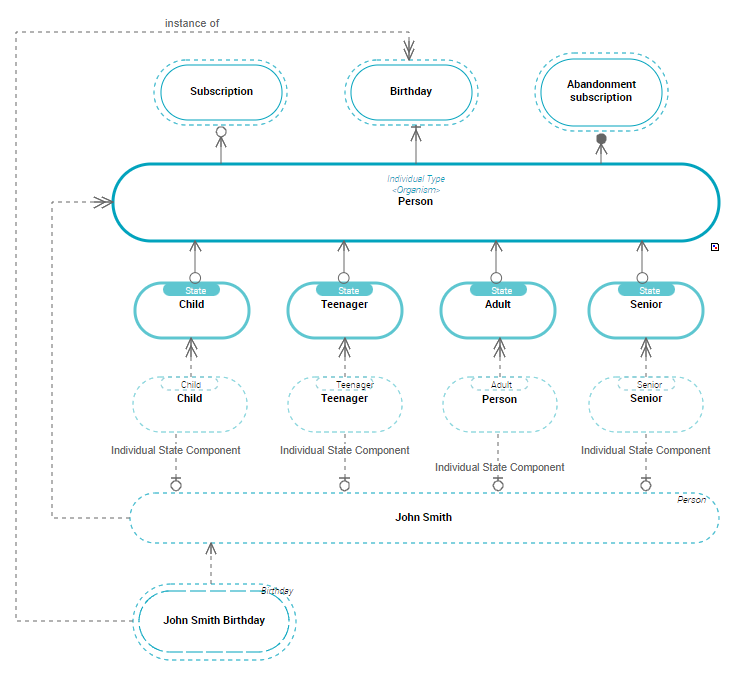
The relationship between an individual and its Individual State is described by an Individual State Component.
An individual state component is used to connect an individual to an individual state.The relationship between an individual and its Individual Event is described by a Dictionary Entity Component.
An entity component is used to connect an individual to a dictionary element.With HOPEX Data Architecture:
• an individual state is an instance of a state concept
A state concept is a situation in a concept life cycle during which it satisfies certain conditions, executes a certain activity or waits for a concept event. A state concept represents a time interval of which limits are two concept events. A state concept is a phase through which the concept passes during its life cycle.• an individual event is an instance of an event concept
An event concept represents an event occurring during concept life, for example a change of season. An event concept marks the impact on a concept of a phenomenon internal or external to the concept. Concept events can be distinguished as concept start events, end events and intermediate events.Accessing the individual state and event list
To access the individual states of a business dictionary in HOPEX Data Governance:
1. Click the Glossary > Dictionaries navigation pane.
 In HOPEX Data Architecture, click the navigation menu then Business Glossary > Business Information Assets.
2. In the edit area, from the business dictionary that interests you, expand the Individual States folder.
The list of individual states of the business dictionary appears.
3. Expand the Individual Events folder.
The list of individual events appears.
Creating an Individual state from a concept domain
The relationship between an individual and its Individual State is described by an Individual State Component.
An individual state component is used to connect an individual to an individual state.If you create an individual state in a diagram, you can automatically create the individual state component of the associated individual.
To create an individual state from a concept diagram:
1. In the diagram, roll the mouse over the individual who owns the individual state.
2. Select Individual state.
3. Click in the diagram.
The individual state creation wizard opens.
4. Specify the Local Name and click Add.
The new individual state appears in the diagram.
You can also create an individual state from its business dictionary.Individual state properties
The individual state properties dialog box presents the following elements in the Characteristics tab:
• Its Local Name
• The individual classifications, which appear in the Classification section.
An individual state component is used to connect an individual to an individual state.For more details, see Creating an Individual Classification.• The Component tab, presenting the individuals who define the described individual.
For more details, see Creating a Dictionary Entity Component.Creating an Individual event from a concept domain
To create an individual event from a concept domain:
1. In the insert toolbar, click Individual Event and click in the diagram.
The individual event creation wizard opens.
2. Specify the Name and click Add.
The individual event appears in the diagram.
Connecting an individual event to an individual
The relationship between an individual and its Individual Event is described by a Dictionary Entity Component.
An entity component is used to connect an individual to a dictionary element.To connect an event concept to its concept in the diagram:
1. In the insert toolbar, click the Link button.
2. Click the individual event.
3. Click the event.
The link appears in the diagram.