Accessing the GRC Desktop
To connect to HOPEX, see Connecting to HOPEX.
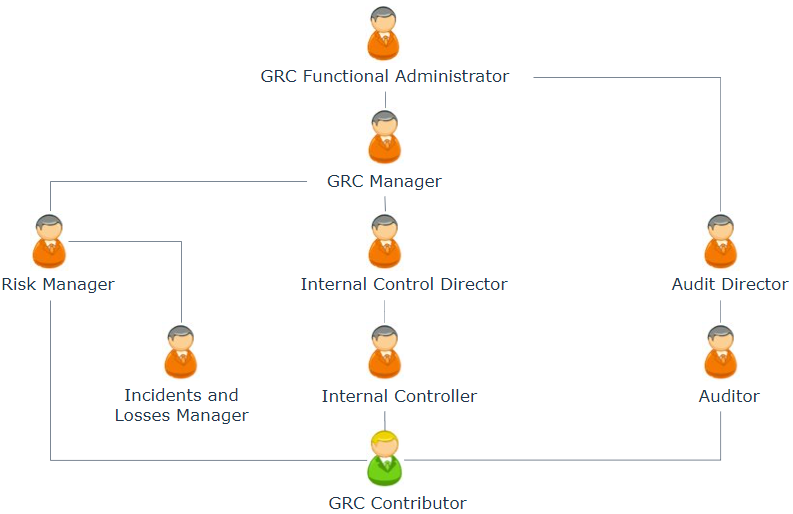
In HOPEX GRC,there are profiles associated to specific activities.
The menus and commands available depend on the profile with which you are connected.
Profiles used in GRC solutions
Risk Manager
The Risk Manager is responsible for executing the following tasks on risks within his/her responsibility domain:
• identifying risks
• carrying out direct assessments
• managing assessment campaigns
• defining action plans
• analyzing and following report creation
For more details, see Managing Risks.
Internal Control Director
The Internal Control Director:
• has all internal Controller rights
 See Internal Controller.
• validates campaigns
• prepares test plans
• validates action plans
For more details, see Managing Controls (HOPEX Internal Control).
Incident and Loss Manager
The incident and loss manager creates elements required for management of incidents and losses.
He manages the description of the environment: entities and organizational processes, regulatory environment, IT resources.
He can deal with:
• declared incidents
• action plans and actions
For more details, see Collecting Incidents (HOPEX LDC).
GRC manager
The “GRC Manager” profile is available if you have access to more than one solution among:
• HOPEX Internal Control (IC),
• HOPEX Enterprise Risk Management (ERM)
• HOPEX LDC
• HOPEX BCM
It groups the following profiles (if you have the relevant solutions):
• Risk Manager
• Internal Control Director
• Incident and Loss Manager
Internal Controller
The internal controller:
• defines controls
• prepares assessment campaigns
• executes tests (creates work programs, creates issues and action plans)
• validates and follows up action plans
GRC functional administrator
The GRC functional administrator has the same rights as the GRC Manager. In addition, he is offered global administration features (such as user management).
The GRC functional administrator also has the same rights as the Audit Director.The GRC functional administrator:
• has rights on all objects and workflows.
• prepares the working environment and creates elements required for risk and control management.
• manages:
• the description of the environment, including org-units and processes
• the regulatory environment
• IT resources
GRC Contributor
The contributor performs his/her tasks in a simplified desktop. For more details, see Features Available to the GRC Contributor.
GRC Profiles/Solutions Summary
Solutions/ Profiles | ERM | IC | LDC | BCM |
GRC functional administrator | X | X | X | X |
GRC manager | X | X | X | X |
GRC Contributor | X | X | X | X |
Risk Manager | X | X | ||
Internal Control Director | X | |||
Internal Controller | X | |||
Incident and Loss Manager | X |