Analyzing Deployment of Applications
Reports enable assessment of compliance level of an existing architecture with a required architecture model.
To check that deployment of an architecture complies with the required infrastructure:
1. Right-click the application concerned and select Report Discovery.
The list of reports available for the object appears.
2. Select Architecture Deployment Compliance Analysis.
3. In Architecture Deployment Compliance Analysis, click Launch a New Report.
Three reports are available:
• Architecture Deployment Compliance Overview
• Architecture Deployment Compliance Details
• Architecture Deployment Compliance Details Level 2
If no deployment has yet been carried out on the selected application, a message asks you to create one. In this case, you must select the application to be deployed, then the targeted architecture or site.

Analysis report example
In our example, we want to check the "Office System" application, common to the different agencies, has been correctly deployed in the Bordeaux agency.
After running compliance analysis, a first report chapter displays the global deployment result:
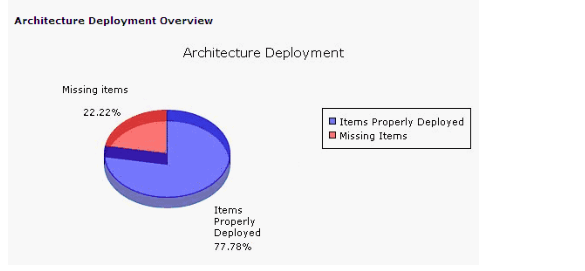
The last chapter displays more details; it gives the percentage of "Office Systems" infrastructure objects that have been correctly deployed in the Bordeaux agency and indicates missing objects.
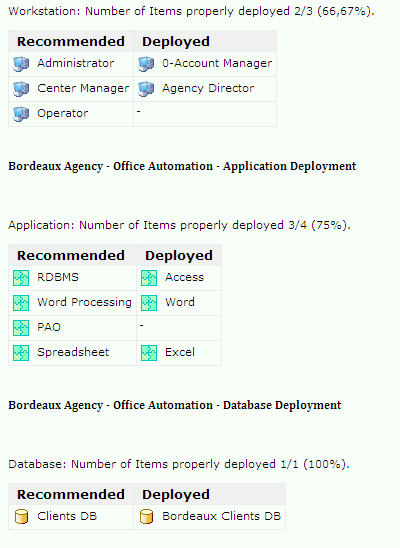
Compliance indicators
Indicators of deployment quality are:
• the number of required infrastructure elements correctly deployed
• the percentage of objects correctly deployed
• the number of elements missing
• the percentage of elements missing.