Managing an Operational Architecture

Accessing the list of Operational Architectures
To access the list of Operational Architectures:
1. From the Operational navigation menu, select Hierarchy.
2. Expand the current enterprise folder, as well as its Operational Architecture folder.
A list of the Operational Architectures appears.
Creating a Operational Architecture
To create a Operational Architecture:
1. In the Operational navigation menu, click Hierarchy.
2. From the Operational Architecture folder, click New > Operational Architecture.
3. Enter its Name and click OK.
The new Operational Architecture appears in the list.
The properties of a Operational Architecture
The Characteristics properties page of the Operational Architecture provides access to:
• its Name,
• its Owner, by default on creation of the Operational Architecture, the current enterprise.
• the text of its Description.
With HOPEX UAF, an Operational Architecture is described by the following property pages:
• the Structure page which provides access to the list of components of the Operational Architecture.
 For more details on the components of the Operational Architecture, see Operational Architecture diagram.
• the Implementation page, which provides access to the list of environments (Capacity Configuration, organization, applications, application systems or logical application systems) that implement the Operational Architecture.
• the Diagram page is used to manage the Operational Architecture diagrams:
Operational Architecture diagram
A Operational Architecture diagram describes the service interactions between the main internal components of the environment described and the external components. It thus describes:
• the internal and external Operational Domains Role,
• the Operational Partners Roles,
In this example, the Operational Performer architecture environment of company is made up of the historical Operational Performer architecture and its interactions with external partners: clients and suppliers. You can see in the diagram that delivery is outsourced to a third party deliver partner.
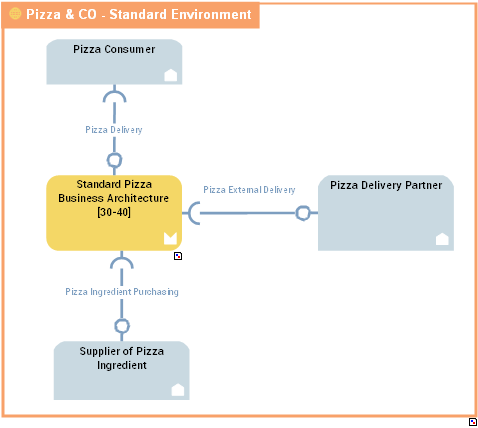
Communications between the objects are represented by service interactions that represent requests and service provision.
For more details on service interactions between components, see Creating a Service Interaction from a diagram.