Imported objects mapping
Container management
The objects imported may be stored in a specific container, for example: an enterprise or a library. This container is set in the Target container field during the ArchiMate file import.
ArchiMate Elements import
The ArchiMate standalone elements are imported as new standalone elements in the ArchiMate model.
The ArchiMate EA elements import is divided into two steps:
1. The ArchiMate EA element creation.
2. A specific processing regarding the HOPEX Building Block referenced by the new ArchiMate EA element:
• If an HOPEX Building Block (with the same name) is defined in the target scope (container or imported container), it is retrieved and linked as referenced building block.
• If no HOPEX Building Block is available, or if many are available with this name in the defined scope, then a new object is created in the defined target container, and a warning is added to the import report
 Depending on the referenced HOPEX Building Block, a specific creation wizard is activated. For more details, see Specific Creation Behavior.
ArchiMate Relationships
The processing of ArchiMate Concept Relationships consists in considering the type (metaclass) of the source element of the relationship, to get the outgoing relationships (concrete path) of the suitable relationship type towards the suitable target concept.
• If no such relationship is available, then a new relationship of the ‘association' type is created (association from ‘source_object' to ‘target_object' created instead of the required ‘relationship_type') and a warning is added to the import report file.
• If the source (or target) object type does not exist, an error message is added to the import report file (non-existing source / target object: relationship of ‘relationship_type' from source_object to target_object could not be created).
• Otherwise, the relationship is created.
The processing of Relationships with attributes consists in importing the attributes as attribute or object.
• Flow: the flow relationship name attribute is defined by the carried content name:
• If no name is defined for the flow relationship, then no content is associated with the flow relationship,
• If a content, with the same name, exists in the scope (in target container or target container imported containers), the content is reused,
• otherwise a new content is created within the target container.
• Access: Access Type
• Access type is stored as a closed enumeration attribute (read, write or read/write).
• Influence: Impact Type
In HOPEX, the impact type (or strength) is an enumeration, so an opened list +++ / ++ / + / - / -- / --- • If the value fits with this list, the corresponding attribute value of HOPEX is used,
• Otherwise, the imported value is set outside of the other predefined values (e.g. low, middle, high).
Specific Creation Behavior
The processing of ArchiMate EA elements import depends on the referenced HOPEX Building Block.
The table below present the cases where a specific creation wizard is activated when the ArchiMate EA elements is imported.
For specific wizards, a simple creation is done. For example, an ArchiMate Project is created without workflow and status.Layer | ArchiMate EA Elements | HOPEX MetaClass | Specific creation wizard |
|---|---|---|---|
Strategy | Capability | Business Capability | Simple case |
Value Stream | Value Stream | Simple case | |
Strategy | Capability | Business Capability | Simple case |
Business Process | Organizational Process | Simple case | |
Business Actor | Org-Unit, Position Type | Complex case: the appropriate concept must be selected | |
Application | Data Object | Class, Entity | Complex case: the appropriate concept must be selected |
Application Process | System Process | Simple case | |
Application Component | Application | Simple case | |
Technology | Technology Process | System Process | Simple case |
Device | IT Device, IT Server, IoT Device | Complex case: the appropriate concept must be selected | |
System Software | Software Technology | Simple case | |
Communication | IT Network | Simple case | |
Network | Facility | Simple case | |
Facility | Hardware | Simple case | |
Implementation & migration | Work Package | Enterprise Project | Specific enterprise project creation wizard |
Other | Location | Site | Simple case |
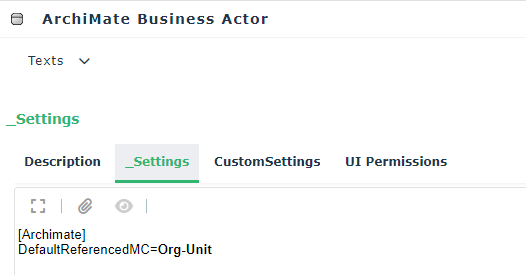
In complex cases, the default MetaClass used by the wizard is defined by a specific setting on the source ArchiMate concept MetaClass; this can be customized if necessary. For example, a Business Actor references an Org-Unit by default.
Views and Diagrams
All views, of any suitable viewpoint type, are created.
In the ArchiMate® format, views are diagrams while, in HOPEX, one view object is described by a diagram object (of the ArchiMate diagram type) In the view's diagrams, the imported file object coordinates are used to position the object in the diagram
If an object is added to the diagram while the viewpoint definition doesn't allow the element (or relationship), then the diagram view is activated, and a warning added to the import report file.