Resources - Processes
The Processes aspect of the Resources view describes Personnel and resource functions, their Inputs/Outputs, resource function actions and flows between them.
Using Personnel Functions from Resource view

To access the list of Personnel Functions:
1. From the Resources navigation menu, select Processes.
2. Click the Personnel Functions tab.
The list of the Personnel Functions is displayed.
Using Resource Functions
In detailed specification phase, the progress of tasks implemented in an IT service can also be modeled by a Resource Function. More generally, operation of an architecture element can be described by a Resource Function modeling, for example, sequence flow of screens presented to the user.
Resource Function diagram example
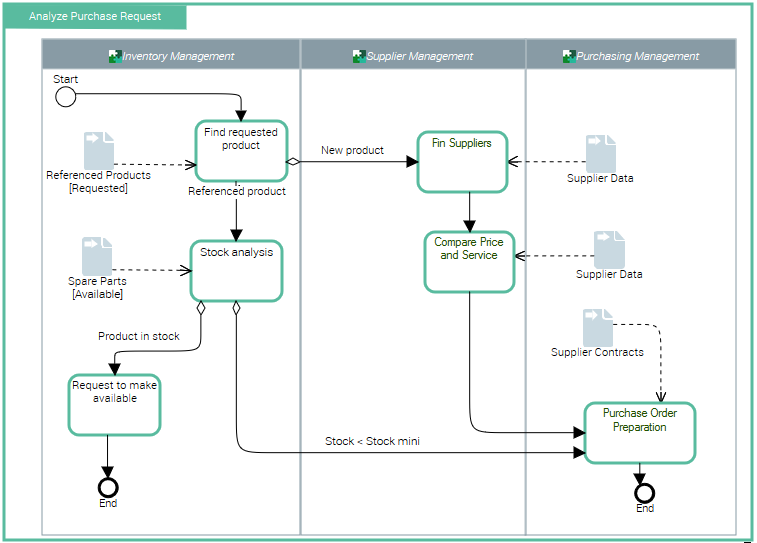
The diagram below represents purchase request processing.
• A product search is carried out from the referenced products repository.
• If the product is new, search for a supplier and comparative study of prices is carried out. An order is then sent and the process ends.
• If the product is referenced, stock is analyzed.
• If stock is sufficient, a "Make available" request is activated and the process ends.
• If stock is less than minimum stock, an order is sent to the supplier and the process ends.
For information regarding Resource Functions (System Processes) in HOPEX, see Describing System Processes.
Accessing Resource Functions
To access the list of Resource Functions:
1. From the Resources navigation menu, select Processes.
2. Click the Resource Functions tab.
The list of the Resource Functions is displayed.
Using a Resource Function Tree diagram
The Resource Function Tree diagram describes the tree structure of the current Resource Function. Such diagram describes the current Resource Function and its sub-Resource Functions.
Using a Resource Function diagram
The Resource Function diagram uses notation proposed by BPMN standard. The Resource Function algorithm can be expressed by sequencing of tasks and decisions.
Creating a Resource Function Action
Resource Function Action correspond to Resource Function steps.
Message flows
Message flows represent exchanges between the Resource Function and the exterior.

 A message flow can be linked to an event of message type.
Sequence flows
Organization of tasks in the Resource Function is represented by sequence flows between tasks.
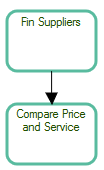 For more information on managing sequence flows, see Describing Sequence Flows.
Events
Events represent facts occurring during process execution.
An example is the start or end of the Resource Function.

Start

Final
The event can also be sending or receiving a message flow.

Gateways
For more information on managing gateways, see Using Gateways.Creating a participant in a Resource Function Diagram
In a Resource Function diagram, a participant enables grouping of tasks assigned to an application or service.