Describing Software Deployments
Describing an Application System Deployement Architecture with HOPEX UAF

Accessing Application System Deployement Architectures with HOPEX UAF
To access Application System Deployement Architectures:
1. From the navigation menu, select Resources > Taxonomy - Structure (Software).
2. Click the Software tab.
3. Click the Application System Deployement Architectures sub-tab.
The list of Application System Deployement Architectures of the Enterprise is displayed.
Creating an Application System Deployement Architectures with HOPEX UAF
To create an Application System Deployement Architectures:
1. From the navigation menu, select Resources > Taxonomy - Structure (Software).
2. Click the Software tab.
3. Click the Application System Deployement Architectures sub-tab.
4. Click New button.
The Application System Deployment Architecture is created and its diagram opens.
To connect an Application to an Application System Deployement Architectures:
1. From the navigation menu, select Resources > Taxonomy - Structure (Software).
2. Click the Software tab.
3. Click the Application System Deployement Architectures sub-tab.
The list of Application System Deployment Architecture appears
4. Select the Application System Deployement Architecture that interests you and use the Application System column to connect an applicaiton system.
 You can create a Application System Deployment Architecture by creating an ApplicationSystem Deployment Architecture diagram from the application System that interests you. See Application Systems diagrams with HOPEX UAF.
Using an Application System Deployement Architectures with HOPEX UAF
An application system deployment architecture is described by an application system deployment architecture diagram composed of the following elements:
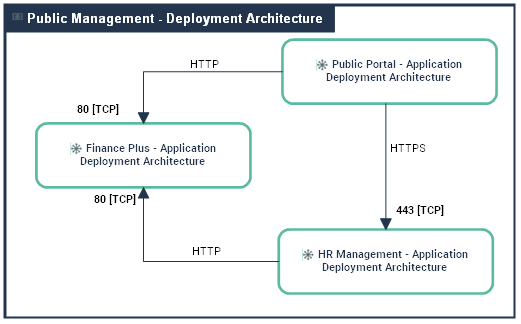
An application system deployment architecture diagram includes the following elements:
• Application Deployment Architecture,
For more details on application deployment architectures, see Describing an Application Deployement Architecture with HOPEX UAF.• Application System Deployment Architectures,
• microservices,
• Deployable Data Packages,
• Technical Server Port and Technical Client Port,
• Package Connections.
Describing an Application Deployement Architecture with HOPEX UAF
Accessing Application Deployement Architectures with HOPEX UAF
To access Application Deployement Architectures:
1. From the navigation menu, select Resources > Taxonomy - Structure (Software).
2. Click the Software tab.
3. Click the Application Deployement Architectures sub-tab.
The list of Application Deployement Architectures of the Enterprise is displayed.
Creating an Application Deployement Architectures with HOPEX UAF
To create an Application Deployement Architectures:
1. From the navigation menu, select Resources > Taxonomy - Structure (Software).
2. Click the Software tab.
3. Click the Application Deployement Architectures sub-tab.
4. Click New button.
The Application Deployment Architecture is created and its diagram opens.
To connect an Application to an Application Deployement Architectures:
1. From the navigation menu, select Resources > Taxonomy - Structure (Software).
2. Click the Software tab.
3. Click the Application Deployement Architectures sub-tab.
The list of Application Deployment Architecture appears
4. Select the Application Deployement Architecture that interests you and use the Application column to connect an applicaiton.
You can create a Application Deployment Architecture by creating an Application Deployment Architecture diagram from the application that interests you. See Application diagrams with HOPEX UAF.Using an Application Deployement Architectures with HOPEX UAF
An application deployment architecture allows you to describe the overview elements that must be deployed to implement an application architecture: Deployable Application modules, Deployable Data Modules as well as Package connections used for data exchange.
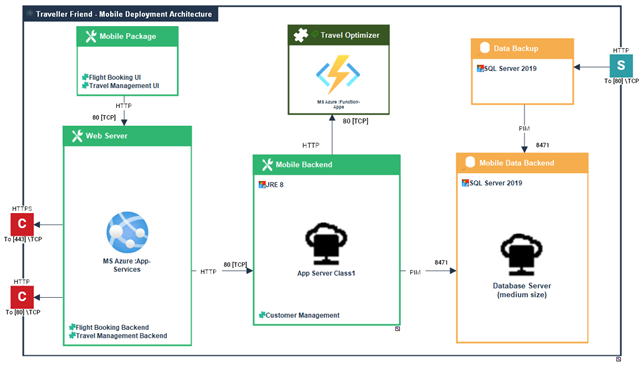
An deployment architecture diagram includes the following elements:
• Deployable Application Packages,
• Deployable Data Packages,
• microservices,
• Technical Server Port and Technical Client Port,
• Package Connections.