The HOPEX UAF Desktop
The menus available in HOPEX UAF depend on the profile with which you are connected.
For a detailed description of the HOPEX interface, see Interface Presentation.
HOPEX UAF Home Page
The HOPEX UAF homepage is divided into the following sections.
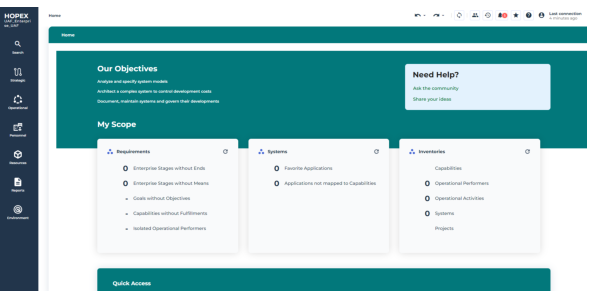
HOPEX UAF Home page
• The header presents some information of general interest, see HOPEX UAF Header homepage.
• My priorities: indicates the main strategic themes of interest to solution users.
• Help: points to user documentation and the user community.
• The Quick Access provides useful shortcuts:
• Recently viewed: last objects and diagrams accessed by the user
• Favorites: user favorites and shared favorites
• My favorite report: displays the user-defined or administrator-predefined report, which can be used as an entry point into the repository.
HOPEX UAF Header homepage
The header homepage is made of the following standard objectives:
• Analyze and specify system models: Stakeholders can use standardized, view-based concepts and models to inter operate effectively and facilitate communication.
• Architect a complex system to control development costs: UAF is an architectural framework that describes complex systems and the interactions that exist between them and with organizations. It helps define and understand the overall needs and capabilities to be achieved.
• Document, maintain systems and govern their developments: Describing systems in a repository helps to document them for shared understanding and knowledge between stakeholders.
Scope Indicators
The My Scope section provides useful indicators on application assets. Clicking the indicator takes you to all the corresponding objects. There are three groups of indicators:
• Requirements,
• System,
• Inventories.
Requirements
This tile lists the following objects:
• Enterprise stage without Ends: Number of Enterprise Stage, sub-stage of current enterprise (included the current enterprise) that don't have Ends (Visions, Goals, or Objectives).
This displays of list of these objects (name of stage, description, etc.)
• Enterprise stage without Means: Number of Enterprise Stage, sub-stage of current enterprise (included the current enterprise) that don't have Means (Missions, Strategies, Tactics).
This displays of list of these objects (name of stage, description, etc.)
• % Goals without objectives: Percent of Goals of current enterprise, its stage and their sub-stages that don't have linked objectives.
This displays of list of these objects (name of Goal, description, multi-combox of stages of current Enterprise).
• % Capabilities without fulfillments: Percent of Capabilities of current enterprise that aren't fulfilled by a system.
This displays of list of these objects (name of Capability, description, etc.).
• % Isolated Operational Performer: Percent of Operational Performer of current enterprise without any interactions.
This displays of list of these objects (name of Operational Performer, description, etc.)
Systems
This tile lists the following objects:
• Favorite Applications: Number of Applications and Application Systems that are added in different Favorite folders.
This displays of list of these objects (name, description, etc.)
• Applications not mapped to Capabilities: Number of Applications of current Enterprise that do not fulfill any Capability.
This displays of list of these objects (name, description, etc.)
• Applications without exposed Exchanges: Number of Applications of current Enterprise that do not exchange any Message.
This displays of list of these objects (name, description, etc.)
• Applications with sensitive or critical data: Number of Applications of the current Enterprise that respect one of the following criteria:
• Have Data Stores referencing a Data Domain using sensitive or critical Data categories
• Send or receive flows with content referencing sensitive or critical Data categories.
This displays of list of these objects (name, description, etc.)
Inventories
This tile lists the following objects:
• Capabilities: Number of Capabilities that are owned and imported by the current Enterprise.
This displays oof list of these objects (name, description, owned/imported flag)
• Operational Performers: Number of Performers agents that are owned and imported by the current Enterprise.
This displays oof list of these objects (name, description, owned/imported flag)
• Operational Activities: Number of Activities that are owned and imported by the current Enterprise.
This displays of list of these objects (name, description, etc.)
• Systems: Number of Systems (applications, Applications Systems) that are owned and imported by the current Enterprise.
This displays of list of these objects (name, description, owned/imported flag)
• Projects: Number of Projects that are owned by Project Domains contained in the current Enterprise.
This displays of list of these objects (name, description, etc.)
Quick Access Action
Quick Access contains shortcuts facilitating your work in HOPEX UAF.
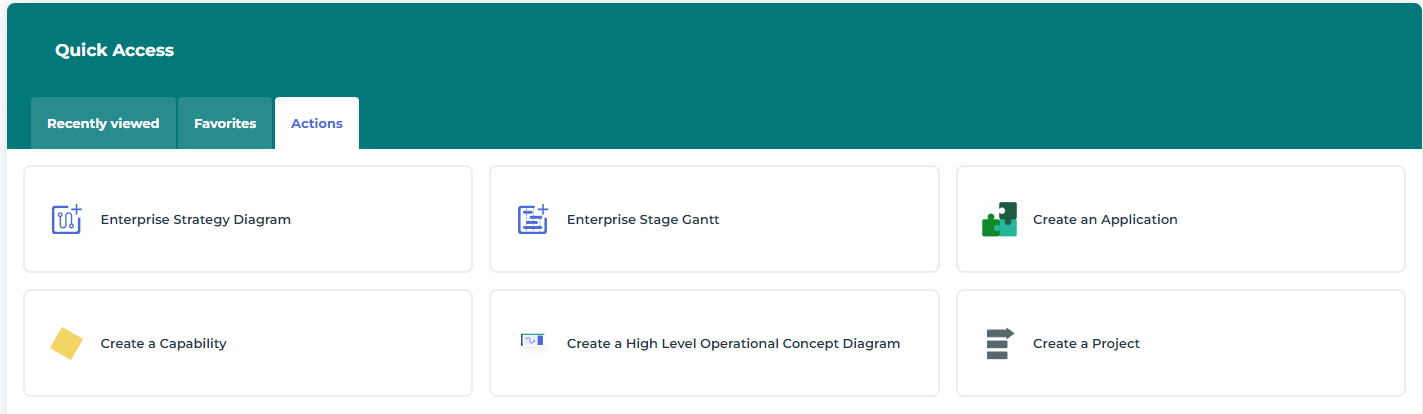
The list of Actions proposed with HOPEX UAF is presented below.
• Create a High Level Operational Concept Diagram, see Using High Level Operational Concepts with HOPEX UAF,