Managing Product and Object Accesses
Restricting Product Accesses for a Profile (Command Line)
The Command Line field of a profile properties enables to restrict the profile access to available products.
Format of the command is:
/RW'<Product Code A>;<Product Code B>;<...>' RO'<Product Code C>;<...>'
RW (or HC): reading and writing access
RO (or HV): reading access only
To restrict the profile accesses to products, see Products accessible on the license (Command Line).
Examples:
User licenses: Products A, B, C and D.
Profile 1 gives reading and writing access to Product A and read only access to product D.
With Profile 1 the user has access to objects A with the permissions defined on the Set of UI access rights of Profile 1, and has read only access to objects D.
Profile 2 gives reading and writing access to Product A, B, and D.
With Profile 2 the user has access to objects A, B, and D with the permissions defined on the Set of UI access rights of Profile 1.
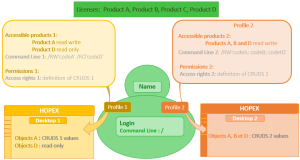
Restricting Product Access for a User (Command Line)
The Command Line field of the login properties of a person enables to restrict the user access to available products.
Format of the command is:
/RW'<Product Code A>;<...>' /RO'<Product Code B>;<Product Code C>;<...>'
RW (or HC): reading and writing access
RO (or HV): reading access only
 If both a user and his/her profile have access to products restricted by the Command Line attribute, the products accessible to the user are at the intersection of the values of the Command Line attribute of the user and profile.
To restrict a user accesses to product, see Products accessible on the license (Command Line).
Examples:
User licenses: Products A, B, C and D.
Profile 1 gives reading and writing access to Product A and read only access to product D.
Profile 2 gives reading and writing access to Product A, B, and D.
The user has reading and writing access to product A only.
With Profile 1, the user has only access to objects A with the permissions defined on the Set of UI access rights of Profile 1.
With Profile 2, the user has only access to objects A with the permissions defined on the Set of UI access rights of Profile 2.
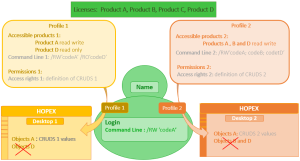
Restricting Product Accesses for a Person Group (Command Line)
The Command Line field of the login properties of a person group enables to restrict the product access to users belonging to the group.
Users belonging to a person group and connecting via the group inherits of the profile assignments and access rights of the person group (whatever their own assignments and access rights).
Format of the command is:
/RW'<Product Code A>;<...>' /RO'<Product Code B>;<Product Code C>;<...>'
RW (or HC): reading and writing access
RO (or HV): reading access only
If both a person group and a profile have access to products restricted by the Command Line attribute, the products accessible to the users belonging to the group are at the intersection of the values of the Command Line attribute of the person group and profile.To restrict a person group accesses to product, see Command line.
Examples:
User licenses: Products A, B, C and D.
Profile 1 gives reading and writing access to Product A and read only access to product D.
Profile 2 gives reading and writing access to Product A, B, and D.
The person group has reading and writing access to product A only and is assigned Profiles 1 and 2.
Users connecting via the group with Profile 1 have only access to objects A with the permissions defined on the Set of UI access rights of Profile 1.
Users connecting via the group with Profile 2 have only access to objects A with the permissions defined on the Set of UI access rights of Profile 2.
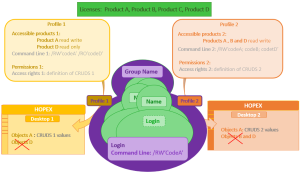
Restricting Object UI Accesses for a Profile (Permission)
Object UI access of a profile are defined by its associated Set of UI access rights.
To manage object UI access, see Managing Permissions on Object UI.
Example: the Application Viewer profile gives reading and searching access to applications (the Permission for Application MetaClass is: "RS"). This profile does not allow application creation, modification, or deletion.
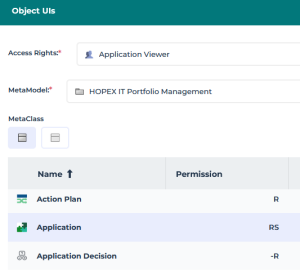
Restricting General UI Accesses for a Profile (Permission)
General UI accesses are managed for a profile. General UIs are classified by category, like:
• desktop
• command category
• command group
• general command
• property page
• tree
• Working Environment Template (WET)
To manage the general UI accesses, see Managing Permissions on General UI.
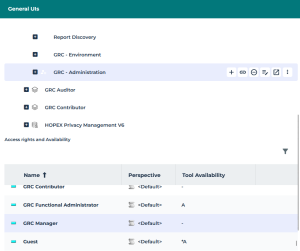
Example: the Administration navigation menu dedicated to GRC (Working Environment Template > GRC > GRC - Administration) is not available for the GRC Manager profile.
Restricting Data Accesses Dynamically (macro)
The profile can be linked to a data access dynamic rule (reading or writing).
You can define dynamic rules for reading or writing data access.
Dynamic rule:
• applies to an object for given profiles
• is defined by a macro
To manage data access dynamically, see Managing Data Access Dynamically.
Restricting Data Accesses Statically
Writing access diagram (authorization) and reading access diagram (confidentiality) define data accesses statically.
A person sees objects belonging to his/her reading access area, and can modify objects belonging to his/her writing access area.
A person belonging to a person group and connecting via the group sees objects belonging to the group reading access area, and can modify objects belonging to the group writing access area.
To manage data accesses statically, see Data Writing Access and Data Reading Access.
Data writing access (authorization management)
Each user (or user group) is connected to a writing access area. It is the person (or person group) that carries the writing access area.
Each object is connected to a writing access area.
 At creation, the object inherits the writing access area of the person who created it.
MEGA delivers by default the "Administrator" writing access area, which is the highest writing access area level.
All other writing access areas depend on at least one writing access area.
Writing access areas are interconnected by hierarchical links. This is a strict hierarchy, with no circular dependencies: a writing access area cannot be declared at a higher level than the writing access area on which it depends, either directly or via a succession of dependencies.
A user can modify an object connected to his/her writing access area or to a hierarchically lower writing access area.
The writing access area of an object can be modified by the administrator:
• by specifically changing the object writing access area
• when modifying the writing access area of another object (project, process, diagram, etc.) if the propagation option is enabled.
Data reading access (confidentiality management)
Information related to the reading access area is only visible when the Activate reading access diagram option is selected in the environment Options (Options: Compatibility > Windows Front-End > Administration).
Certain objects or modeling projects may be confidential or contain data (costs, risks, controls) that should be visible only to authorized users.
The HOPEX administrator can mask objects corresponding to this confidential or sensitive data.
To implement a data confidentiality policy, objects must be organized in distinct sets. Each set of objects is a reading access area.
Each user (or user group) is associated with a reading access area that determines the objects the user (or user group) can see. A user can only see objects located in his/her own reading access area or in the lower reading access areas.