2. Reporting Datamart Description
2.1. Structure
The Reporting Datamart structure is initialized with the RDBMS database standard structure.
Tables are created and fed with the HOPEX repository and SystemDb repository data. If there is no data to be exported to a table, this table remains empty, so that the Reporting Datamart structure is always consistent. This ensure the user that any of his queries run properly on the Reporting Datamart.
Reporting Datamart table and column names are in English language.
Reporting Datamart data is stored in the language selected at Reporting Datamart creation.
SQL database-based Reporting Datamart
For an SQL database-based Reporting Datamart the rule is as follows:
 an SQL Database Table is created for each HOPEX MetaClass an SQL Database Table is created for each HOPEX MetaAssociation an SQL Database Column is added in the SQL database Table for each HOPEX MetaAttribute See Reporting Datamart Detailed description for a detailed description.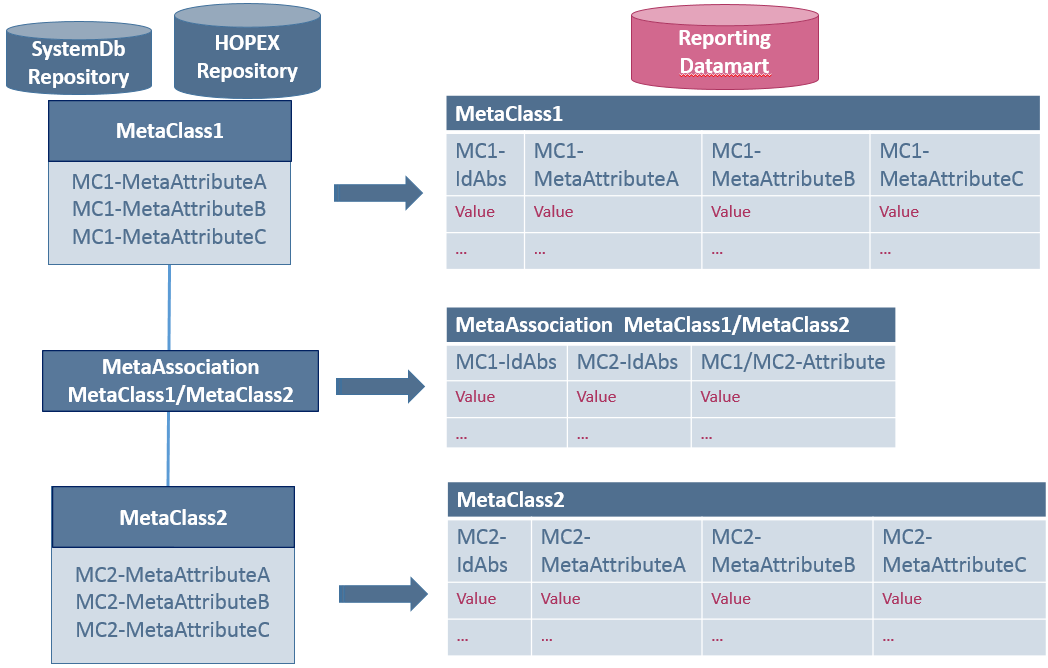
2.2. Data
HOPEX repository
Most of the HOPEX repository data is exported to the Reporting Datamart, including:
MetaClasses, MetaAssociations, and MetaAttributesdiagrams exported in BLOB column of their objectcalculated MetaAttributescomments, in html format (instead of RTF format)Logs and object history are not exported.
SystemDb repository
Few data is exported from the SystemDb repository:
LoginsPersons (system)Person groups2.3. Content
With the Reporting Datamart, data is filtered so that the data amount is reduced to the data needed only:
Only the last dispatched version of each object is kept in the Reporting Datamart. Data is filtered at Reporting Datamart creation according to a user rights (confidentiality) and his profile permissions.Data name is displayed (not Idabs) for an easy reading.Data is in the Reporting Datamart language.Note: if you need the Reporting Datamart data in multiple languages, you need to create as many Reporting Datamart as languages needed.
2.4. Excluding MetaAttribute values from the Reporting Datamart
In some cases, you might not need to export some specific MetaAttribute values in your Reporting Datamart.
To exclude MetaAttribute values from the Reporting Datamart:
1) In HOPEX, access the MetaAttribute properties.
2) Click the Characteristics tab, then Advanced subtab.
3) Click the Extended Properties field arrow and select Exclude from Reporting Datamart.