7. Reporting Datamart Detailed description
7.1. Reporting Datamart table classification
In the Tables folder, tables are classified according to their content:
 Technical data (MetaData)Object occurrences (MetaClass occurrences)Links (MetaAssociations)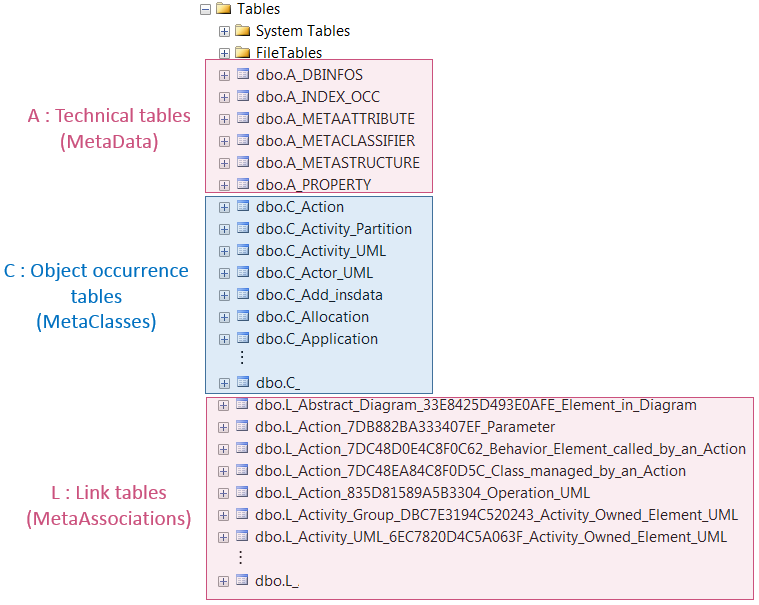
7.2. Reporting Datamart table name format
Each table name format is as follows:
|
dbo.<letter>_<table name>
|
||||
|
|
dbo: data base owner
|
|||
|
|
<letter>:
|
A for Technical tables
C for object occurrence tables
L for link tables
|
||
|
|
<table name>: describes the table content
|
|||
7.2.1. Technical tables
Technical table name is prefixed with: dbo.A_.
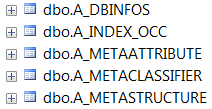 dbo.A_DBINFOS table is for internal use only (source repository information).dbo.A_INDEX_OCC table details all the object IdAbs with their corresponding MetaStructure Idabs. It enables to find out to which table belongs an object.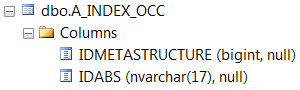
For an example see Finding information on an attribute section.
dbo.A_METACLASSIFIER table describes the tables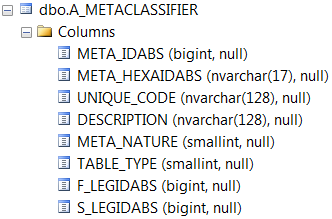
- META_IDABS and META_HEXAIDABS are the Metamodel object (MetaClass or MetaAssociation) IdAbs in HOPEX, in numerical (integer) and hexadecimal formats.
- UNIQUE_CODE is the table name
- DESCRIPTION is the Metamodel object (MetaClass or MetaAssociation) name in HOPEX
- F_LEGIDABS and S_LEGIDABS give the MetaAssociationEnd Idabs
For examples see Finding the MetaClass, and Finding information on an attribute sections.
dbo.A_METATTRIBUTE describes the columns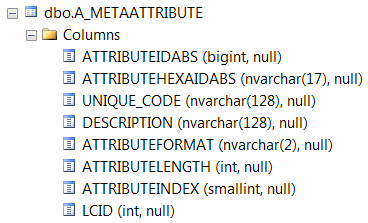
- ATTRIBUTEIDABS and ATTRIBUTEHEXAIDABS are the MetaAttribute IdAbs in HOPEX
- UNIQUE_CODE is the column name
- DESCRIPTION is the MetaAttribute name in HOPEX
dbo.A_METASTRUCTURE describes the Table x Column matrix
- IDMETASTRUCTURE gives the META_IdAbs of the dbo.A_METACLASSIFIER table
- ATTRIBUTEIDABS gives the MetaAttribute IdAbs in HOPEX.
7.2.2. MetaClass occurrence tables
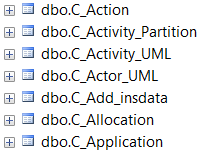
MetaClass occurrence table name is prefixed with: dbo.C_.
7.2.3. MetaAssociation tables
MetaAssociaton table name:
is prefixed with: dbo.L_is made up of the MetaAssociation IdAbs between the major MetaAssociationEnd name (the first one) and the minor MetaAssociationEnd name (the second one)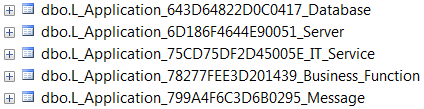
Example:
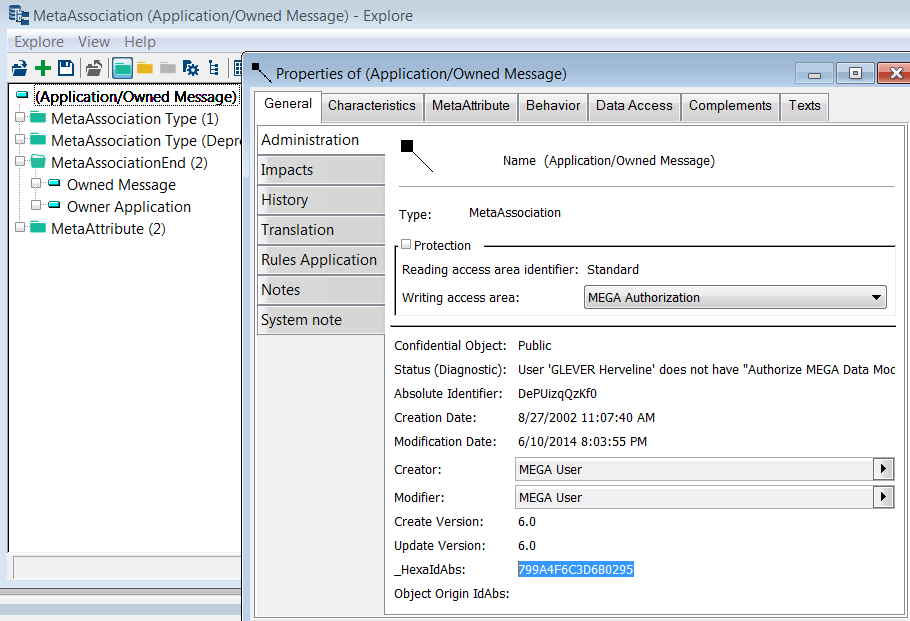
dbo.L_Application_799A4F6C3D6B0295_Message:dbo.L: indicates it is a link (MetaAssociation) tableApplication: the first MetaAssociationEnd (major)799A4F6C3D6B0295: the “Application-Message” MetaAssociation IdAbsMessage: the second MetaAssociationEnd (minor)
In HOPEX, with the MetaStudio console, in Explore an object by its absolute identifier, enter the 799A4F6C3D6B0295 IdAbs.
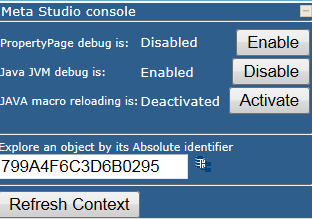
You get the MetaAssociation:
7.3. Reporting Datamart columns
7.3.1. MetaClass occurrence table columns
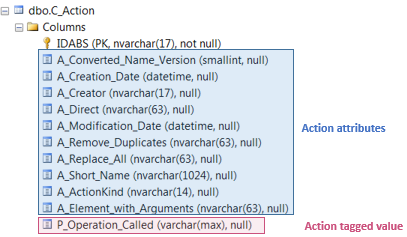
In dbo.C_<MetaClass name>, the Columns folder details the attributes or tagged values belonging to the MetaClass occurrence concerned. Each column name is prefixed as follows:
A_ for attributesP_ for tagged valuesExample:
dbo.C_Action table includes in Columns folder all the attributes and tagged values belonging to the Actions.
7.3.2. Link table columns
In dbo.L_<…>, the Columns folder details the attributes, and the first (major) and second (minor) MetaAssociationEnd IdAbs belonging to the MetaAssociation concerned. Each column name is prefixed as follows:
F_LEGTABLEIDABS: indicates the first (major) table IdAbsS_LEGTABLEIDABS: indicates the second (minor) table IdAbsF_< IdAbs>: indicates the first (major) MetaAssociationEnd IdAbsS_< IdAbs>: indicates the second (minor) MetaAssociationEnd IdAbsA_<…> for attributes Example:
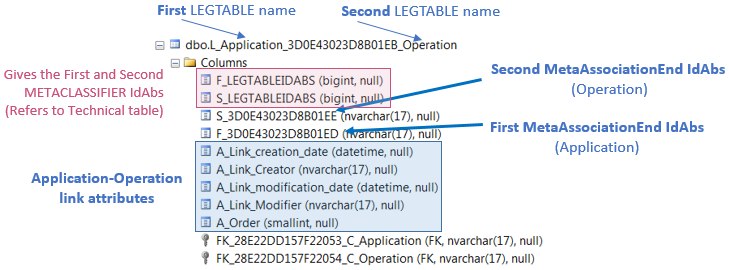 In dbo.L_Application_3D0E43023D8B01EB_Operation link table, the Columns folder is made up of:Application is the first MetaAssociationEnd (major)F_3D0E43023D8B01ED is the Application occurrence IdAbsOperation is the second MetaAssociationEnd (minor)S_3D0E43023D8B01EE is the Operation occurrence IdAbs
7.4. Use case: reading the Reporting Datamart through a link

7.4.1. Accessing your Reporting Datamart tables
To access your Reporting Datamart:
1) Launch Microsoft SQL Server Management Studio.
2) Access the server where you saved your reporting Datamart.
3) In the server tree view, expand Databases folder.
4) Expand your Reporting Datamart folder.
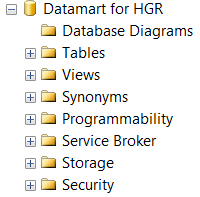
5) Expand the Tables folder.
7.4.2. Understanding a link table
Link example: Org_Unit - Application.
Dbo.L: “Org_Unit - Application” link
Org_Unit: major MetaAssociationEnd
B1EDB2712C140265: MetaAssociation IdAbs
Application: minor MetaAssociationEnd
To understand the dbo.L_Org_Unit_B1EDB2712C140265_Application table information:
1) In your Reporting Datamart tree view, Tables folder, right-click dbo_Org_Unit_B1EDB2712C140265_Application table and select Select Top 1000 rows.
The result is displayed in the right pane.
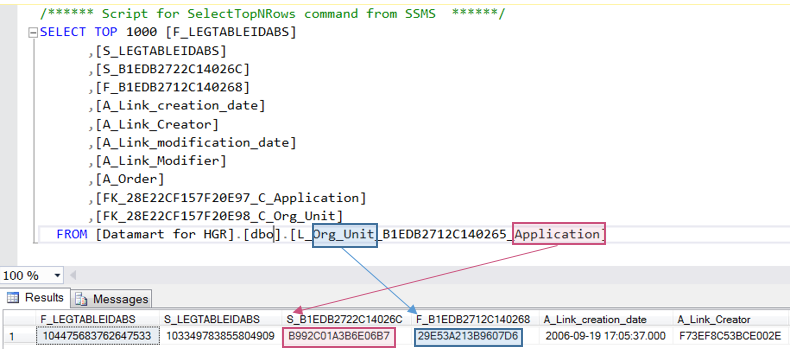 104475683762647533 is the Org Unit MetaClass IdAbs (for the first MetaAssociationEnd).
See Finding the MetaClass corresponding to an IdAbs section.
103349783855804909 is the Application MetaClass IdAbs (for the second MetaAssociationEnd).29E53A213B9607D6 is the Org Unit (first MetaAssociationEnd occurrence) IdAbs.B992C01A3B6E06B7 is the Application (second MetaAssociationEnd occurrence) IdAbs.7.4.3. Finding the MetaClass corresponding to an IdAbs
To find out the MetaClass corresponding to the 104475683762647533 IdAbs use the dbo.A_METACLASSIFIER table.
To find out the MetaClass corresponding to 104475683762647533 IdAbs:
1) In your Reporting Datamart tree view, right-click dbo.A_METACLASSIFIER and select Select Top 1000 rows.
2) In the right pane complete the query with : where META_IDABS=104475683762647533
FROM [Datamart for HGR].[dbo].[A_METACLASSIFIER] where META_IDABS=104475683762647533
3) Execute the query.
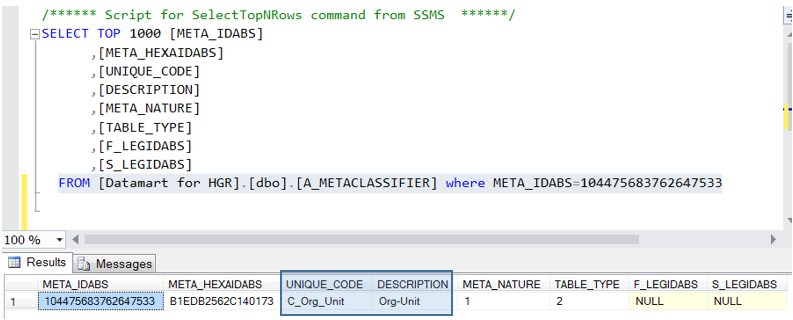
The query result indicates that 104475683762647533 is the Org-Unit MetaClass IdAbs.
7.4.4. Finding attributes or tagged values belonging to a MetaClass occurrence
Use the dbo.C_<MetaClass name> table to find the attributes and tagged values belonging to a MetaClass occurrence.
For example 29E53A213B9607D6 is the IdAbs of an Org_Unit occurrence.
To find the Org_Unit table which IdAbs is 29E53A213B9607D6:
1) In your Reporting Datamart tree view, right-click dbo.C_Org_Unit and select Select Top 1000 rows.
2) In the right pane complete the query with: where IDABS='29E53A213B9607D6'
FROM [Datamart for HGR].[dbo].[C_Org_Unit] where IDABS='29E53A213B9607D6'
3) Execute the query.
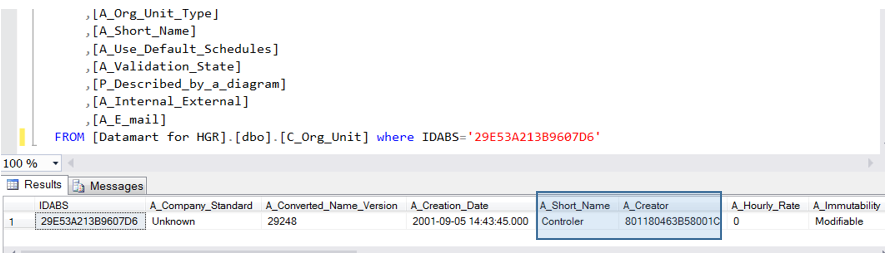
The query result details all the Org-Unit attributes (IdAbs: 29E53A213B9607D6, Short Name: Controler). It indicates, in particular that its creator IdAbs is: 801180463B58001C.
7.4.5. Finding information on an attribute
You want information on the Creator attribute whose idabs is 801180463B58001C.
You need to:
use the dbo.A_INDEX_OCC table to get the MetaClass IdAbs to which the Creator belongs to.use the dbo.A_METACLASSIFIER table to get the MetaClass name from its Idabsuse the dbo.C_<MetaClass name> table to get the Creator (801180463B58001C IdAbs) informationTo find the MetaClass IdAbs of the MetaClass occurrence whose IdAbs is 801180463B58001C:
1) To find out to which MetaClass belongs the occurrence with 801180463B58001C IdAbs, in your Reporting Datamart tree view, right-click dbo.A_INDEX_OCC and select Select Top 1000 rows.
2) In the right pane complete the query with: where IDABS='801180463B58001C'
FROM [Datamart for HGR].[dbo].[A_INDEX_OCC] where IDABS='801180463B58001C'
3) Execute the query.
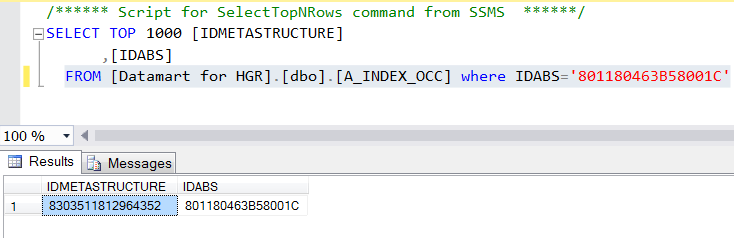
The query result indicates that the IDMETASTRUCTURE of the 801180463B58001C IdAbs is: 8303511812964352.
4) To find out which MetaClass has the 8303511812964352 IdAbs, in your Reporting Datamart tree view, right-click dbo.A_METACLASSIFIER and select Select Top 1000 rows.
5) In the right pane complete the query with: where META_IDABS=8303511812964352
FROM [Datamart for HGR].[dbo].[A_METACLASSIFIER] where META_IDABS=8303511812964352
6) Execute the query.
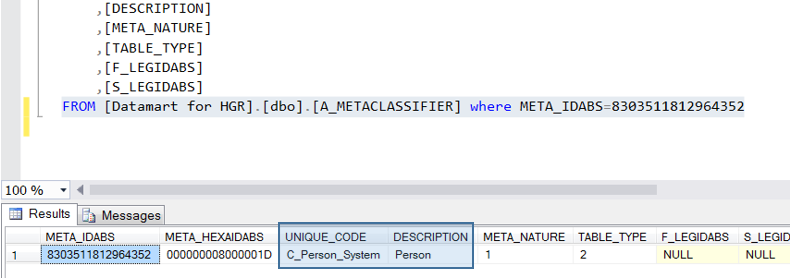
The query result indicates that 8303511812964352 IdAbs is the Person System MetaClass IdAbs.
7) To find out which Person has the 801180463B58001C IdAbs, in your Reporting Datamart tree view, right-click dbo.C_Person_System and select Select Top 1000 rows.
8) In the right pane complete the query with: where IDABS='801180463B58001C'
FROM [Datamart for HGR].[dbo].[C_Person_System] where IDABS='801180463B58001C'
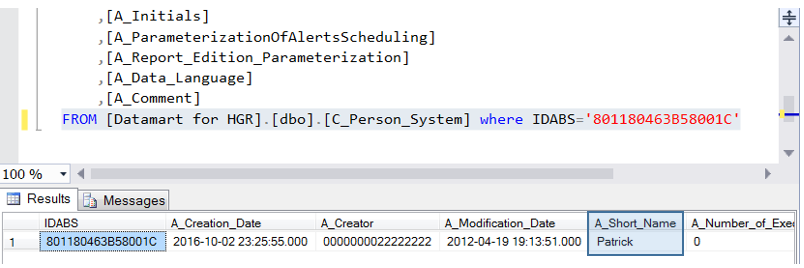
The query result indicates that the 801180463B58001C IdAbs belongs to Patrick.
7.5. Use case: saving the diagram drawings
In dbo.C_Diagrams table, the diagrams drawings are in the A_Drawing column.
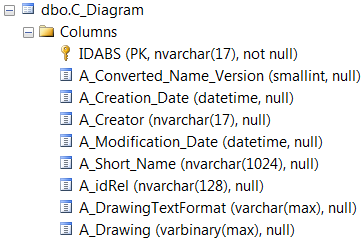
To save the diagram drawings:
1) Launch Microsoft SQL Server Management Studio.
2) Access the server where you saved your reporting Datamart.
3) Check in your configuration that the following features are unlock (= 1):
/*
CONFIGURATION
=============
*/
---- check the configuration for 'Ole Automation Procedures'. It must be set to 1
EXEC sp_configure 'Ole Automation Procedures';
GO
---- setting 'Ole Automation Procedures' to 1
EXEC sp_configure 'show advanced options', 1;
GO
RECONFIGURE;
GO
EXEC sp_configure 'Ole Automation Procedures', 1;
GO
RECONFIGURE;
/*
EXECUTION
=========
*/
4) Create a folder where you want to retrieve the diagram drawings.
For example: C:\Pictures.
5) Enter the following code:
DECLARE @SQLIMG VARCHAR(MAX),
@IDABS NVARCHAR(17),
@NAME NVARCHAR(1024),
@IMG_PATH VARBINARY(MAX),
@FILENAME VARCHAR(MAX),
@ObjectToken INT
DECLARE IMGPATH CURSOR FAST_FORWARD FOR
SELECT [IDABS], [A_Short_Name], [A_Drawing] from [dbo].[C_Diagram]
OPEN IMGPATH
FETCH NEXT FROM IMGPATH INTO @IDABS, @NAME, @IMG_PATH
WHILE @@FETCH_STATUS = 0
BEGIN
SET @FILENAME = 'C:\Pictures\'+ @IDABS + '_' + @NAME + '.png'
EXEC sp_OACreate 'ADODB.Stream', @ObjectToken OUTPUT
EXEC sp_OASetProperty @ObjectToken, 'Type', 1
EXEC sp_OAMethod @ObjectToken, 'Open'
EXEC sp_OAMethod @ObjectToken, 'Write', NULL, @IMG_PATH
EXEC sp_OAMethod @ObjectToken, 'SaveToFile', NULL, @FILENAME, 2
EXEC sp_OAMethod @ObjectToken, 'Close'
EXEC sp_OADestroy @ObjectToken
FETCH NEXT FROM IMGPATH INTO @IDABS, @NAME, @IMG_PATH
END
CLOSE IMGPATH
DEALLOCATE IMGPATH