Performing a Pre-assessment
The objective of pre-assessment is to identify those processing activities which have a low compliance level and require a DPIA or require adjustments.
 Before starting your pre-assessment, we recommend to take a look at the compliance levels which were given by the processing activity owner. See Viewing the Initial Compliance Level of a Processing Activity
Performing the Pre-Assessment
Based on the compliance scores made available in the pre-assessment dashboard, you can:
• Give a final validation score
• Define subsequent actions.
To record your pre-assessment:
1. In the Pre-assessment page of the processing activity properties, expand the Validation section.
2. Select a value for the Final Compliance level and the Final Risk Level.
These fields are initialized based on the various compliance levels which have been entered beforehand.3. Enter a comment to justify your choice.
4. Indicate the Subsequent Actions to perform:
• Nothing
• Stop Processing Activity
• Notify Supervisory Authority
• Others
5. Once you have entered all the necessary information, click Record Pre-assessment.
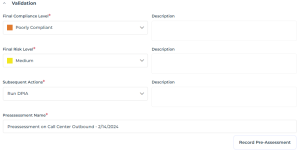 If the final compliance level is poor, you need to perform a DIPA. For more information, see Performing Impact Assessment (DPIA).
Consulting the History of Pre-assessments
When you record the pre-assessment, it is stored in the History section with the data protection values which have been entered.
To access the history of pre-assessments:
 In the Pre-assessment page of the processing activity properties, expand the Pre-assessment History tab.
You can consult the property pages of the recorded pre-assessment in read-only mode.