Introduction to Report DataSet Definition
Report DataSet Definition and Report DataSet Principles
 Report DataSet Definition is only available with HOPEX Power Studio technical module.
A Report DataSet enables to extract HOPEX raw data and show it in tabular form. With this data the end-user can create reports that use tabular data (e.g.: pie-chart, set of gauges, table, bar-chart, matrix) without needed to enter any code.
Report DataSet Definition creation is performed in both HOPEX Windows Front-End and Web Front-End for users with HOPEX Customizer or HOPEX Customizer Publisher profile.
Once a Report DataSet Definition is created, any user of a Solution can use it to query HOPEX repository and create a Report DataSet. Data first shown in tabular form can then be handled and shown in graphical format using Instant Report feature.
Report DataSet Definition
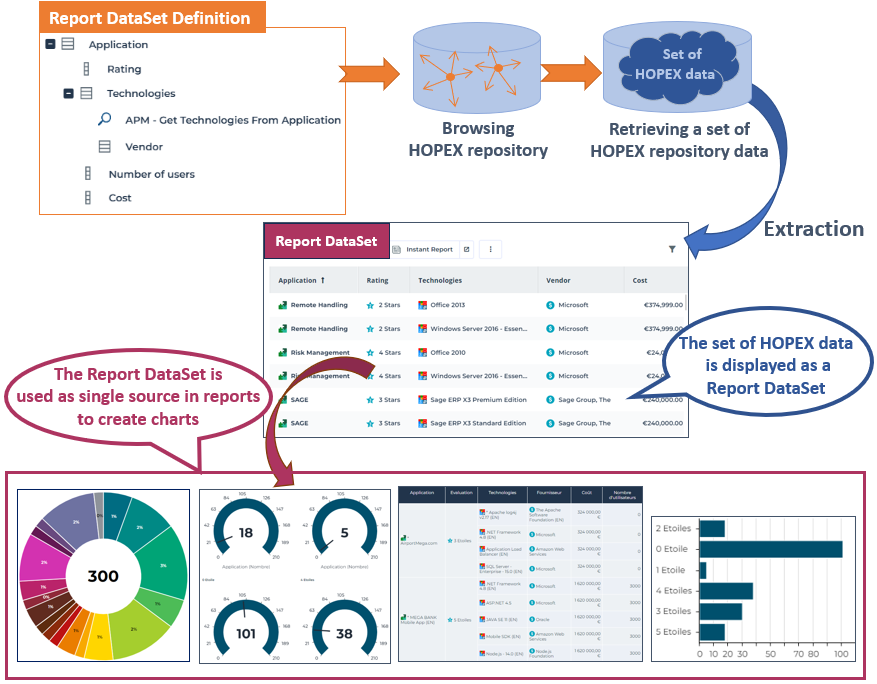
The Report DataSet Definition defines how to build a tabular set of data (Report DataSet). The Report DataSet Definition can be used as a Report DataSource in a Report Template.
A Report DataSet Definition is MetaClass-specific.
The Report DataSet Definition is based either on:
• a collection parameter (an occurrence or a set of occurrences of the root MetaClass)
At creation you need to define the root MetaClass (concrete or abstract)
• a query (a set of occurrences)
At creation you need to define the root MetaClass (concrete or abstract) and the query that collects the entry points.
If the query includes parameters, these parameters will result in Property Parameters in the definition.
Once this root Report DataSet Collection  is defined, you can add it as many items as needed:
is defined, you can add it as many items as needed:• Report DataSet Properties 
• Report DataSet Collections
Example:
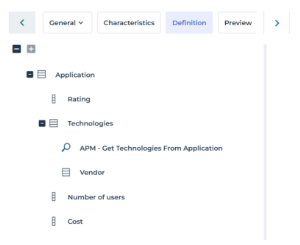
The "Application Technologies" Report DataSet Definition is based on the "Application" root Report DataSet Collection to which the following items are added:
to which the following items are added:- Report DataSet Properties :
: "Rating", "Number of users", and "Cost" MetaAttributes belonging to the Application MetaClass.
- Report DataSet Collections :
:"Technologies", which is a MetaAssociationEnd of the Application MetaClass
"Vendor", which is a MetaAssociationEnd of the "Technology used" MetaClass.
Report DataSet
The Report DataSet is a set of data defined by a Report DataSet Definition. The Report DataSet is used as a tabular source of data in a report.
Creating and Defining a Report DataSet Definition: the Big Picture
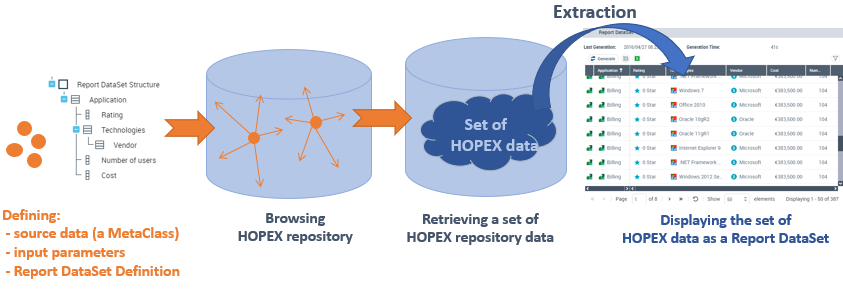
To create and define a Report DataSet Definition:
1. Define the Report DataSet source data: a MetaClass.
This MetaClass is the root of the tree that represents the set of data collected from the repository.
2. Define which data type feeds the data collection:
Define the data you want to be displayed in the Report DataSet.
3. (if needed) Define input parameters:
• Property parameters, which can be used in queries to populate a Report DataSet collection.
• Collection parameters, which can be used directly to populate a Report DataSet collection.
The user is asked to enter these parameters at Report DataSet creation.
4. Customize the Report DataSet.
5. Preview the Report DataSet.
The Report DataSet Definition is available for any user to create a Report DataSet.
For examples of Report DataSet Definitions see:
Report DataSet Definition Best Practices
When you create a Report DataSet Definition you should follow the best practices.
Defining the Report DataSet Definition
Define a Report DataSet Definition to create focused Report DataSets, i.e.:
• The Report DataSet should answer a single issue.
For examples: a report, an export of specific data.
• Do not build Report DataSets with huge amount of data that you would use for different purposes.
Optimizing the Report DataSet Definition for better performance
Retrieving the data
When you create a Report DataSet Definition, use the most efficient way to retrieve data.
Time monitoring
To identify the column that may introduce performance issues, use the debug log to find out how long it takes to get each column.
To get the time monitoring tool:
1. Access the megasite.ini file (in the HAS console: Modules > Module Settings > MegasiteSettings).
2. Add:
[Debug]
ReportDataSetGenerationTimeMonitor=1
Keep the last generated Report DataSet
The Keep last generated result option is selected by default, so that at next session, the first Report DataSet display time is shorten.
Checking the Report DataSet row count
The Report DataSet size is limited to:
• 100 000 rows
• 50 columns
These limits are defined in the following Options (Options > Tools > Documentation > Reports):Fix the limit for Report DataSet rows
Fix the limit for Report DataSet columns
As this maximum size can be reached quickly, check that the Report DataSet includes all the expected rows, so that it does not miss any data.
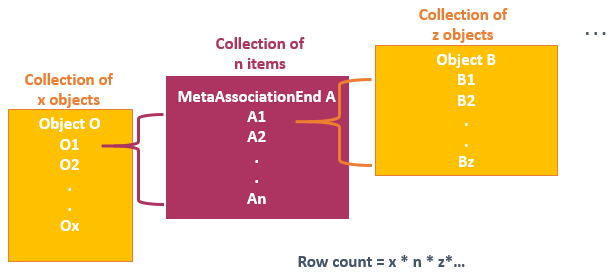
For information regarding Report DataSet related supervision events (e.g.: "Report DataSet Generate" informative event), see the HOPEX Administration > Managing Events > Events to be monitored (Production server).Rows are produced by multiplication of the object count of each MetaAssociationEnd.
Advice:
If your Report DataSet Definition does not include more than four levels of MetaAssociationEnds or queries the Report DataSet should include all the data.
Supervising Report DataSet events
Alerts are generated when a Report DataSet exceeds the limited size.
• Lines count indicates the number of rows (hidden or not) of the Report DataSet
• Columns count indicates the number of Report DataSet items on the Report DataSet collector.
In the HOPEX Supervision console, you can check the Report DataSet events.
For detailed information regarding Report DataSet related supervision events, see HOPEX Administration > Technical Articles > Supervision Event Description > ReportDataSet, TreeSet, and GraphSet.