5 Scheduling
The Scheduling must be defined when adding (registering) a Trigger into the Scheduler. Scheduling information must be passed as an XML string.
Abstract layers enable to:
handle the Scheduling information as a MEGA object. In this form, the Scheduling information is the set of properties of this MEGA object and this enables easy update via MegaObject API.
give access - for reading and updating - to the Scheduling information into reusable MetaPropertyPages.
5.1 Scheduling information: XML Scheduling format
Date and time are interpreted as UTC date and time.
<?xml version="1.0" encoding="utf-8"?>
<scheduling>
<reference (defined for relative scheduling)
date="yyyy/mm/dd"
hour="hh:mm:ss"
/>
<start
date="yyyy/mm/dd" (defined for absolute scheduling)
hour="(A/R)hh:mm:ss" (A=> absolute time, R=> relative: adds to current time)
executeatstart="y/n" (y: launches the trigger at defined start date and time
n: only launches at recurrent date and time)
>
<relativedate (defined for relative scheduling)
daysfromreference="(-)1" (cannot be used with "dayofweek" or "dayofmonth")
dayofweek="Su" (cannot be used with "daysfromreference" or "dayofmonth")
dayofmonth="01" (cannot be used with "daysfromreference" or "dayofweek")
weeksfromreference="(-)1" (in case "dayofweek")
weekofmonth="1" (in case "dayofweek")
monthsfromreference="(-)1" (in case "dayofmonth" or "weekofmonth")
month="Jan" (in case "dayofmonth" or "weekofmonth")
/>
</start>
<dailyrepeat (cannot be used with <weeklyrepeat> or <monthlyrepeat>)
daysperiod="1"
>
<endrepeat
noend="y/n" (cannot be used with "repeatnumber" or "date" and "time")
repeatnumber="1" (cannot be used with "noend" or "date" and "time")
date="yyyy/mm/dd" (cannot be used with "repeatnumber" or "noend")
hour="(A/R)hh:mm:ss"
>
<relativedate (defined for relative scheduling)
daysfromreference="(-)1" (cannot be used with "dayofweek" or "dayofmonth")
dayofweek="Su" (cannot be used with "daysfromreference" or "dayofmonth")
dayofmonth="01" (cannot be used with "daysfromreference" or "dayofweek")
weeksfromreference="(-)1" (in case "dayofweek")
weekofmonth="1" (in case "dayofweek")
monthsfromreference="(-)1" (in case "dayofmonth" or "weekofmonth")
month="Jan" (in case "dayofmonth" or "weekofmonth")
/>
</endrepeat>
<timescheduling
singlestart="hh:mm:ss" (cannot be used with "begin", "end" and "repeat")
begin="hh:mm:ss" (cannot be used with "singlestart")
end="hh:mm:ss" (cannot be used with "singlestart")
repeat="hh:mm:ss" (cannot be used with "singlestart")
/>
</dailyrepeat>
<weeklyrepeat (cannot be used with <dailyrepeat> or <monthlyrepeat>)
weeksperiod="1"
daysofweek="Su,Mo,Tu,We,Th,Fr,Sa"
>
<endrepeat
noend="y/n" (cannot be used with "repeatnumber" or "date" and "time")
repeatnumber="1" (cannot be used with "noend" or "date" and "time")
date="yyyy/mm/dd" (cannot be used with "repeatnumber" or "noend")
hour="(A/R)hh:mm:ss"
>
<relativedate (defined for relative scheduling)
daysfromreference="(-)1" (cannot be used with "dayofweek" or "dayofmonth")
dayofweek="Su" (cannot be used with "daysfromreference" or "dayofmonth")
dayofmonth="01" (cannot be used with "daysfromreference" or "dayofweek")
weeksfromreference="(-)1" (in case "dayofweek")
weekofmonth="1" (in case "dayofweek")
monthsfromreference="(-)1" (in case "dayofmonth" or "weekofmonth")
month="Jan" (in case "dayofmonth" or "weekofmonth")
/>
</endrepeat>
<timescheduling
singlestart="hh:mm:ss" (cannot be used with "begin", "end" and "repeat")
begin="hh:mm:ss" (cannot be used with "singlestart")
end="hh:mm:ss" (cannot be used with "singlestart")
repeat="hh:mm:ss" (cannot be used with "singlestart")
/>
</weeklyrepeat>
<monthlyrepeat (cannot be used with <dailyrepeat> or <weeklyrepeat>)
monthsperiod="1" (cannot be used with "months")
months="Jan,Feb,Mar,Apr,May,Jun,Jul,Aug,Sep,Oct,Nov,Dec" (cannot be used with "monthsperiod")
daysofmonth="01,02,03,04,05,...,28,29,30,31,L" (cannot be used with "weeksofmonth")
weeksofmonth="1,2,3,4,L" (cannot be used with "daysofmonth")
daysofweek="Su,Mo,Tu,We,Th,Fr,Sa" (cannot be used with "daysofmonth")
>
<endrepeat
noend="y/n" (cannot be used with "repeatnumber" or "date" and "time")
repeatnumber="1" (cannot be used with "noend" or "date" and "time")
date="yyyy/mm/dd" (cannot be used with "repeatnumber" or "noend")
hour="(A/R)hh:mm:ss"
>
<relativedate (defined for relative scheduling)
daysfromreference="(-)1" (cannot be used with "dayofweek" or "dayofmonth")
dayofweek="Su" (cannot be used with "daysfromreference" or "dayofmonth")
dayofmonth="01" (cannot be used with "daysfromreference" or "dayofweek")
weeksfromreference="(-)1" (in case "dayofweek")
weekofmonth="1" (in case "dayofweek")
monthsfromreference="(-)1" (in case "dayofmonth" or "weekofmonth")
month="Jan" (in case "dayofmonth" or "weekofmonth")
/>
</endrepeat>
<timescheduling
singlestart="hh:mm:ss" (cannot be used with "begin", "end" and "repeat")
begin="hh:mm:ss" (cannot be used with "singlestart")
end="hh:mm:ss" (cannot be used with "singlestart")
repeat="hh:mm:ss" (cannot be used with "singlestart")
/>
</monthlyrepeat>
</scheduling>
5.1.1 <reference>
Used in case the Scheduling is relative. Defines the date and time in UTC which is used as reference for relative start date and time and relative endrepeat date and time.
5.1.2 <start>
Defines the date and time at which the Scheduling starts.
If “executeatstart” is:
“y”, the Trigger launches the Job at this date and time.
“n”, the Trigger waits for the next recurrent date and time to launch the Job (see <dailyrepeat>, <weeklyrepeat>, <monthlyrepeat>).
In case the scheduling is:
relative (see <reference>), the date is defined by the <relativedate> structure and the time “attribute” can be relative (example time="R00:02:00", means +2minutes).
absolute, the date is defined by the “date” attribute.
5.1.3 <relativedate>
Defines a relative date. This structure is used into <start> and <endrepeat>.
The relative date refers to the <reference> date and time.
5.1.4 "daysfromreference"
Defines a number of days applied to the reference date, if:
negative: number of days before
positive: number of days after the reference date.
5.1.5 "dayofweek"
Defines a day of the week at which the Trigger launches the Job.
The value is one of the two characters items: Su=Sunday, Mo=Monday, Tu=Tuesday, We=Wenesday, Th=Thursday, Fr=Friday, Sa=Saturday.
"dayofweek" must be used with "weeksfromreference" or "weekofmonth".
5.1.6 " weeksfromreference "
Defines the number of weeks for the reference date, if:
zero: the Trigger launches the Job the day of week defined by "dayofweek" in the next 7 days.
positive: the Trigger launches the Job the day of week defined by "dayofweek" after the number of weeks defined
negative: the Trigger launches the Job the day of week defined by "dayofweek" before the number of weeks defined
5.1.7 "weekofmonth"
Defines a week in the month at which the Trigger launches the Job.
The value is one of the following values 1=1st week of the month, 2=2nd week of the month, 3=3rd week of the month, 4=4th week of the month, L=last week of the month (4th or 5th).
"weekofmonth " must be used with "monthsfromreference" or "monthofyear".
5.1.8 "dayofmonth"
Defines a day of the month at which the Trigger launches the Job.
The value can be a number between 1 and 31 or L=last day of month.
"dayofmonth" must be used with "monthsfromreference" or "month".
5.1.9 "monthsfromreference"
Defines the number of months for the reference date, if:
zero: the Trigger launches the Job the day defined by "dayofmonth" in the next 31 days or the day of the week defined by "dayofweek" and "weekofmonth".
positive: the Trigger launches the Job the day defined by "dayofmonth" in the next 31 days or the day of the week defined by "dayofweek" and "weekofmonth" after the number of weeks defined.
negative: the Trigger launches the Job the day defined by "dayofmonth" in the next 31 days or the day of the week defined by "dayofweek" and "weekofmonth" before the number of weeks defined.
5.1.10 "month"
Defines a month in the year at which the Trigger launches the Job.
The value is one of the three characters items: Jan=January, Feb=February, Mar=March, Apr=April, May=May, Jun=June, Jul=July, Aug=August, Sep=September, Oct=October, Nov=November, Dec=December.
"month" must be used with "dayofmonth" or "weekofmonth".
5.1.11 <endrepeat>
Defines the end of a recurrent scheduling defined by <dailyrepeat>, <weeklyrepeat> or <monthlyrepeat>.
One and only one of the following item can be defined into the <endrepeat> tag:
"noend": the recurrence never stops
"repeatnumber": number of time the recurrence occurs (the <start> date and time is not included into this number)
"date" and "time": absolute date and time
<relativedate> and "time":
o date relative to <reference> date
o time relative to <reference> time if "time" value starts with "(R)"
o time absolute if "time" value starts with "(A)" or nothing
5.1.12 <timescheduling>
Can only be used into <dailyrepeat>, <weeklyrepeat>, or <monthlyrepeat>. Used to define the hours at which the trigger launches the Job in the recurrent days. Use "singlestart" or the set of attributes "begin", "end", and "repeat".
If used with:
"singlestart", the Job is launched only once in the day.
"begin", "end", and "repeat" the Job is launched every "repeat" time between "begin" and "end".
5.1.13 <dailyrepeat>
Used to define a day-based recurrence. The recurrence occurs every "daysperiod" days.
5.1.14 <weeklyrepeat>
Used to define a recurrence based on weeks.
The recurrence occurs every "weeksperiod" weeks on the days defined by "daysofweek". "daysofweek" is a coma separated list of values in the following two characters items : Su=Sunday, Mo=Monday, Tu=Tuesday, We=Wenesday, Th=Thursday, Fr=Friday, Sa=Saturday.
5.1.15 <monthlyrepeat>
Used to define a recurrence based on months. The recurrence occurs every "monthsperiod" months or on "months" of the year.
"months" is a coma separated list of values in the following three characters items : Jan=January, Feb=February, Mar=March, Apr=April, May=May, Jun=June, Jul=July, Aug=August, Sep=September, Oct=October, Nov=November, Dec=December.
The recurrence can occur days of the months using "daysofmonth" or days of week using "weeksofmonth" combined with "daysofweek".
"daysofmonth" is a coma separated list of values that can be a number between 1 and 31 or L=last day of month.
"weeksofmonth" is a coma separated list of values in the following values 1=1st week of the month, 2=2nd week of the month, 3=3rd week of the month, 4=4th week of the month, L=last week of the month (4th or 5th).
"daysofweek" is a coma separated list of values in the following two characters items : Su=Sunday, Mo=Monday, Tu=Tuesday, We=Wenesday, Th=Thursday, Fr=Friday, Sa=Saturday.
5.2 Scheduling MegaObject interface
The properties of the Scheduling MegaObject available via the Scheduler client API can be listed in the HOPEX Explorer as following:
Dim mgRoot
Dim objSchedulerClient
Dim mgobjScheduledTrigger
Dim mgobjScheduling
Dim mgobjSchedulingType
Set mgRoot = GetRoot()
' Get the SchedulerClient API object
Set objSchedulerClient = mgRoot.SchedulerClient
' Allocate a "System Trigger" MegaObject
Set mgobjScheduledTrigger = objSchedulerClient.NewTrigger()
' Get the Scheduling MegaObject
Set mgobjScheduling = mgobjScheduledTrigger.GetCollection("~e)PMRueCFbLR[Scheduling]").Item(1)
' Get the Scheduling ObjectType MegaObject
Set mgobjSchedulingType = mgobjScheduling.GetTypeObject()
' Explores the Scheduling ObjectType
mgobjSchedulingType.Explore
The result is an Explorer window as bellow:
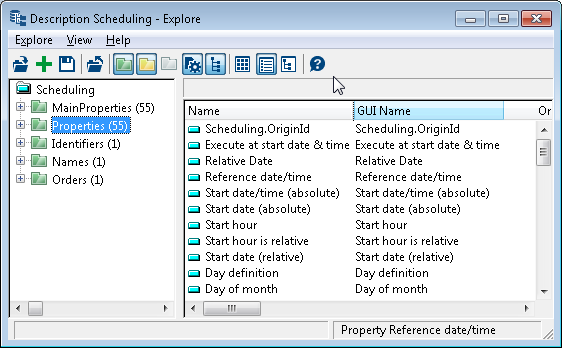
All the properties match information elements detailed in “Error! Reference source not found.”.
A description is available in the comment of each property.
5.3 Scheduling Property Page
5.3.1 Presentation of the Scheduling Property page
Scheduling configuration on a MetaClass on which a scheduling has to be defined is stored into a text property of the MetaClass.
The scheduling property page is a graphical layer over the scheduling XML text format that enables easy edition/display of scheduling configurations.
This property page can be integrated in property pages of custom MetaClasses.
Example: scheduled Workflow Action
The MetaAttribute “Scheduling” is added on “Workflow Action” MetaClass. A MetaPropertyPage is added on “Workflow Action” MetaClass, this MetaPropertyPage includes a platform provided scheduling propertypage using this syntax:
SchedulingMap=Map(~e)PMRueCFbLR[Scheduling])
SchedulingProperties=Item(~bwjCkgpSFTAH[Scheduling - Characteristics <relative definition>]),From(SchedulingMap),Control(SubPage),Param(Owner=off,Name=off)

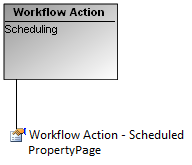
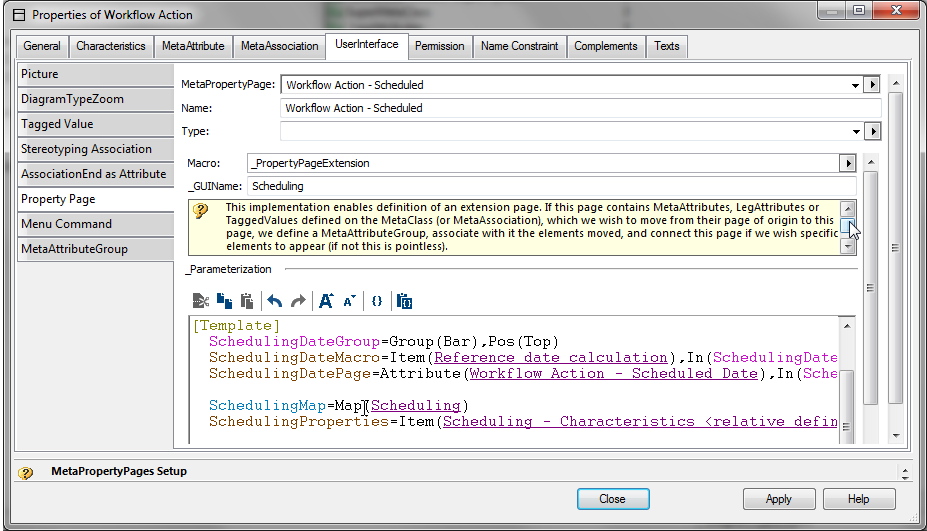
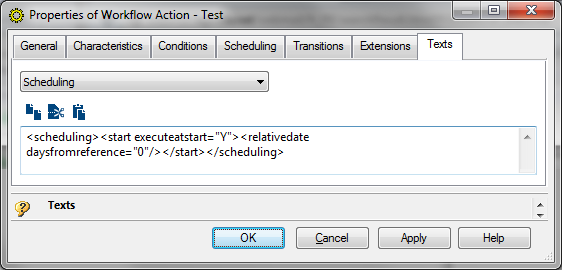
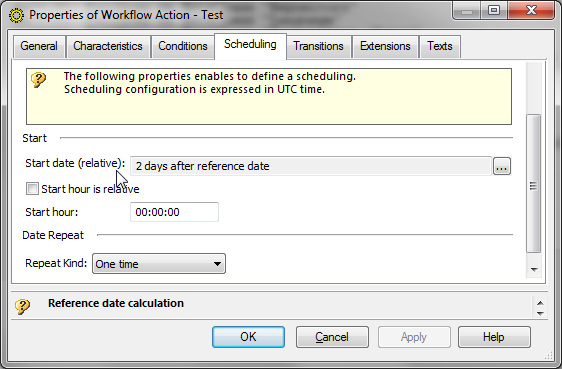
The result on “Workflow Action” objects is as follows:
Physical scheduling XML text format value
Scheduling graphical layer
5.3.2 Provided property pages
The following MetaPropertyPages can be included into MetaPropertypages of MetaClasses having the “~iUhj4likEzJQ[Scheduling]”:
~I8QfkFtCF19M[Scheduling - Characteristics]: this property page enables to configure all possible kind of scheduling
~bwjCkgpSFTAH[Scheduling - Characteristics (relative definition)]: this property page enables to configure scheduling that must be relative
~fgkxoz(xH5zN[Scheduling - Characteristics (readonly)]: this property page enables to display a scheduling configuration
5.3.3 Property page description help
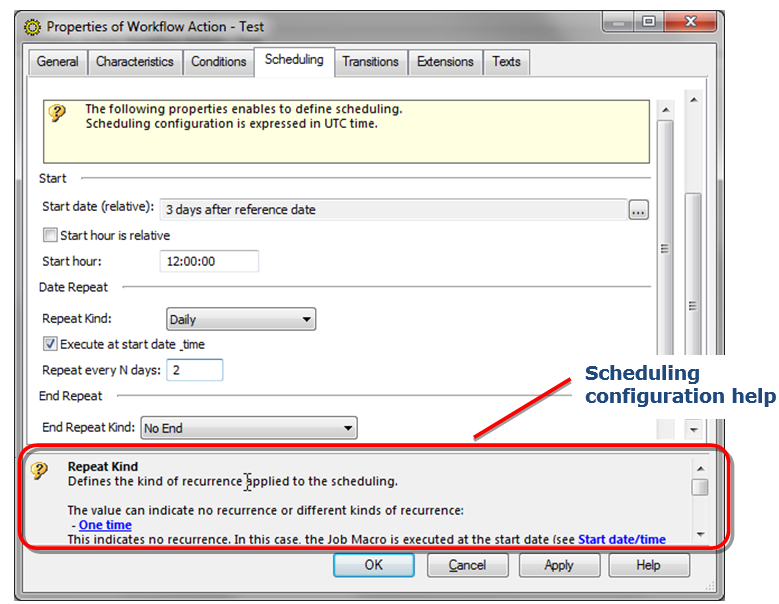
All scheduling properties are commented. These properties are the ones that can be listed by exploring the scheduling MegaObject type as described in section Scheduling MegaObject interface.
Thus, help for all properties is available into the contextual help: