2 Scheduler principles
2.1 Concepts
2.1.1 Job
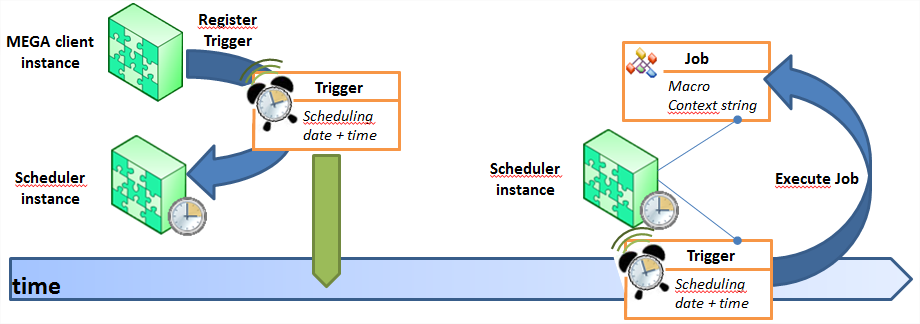
The Job is the item identifying the Macro to be executed. It includes a “Context” string used to pass needed information at Macro execution.
2.1.2 Trigger
A Trigger is associated to the Job to define when to execute this Job.
The Scheduling enables to define when (date & time) to execute the Job and which frequency to apply if any.
2.1.3 Scheduler
The Scheduler component provides the following services:
Add a Trigger (same as register a Trigger)
Delete a Trigger
Find existing Triggers
Modify a Trigger
Execute Jobs associated to Triggers at the date and time specified in the Scheduling
2.2 Scheduler execution details
2.2.1 Persistance
The Scheduler component instantiated into the Environment process loads and manage the Triggers into its memory.
Triggers and Jobs are replicated into the Repository. In case the process hosting the Scheduler dies, all Triggers and Jobs are recovered.
 Consistency of the Triggers and Jobs are managed by the Scheduler component and Scheduler Client API. It is forbidden to handle Triggers and Jobs repository objects.
2.2.2 Scheduler API
A dedicated API is provided to access Scheduler services. This API is called the Scheduler Client API (see Scheduler Client API section).
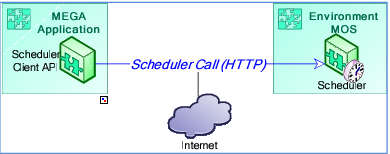
You must use the Scheduler Client API for any operation (Add, Remove, Update, Find) performed with the Scheduler. This API guaranties Triggers and Jobs consistency.
2.2.3 Scheduler and Workspaces
All operations on the Scheduler are done by default via an HTTP call so that they are executed as soon as the HTTP call is received and processed. The operation is executed without any dependency with the current opened Workspace in the MEGA Application process.
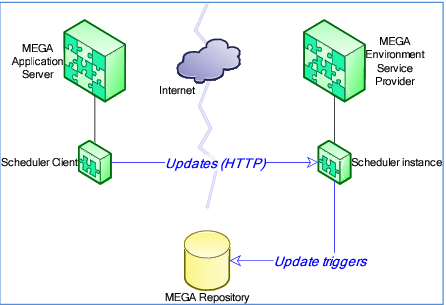
1 WebService mode
Several Scheduler operations update Triggers of are registered into a Scheduler instance:
Add a Trigger
Delete a Trigger
Modify a Trigger
Update mode
If the Scheduler operation depends on changes made into the current Workspace and this operation is executed outside the current Workspace, this could lead to inconsistencies.
Example:
In a Workspace, an object and a Scheduled Job to process something later on that object are created. If the Workspace is discarded and the Trigger is registered, when the matching Job is executed, it can generate errors, or worse, apply inconsistent updates.
Specify the “update modes” for the Scheduler update operations:
The “Web Service” mode
The Transactional mode
A Scheduler operation executed in Transactional mode is effective into the Scheduler only once the work in the Workspace has been dispatched. If the work is discarded, the Scheduler operation is also discarded.
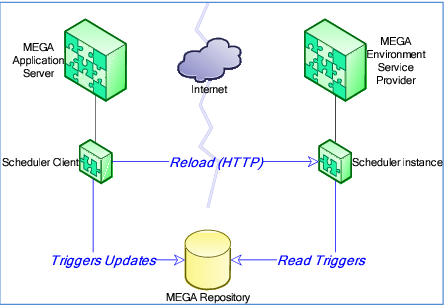
2 Tansactional mode
2.2.4 Job execution: user/profile/repository
All operations into a MEGA process require a connection (Session & private Workspace):
A connection is necessary prior to Job execution.
A Scheduler instance is hosted into an Environment MOS, meaning it is global to an Environment.
The Job connection implies to know which user connects, to which repository, with which profile.
For security reasons, the user used to execute a Job is always the one who added (registered) the matching Trigger from the MEGA Application Client into the Scheduler instance. Profile and Repository can be specified as parameters of the AddTrigger operation. By default Profile and Repository are the ones specified at the Trigger registering.