Configuring Standard Navigation in a MetaClass
In the absence of specific configuration for a tree, navigation from a given MetaClass always respects the same presentation.

Standard navigation from an object is configured by creation of:
• Branches associated with object collections
• Filters defined on these object collections
• Branches associated with folders.
Configuring navigation for a MetaClass
The list of MetaClasses accessible from an object of a given type is fixed based on the MetaAssociationEnds defined for the MetaClass of the object.
To obtain the list of navigable objects:
1. In the MetaStudio navigation window, expand the MetaTree folder.
2. Under the MetaTree folder, expand the MetaClass Navigation folder.
3. Expand the folder corresponding to the MetaClass that interests you.
Example: "Project".
• The "Navigable" folder contains the list of navigable MetaAssociationEnds.
• The "Unnavigable" folder contains the list of MetaAssociationEnds that are not navigable.
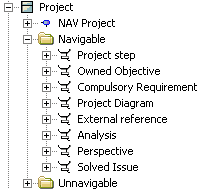
To specify that a MetaAssociationEnd is navigable, there are two possible solutions:
• In the "Unnavigable" folder, select the MetaAssociationEnd that interests you and drag this into the "Navigable" folder.
• From the Properties window of the MetaAssociationEnd concerned, select the Characteristics tab and in the Navigable box, select "Navigable".
Defining a branch from a MetaClass
To show branches in the navigation tree of an object:
1. In the MetaStudio navigation window, expand the MetaTree folder.
2. Under the MetaTree folder, expand the MetaClass Navigation folder.
3. Right-click the MetaClass concerned, for example Project, and select New > MetaTreeNode.
4. In the dialog box that appears, enter the name of the new node and click OK.
 The convention adopted for naming this root node specific to a MetaClass is:
 (<MetaTree Name >) <MetaClass Name > Root.
5. Create branches and filters of this new node according to the procedures described in sections Creating Navigation Tree Branches and Creating Classification Folder Branches.