Diagram Type Creation
Accessing Diagram Types
To access diagram types:
 From the HOPEX menu bar, select View > Navigation Windows > MetaStudio.
The diagram types are grouped in the Diagram Types folder.
Sorting Diagram Types
Diagram types are sorted by category. These categories are presented as sub-folders of Dagram Types folder.
To create a folder of diagram types:
1. In the MetaStudio navigation window, right-click the Diagram Types folder and select New > Folder of Diagram Types.
The Creation of Folder of Diagram Types window appears.
2. Enter the folder Name.
3. Click OK.
4. Create a diagram type from this sub-forder or drag and drop a diagram type in this folder.
Creating a Diagram Type
To create a diagram type:
1. In the MetaStudio navigation window, right-click the Diagram Types folder (or sub-folder) and select New > Diagram Type.
The Creation of Diagram Type window appears.
2. Enter the diagram type Name.
3. Click OK.
Diagram Type Concepts
Diagram type configuration uses concepts presented in the following metamodel:
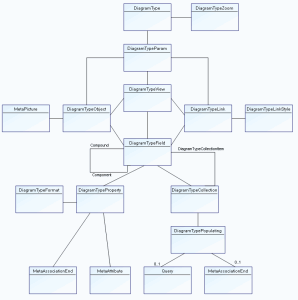
A DiagramType can describe a specific number of concepts.
A DiagramTypeZoom enables a MetaClass to be described by a diagram type.
E.g.: a Process can be described by a Process Diagram).
Configurations of a diagram type are carried by a DiagramTypeParam.
Diagram type configuration is based on the following concepts:
• DiagramTypeObject: object types (MetaClasses) that can be used in a diagram type.
• DiagramTypeView: views available in a diagram type. A view groups one or several object types that can be used in a given diagram type.
• DiagramTypeLink: links that can be displayed in a diagram type.
• DiagramTypeField: fields that can appear in an object shape or link.
These concepts enable definition of graphical representation of objects, links, views, and fields (in graphical representation of objects and links).
Concept Descriptions:
Diagram Concept | Definition |
|---|---|
DiagramType | Type of diagram |
DiagramTypeCollection | Configuration of an attribute repeated n times in a diagram configuration |
DiagramTypeField | Representation of a field displaying a list of properties or a basic property |
DiagramTypeFormat | Defines a format or string that can change according to a specific condition |
DiagramTypeLink: | Representation of a MetaAssociation in a diagram type |
DiagramTypeLinkStyle | Defines a link style that can change according to a specific condition |
DiagramTypeParam | Configuration of a diagram type |
DiagramTypePath | Representation of a path (eg. MetaAssociation) in a diagram type |
DiagramTypePathPart | Configuration of a DiagramTypePath element |
DiagramTypeView | Configuration of a view and its content |
DiagramTypeProperty | Configuration of a basic attribute in a diagram configuration |
DiagramTypeObject | Representation of an object type in a diagram type |
DiagramTypePopulating | Defines the method (MetaAssociationEnd, Query) of populating a collection specified by DiagramTypeCollection |
DiagramTypeZoom | A DiagramTypeZoom enables a MetaClass to be described by a diagram type. |