Adding a Review Note to an Object
You can add a review note to an object from its properties. When you add a review note to an object, you automatically subscribe to the alerts on object modifications.
 You can use the @ character followed by at least the first letter of the name of the person that you want to mention in your text. Then, select the person in the list that appears.
 The persons mentioned in a review note are automatically added to the list of persons that follow the object.
To add a review note to an object:
1. From your HOPEX desktop, access the review notes of the object of interest.
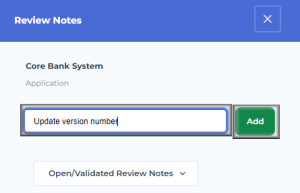
The Review Notes window opens on the right of the desktop.
2. Enter the note that you want to share.
3. Click Add.
Your object review note is created.
 To modify your review note, see Modifying a Review Note.To view all the review notes created on the object (on the object itself and on its attributes), see Accessing the review notes of an object.To answer (yourself or other users) to this review note, see Answering a Review Note.
You automatically subscribe to the alerts on the object modifications.
Users subscribing to alerts on object modifications get notified.