Contents of a Data Catalog
A data catalog is a metadata management tool in HOPEX. It references data sources that contain physical metadata.
Data catalogs are available with the “Data Asset Manager” profile.
To access the data catalogs:
 In the navigation bar click Catalogs then Hierarchy.
In a data catalog you can define:
• the organizations at stake, which use or consume the data in the catalog.
• the regulatory frameworks and business policies that apply to the metadata in the catalog, and to which the organizations involved are subject. See Regulations Associated with the Data Catalog.
• a concept domain map
• data lineages
Data Source
Catalog data sources are deployed data stores.
Data stores are grouped by technology in a catalog.
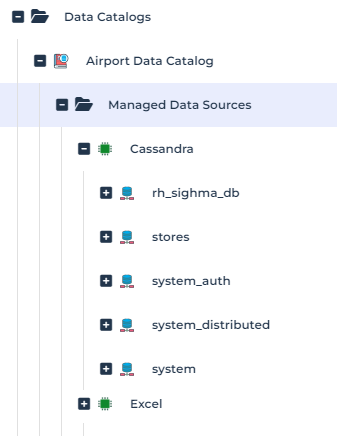
For more details on data source infrastructure, see Data Source Infrastructure.
A deployed data store is a collection of metadata. It can contain:
• Meta dataset schemas, which group meta datasets
• Meta datasets (e.g. tables).
Meta Dataset
A meta dataset represents the structure of a collection of related data held in a data source.
The represented data structure can be relational (Table) or NoSQL (triple store, document store, flat files, etc.).
Meta field
A meta field is a physical data property that is the specification of the content of a meta dataset. A meta field corresponds to a column in a table or an Excel sheet column.
A meta field can be of the following types:
• simple meta field
• structured meta field: it is a data field composed of other data fields (example : postal address)
• primitive type of a field: type that identifies the field (example: "Address", "Code", "Date" )
To connect a meta field (simple or structured) to a meta dataset, you will first indicate whether it is a field that identifies the metadata, a referenced field or a field that is neither identifying nor referenced.
To connect a meta field to a meta dataset:
1. Open the properties of the meta dataset.
2. In the Meta Fields page, click New.
3. In the window that appears, select the desired field type, which indicates whether the field to be connected is identifying or referenced:
• Identifier: meta field that allows to distinguish the object. It can be a simple or structured meta field.
• Reference: meta field that is not held by the meta dataset. It can be a simple or structured meta field.
• Standard: meta field that is neither identified nor referenced. It can be a simple or structured meta field.
Regulations Associated with the Data Catalog
You can connect regulatory frameworks or business policy frameworks to the catalog.
To connect a regulation to the catalog:
1. Under the catalog name, hover over the Regulatory Frameworks and Business Policies folder.
2. Click the link that appears to the right of the folder.
The query dialog box appears.
3. Select the type of regulation and click the Search button.
A list of matching regulations appears.
4. Select the desired regulation and click Connect.
You can further define which sections of a regulation and/or business rule an entity must comply with.
Example
An organization is constrained by the regulation concerning building accessibility and the adaptation of working conditions for handicapped persons.
To define the elements of a data catalog regulation:
Click the catalog icon and select Edit the data catalog.The data catalog editing window appears.
On the left side of the editor are the regulatory frameworks or business policy frameworks attached to the data catalog. On the right you can see the data catalog. To define the data catalog items, drag and drop the regulatory sections from the left tree into the right tree
Data Lineage of a Data Catalog
You can associate the data catalog with a data lineage to visualize the implementation and track the regulations that constrain the data catalog within the organization.
To connect a data lineage to the data catalog:
1. Open the properties of the data catalog.
2. Click the Activities page.
 If the tab doesn't appear by default, click Show/Hide, select Activities and Apply.
3. Under the Data Lineage section, click New or Connect depending on whether you want to create a data lineage or connect an existing data lineage.
See Data Lineages.
Concept Domain Map of a Data Catalog
A Concept Domain Map organizes into domains the use of business data that is implemented by the meta dataset and metadata fields. Thus, the data catalog not only references physical and technical data sources but also provides a business-oriented entry point via this map.
For more information on Concept Domain Maps, see Concept Domain Map.To connect a concept domain map to a data catalog:
1. Move the mouse over the data catalog.
2. Click + New > Concept Domain Map.
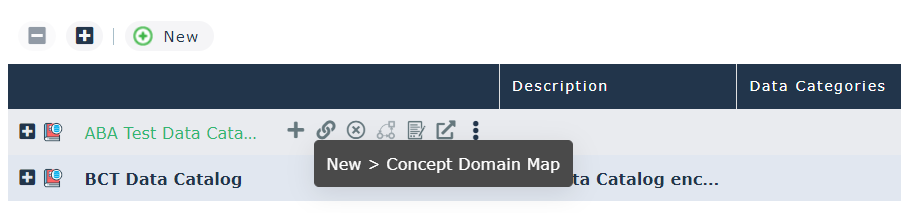
Business data connected to the data catalog through the map is displayed in the Business Data page of the catalog properties.
See also: Collecting Business Data.