Collecting Business Data
Under the Business Data page of a data catalog's properties appear the business data implemented by the metadata and/or defined in the concept domains of the data catalog.
 For the implementation of business data through metadata, see Connecting Metadata to Business Information.For the definition of concept domains in a catalog, see Concept Domain Map of a Data Catalog.
The data catalog administrator can ask business owners to complete the business data properties associated with the catalog. This request is made through an evaluation session.
The managers contacted are the Data Owner, the Data Designer and the Data Steward defined on the data in question, or, failing that, those defined on the business dictionary or the data domain.
To collect business data:
1. Open the properties of the data catalog concerned.
2. Click the Business Data page.
3. From the list displayed, select the data to be completed.
4. Click the button More...  Then Fill Data.
Then Fill Data. 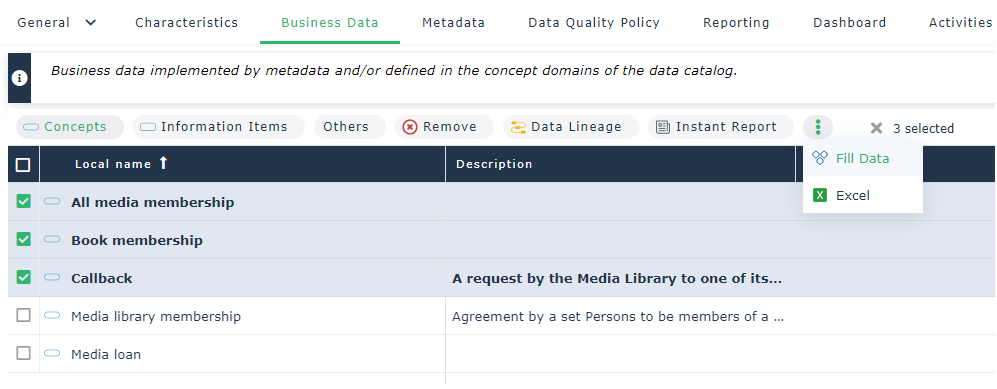
The assessment wizard appears.
5. Plan the assessment session if necessary.
6. Click Next.
7. Select the items you want to send to the data managers:
• one or more property pages (e.g. the Data Quality page if you want managers to evaluate data quality)
• advanced characteristics (special attributes, e.g. modification date, or technical properties)
8. Click Next.
9. Start the session immediately or at a specific date and time.
A notification is sent to the data owners, containing direct access to the form.
Monitoring of Data Call Forms
To access the data call forms received or sent:
1. Click the Tools navigation menu.
2. In the drop-down list select the form type to display:
• Sent forms
• Answered forms
• Unanswered forms
• Late forms