Concluding the Audit
Analysis reports enable the lead auditor to evaluate the audit, its findings and recommendations to prepare the validation meeting.
When elements have been validated, the audit closing report can be submitted to the audit director.
Assessing Audits
Findings and recommendations summary
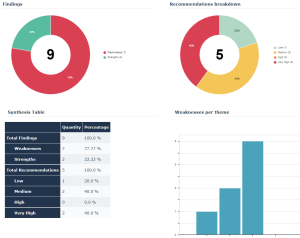
The lead auditor can access an analysis report on strengths and weaknesses derived from audit findings and recommendations.
To access the Reports tab:
 In the properties of the audit, select the Reports > Evaluation page.
 Several reports are proposed:
• Breakdown of findings by type (strength, weakness)
• Breakdown of recommendations by priority (low, high, medium)
• Summary table of above elements
• Weaknesses per theme
Risk assessment report
An analysis report provides a summary of risks of the audit.
To access the Reports tab:
In the properties of the audit, select the Reports page then Heatmap. Steering the Closing Meeting
The objective of the closing meeting is to validate findings and recommendations with the auditees.
To review findings, you can refer to:
• the structure of the work program provided by HOPEX Internal Audit
• the different analysis reports supplied by HOPEX Internal Audit
• the audit closing report
Generating and Submitting the Audit Closing Report
Generating the audit report
To generate an audit report:
1. Display the navigator of your work program.
2. Click the audit icon and select Deliverables > Audit Report.
A message asks if you want to open or save the file.
3. Save the file to be able to modify and then submit it.
Contents of an audit report
The audit report uses audit elements:
• Audited operational managers
• Audit cost (estimated and effective load, total of expenses)
• Resources assigned
• Scope (objectives, risks, operational context)
• Audit opinion
• Priority findings
• Findings and recommendations details
Saving the audit report
When you obtain a suitable version of the report, before submission you should save it as a business document.
To connect the audit report to the audit and make it a business document:
1. Open the properties of the audit and select the Documents page.
2. Create or connect a document.
3. Specify the Document Category.
 For more information, see Using Business Documents.
Submitting the audit closing report to the audit director
The lead auditor submits to the audit director the audit closing report containing any modifications entered following the validation meeting.
To submit the audit report:
1. Display the navigator of your work program.
2. Click the audit icon and select Closing report to be submitted > Submit closing report.
Validating and circulating the audit closing report to auditees
Validating the report
The audit director validates the audit closing report by return.
Circulating the report and its recommendations
The audit director sends the final report to persons audited during audit execution.
Circulating the closing report automatically sends its recommendations to responsible users.
The recommendation owners must then set up actions to implement the recommendations. For more details, see Implementing Recommendations.
Closing Audits
When the audit is completed, the audit director can close it.
Closing an audit closes all objects at a lower level, with the exception of recommendations and actions. When these objects have been closed you can no longer modify them.
The administrator can exceptionally reopen these objects if necessary.