Distinguishing Applications from Technologies
Thanks to an AI-based analysis engine, AI-Driven APM automatically detects business applications from the list of technologies, helping enterprise architects to build their application repository.
Application detection is based on a repository of technologies standardized with IT-Pedia. Following standardization of technologies in the HOPEX repository, you can use the tool to identify technologies that turn out to be applications, and thus distinguish technical bricks from business applications.
 For more information on the normalization, see Normalizing Technologies.
HOPEX creates its own classification of IT-Pedia technology products to help the enterprise architect make the technical/business distinction, but also to indicate to which business capability in HOPEX an application contributes. The tool makes recommendations - it's up to the architect to arbitrate and validate them. HOPEX records the decision and updates the repository.
Prerequisites
The application detection function is available with the AI-Driven APM module. The module requires installation of the Aquila version of HOPEX and the IT-Pedia module.
For more details on module installation, see Importing a Module into HOPEX.The recommendations provided by the AI-driven APM tool are based on a calculation performed by the Remote-Taxonomy service hosted by MEGA.
To use the tool, you need to specify the URL of this service in the administration options:
1. Access the HAS Console and stop HOPEX Core Back-End module. Make sure to perform this action when users are not connected.
2. Open the HOPEX Administration window.
3. Right-click on HOPEX and select Options > Modify.
4. Unfold the Tools > Data Exchange > Remote Taxonomy folder.
5. In the Root URL of remote taxonomy field, enter the following URL: https://ea-ai.saas.mega.com.
6. Click OK.
7. In the Administration application, connect to the environment and perform an Automatic Environment Update.
8. Restart the HOPEX Core Back-End module.
Optimization of the HOPEX Intelligence Experience
To ensure optimal results, our HOPEX AI services have been designed to conform to standard APM usages.
Overly large portfolios or excessively long descriptions can significantly increase processing times. By following best practices, you will fully benefit from the power and responsiveness of our services.
We recommend to:
• Dimension your porfolios in an appropriate way:
An application domain manager typically works with a few dozen applications (50 to 100). This size allows you to obtain comprehensive analyses in just a few minutes.
• Write concise and relevant descriptions:
A few well-written lines describing your business capabilities and applications are preferred.
• For a business capability: [Action verb] + [Business object] + [Context/Objective/Expected result]
Example: "Manage customer order lifecycle, from entry to delivery, ensuring inventory tracking and invoicing, while respecting customer expectations at each stage."
• For an application: [Main functions] + [Processes covered] + [User profiles] + [Main business objects handled]
Exemple : "ERP managing orders, inventory, and invoicing. Covers sales and logistics processes. Used by sales and warehouse teams."
Application Detection
HOPEX can identify which technologies correspond to which applications. For each technology, it provides a recommendation; it's up to you to validate it or not.
Presentation of the wizard
The application detection wizard presents a list of technologies awaiting arbitration.
It consists of two steps:
• Qualification of software assets
• Preview and update of the repository
Qualify software assets
The software products displayed are the “Product” technologies standardized from IT-Pedia, all versions included.
If a new version of a technology is imported, it is attached to the existing technology. You can view the versions of a technology in its properties, on the Version page.Each software product has a recommendation associated with:
• a confidence level
Using this confidence rate, you can sort technologies.• a justification.
Preview and update the repository
This second step presents the applications and their properties that will be created in the HOPEX repository.
When you validate, all the lines you have modified are processed (name and objects associated with the application).
The applications created are connected to the source technologies.
Starting application detection
You can launch application detection with the Enterprise Architect and EA Functional Administrator profiles.
To launch application identification:
1. In the navigation bar, click Applications > Application Detection.
A table lists the technologies awaiting qualification.
A table lists the technologies awaiting qualification.
2. For each one, validate or invalidate the recommendation by selecting Yes or No in the Decision column.
Depending on the decision, the asset is qualified as Technology or Application.
At this stage, objects are not created yet.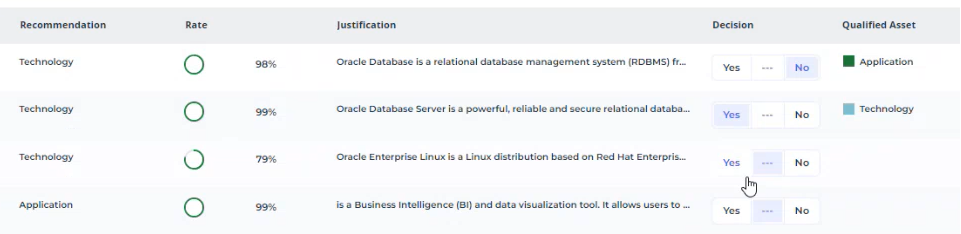
3. Click on step 2: Preview and update repository.
A table lists the technologies that have been qualified as Applications.
4. If necessary, complete the information before creating them:
• when a technology corresponds to an application, the application takes the name of the technology by default, but you can override the name.
• you can associate the application with a portfolio and a manager.
5. You can:
• create all the applications in the list at once: click the Create Applications button. You will be prompted to validate. Click Yes to create all the applications displayed.
• create applications one by one: tick the application in question and click Create Applications.
6. Once the applications have been created, the wizard suggests to match them to business capabilities.
You can also carry out this step at a later date. See Matching Applications to Business Capabilities below.Matching Applications to Business Capabilities
Once the technologies have been requalified as applications, the AI-Driven APM tool defines the functional coverage of these applications by associating them with business capabilities.
Applications must be linked to an application portfolio.Business capabilities are derived from standard MEGA business capability maps, delivered in the module “Standard Industry Capability Maps” : https://store.mega.com/modules/details/sample.itbm.stdcapamaps?prerelease=False.For each application, the tool displays a list of capabilities to which it is likely to respond. You can modify this list.
Launching Capability Smart Mapping
You can launch Capability Smart Mapping with the Enterprise Architect and EA Functional Administrator profiles:
1. In the navigation bar click Tools> Capability Smart Mapping.
2. Select the portfolio containing the relevant applications and the business capability map.
3. The wizard presents:
• the application list
• the recommended business capabilities
• business capabilities already linked to applications.
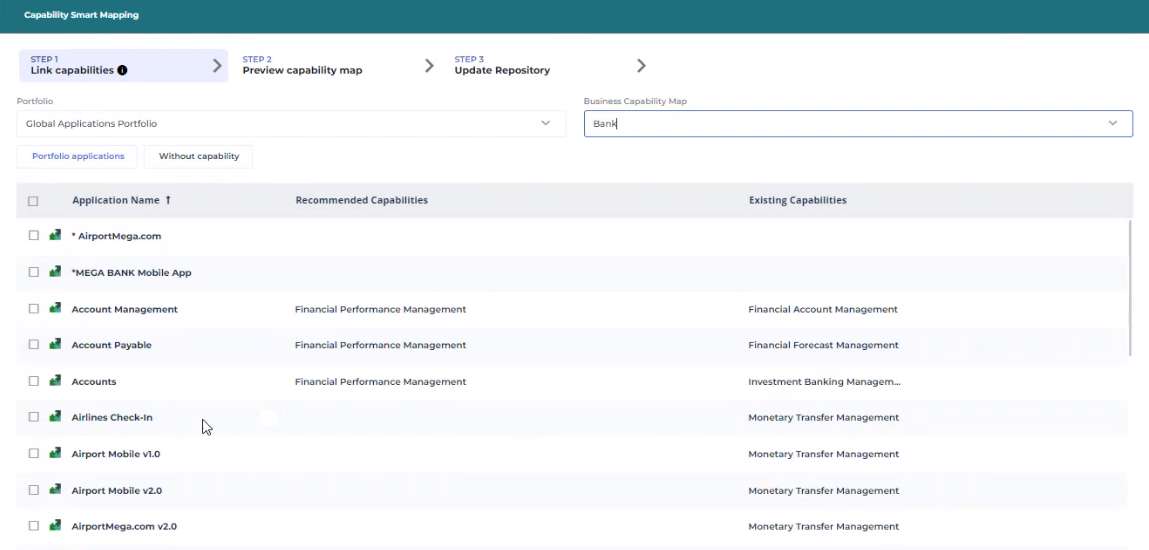
You can define or modify recommended capabilities manually. Recommended applications are displayed in the capability map in step 2. If required, you can go back to step 1 and modify the recommendation.
4. Click on step 2 to preview the business capability map.
Applications associated with business capabilities appear in green.
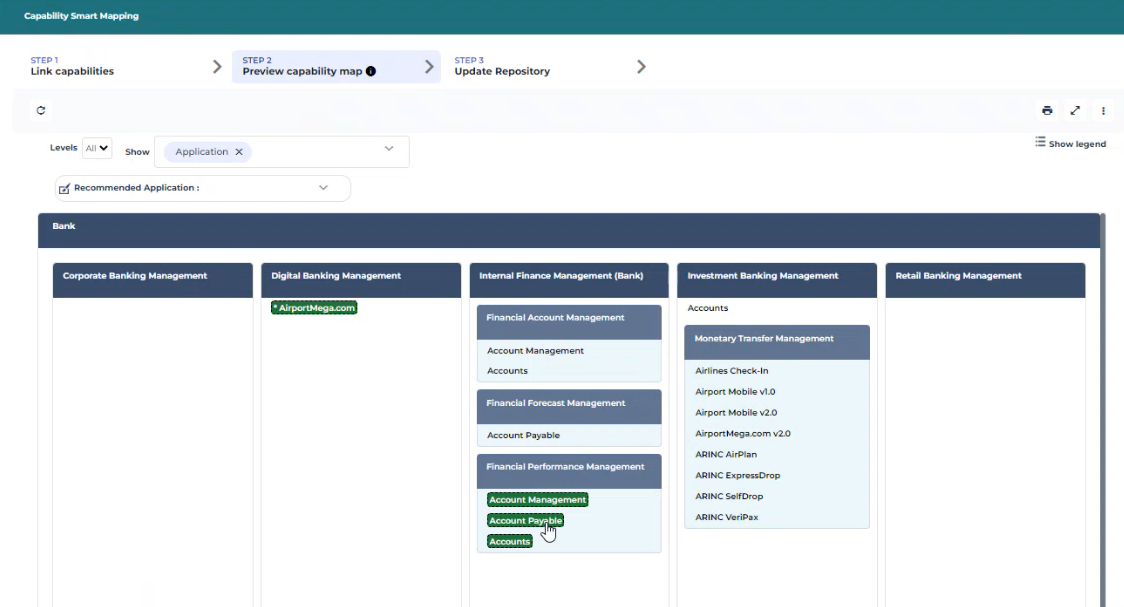
5. Go to step 3.
6. You can:
• connect all applications on the list to the recommended capabilities at once: click Link Applications to Capabilities and confirm.
• connect applications one by one: check the application in question and click Link Applications to Capabilities.
Reliability of recommendations
The model characterizes a business application on the basis of the following elements:
• Product analysis:
• A product that brings added value to the company's end-users.
• A product that supports a business function
• A product containing specific words such as Designer, Networker, Backup, etc.
• Training on a massive database: the machine learning model has been trained on over 74,000 different technologies, assimilating the patterns that distinguish one application from another.
Model accuracy and performance measures:
Displayed confidence rate | Reliability for an application | Reliability for a technology |
|---|---|---|
>80% | 99% | 89% |
60%-80% | 65% | 67% |
<60% | 66% | 66% |
The model's recommendations may be interpreted differently depending on the expertise of the sector and the user.
Expertise of the user
A software may be considered an application by one user, but a technology by another, depending on their expertise and needs.
Example
Take software like Docker: it can be considered as an application by a developer who uses it to build and run applications, but it can be considered as a technology or platform by a system administrator who uses it to manage system resources, ensure container security, and so on.
The final categorization may also depend on the user's level of expertise.
A less technical user may rely more on high-confidence recommendations, while a more technical user may feel comfortable interpreting low-confidence recommendations on the basis of their own knowledge and experience.