Creating Application in HOPEX IT Portfolio Management
HOPEX IT Portfolio Management offers the possibility of describing simple applications or more complex applications via the use of application systems.
Applications and application systems of the organization can be created by the Enterprise Architect or the EA functional administrator.
Application portfolio managers can create applications and specify the owners of those applications. They can then initiate update workflows (functional and technical) so that the application owners can complete the data for their applications.
Creating an Application
As an Entreprise Architect you can access applications from the Applications navigation pane of the HOPEX Architecture desktop.
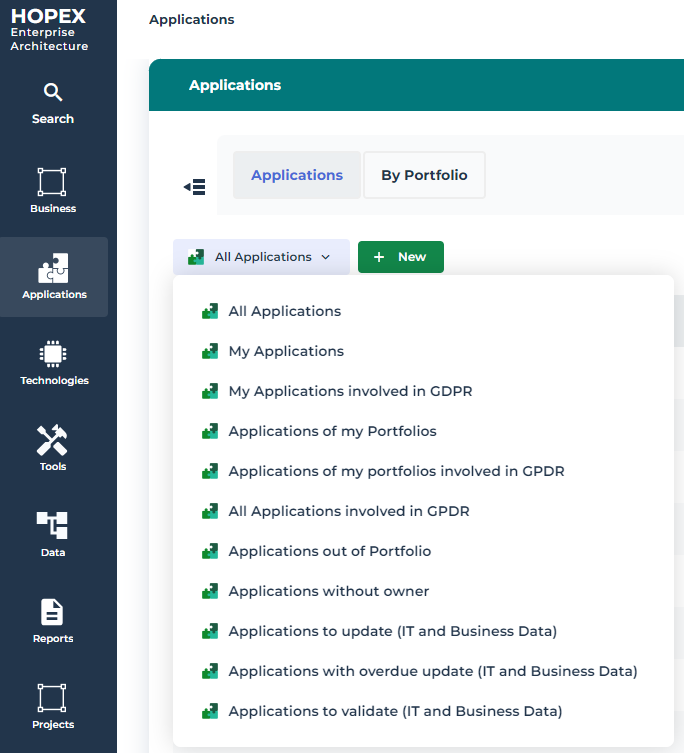
Under Applications, a drop-down list classifies the applications according to the following criteria:
• All applications of the repository
• Applications of the connected user portfolio
• Applications outside portfolio (those not belonging to any inventory portfolio)
• Applications without owner
• etc.
To create an application:
1. In the navigation bar, click Applications.
2. In the edit area, click Inventory.
The list of applications appears in the edit area.
3. Click the + New button.
4. In the an application creation window, you can specify:
• the name
• the life cycle
• life cycle begin and end dates
• the functional scope
• the associated technologies
 For further details, see Application Characteristics.
5. Click OK.
The user that created an application becomes its manager.Importing Applications from an Excel file
You can bulk import applications and other application assets via a dedicated Excel file. For more details, see Importing Objects in HOPEX IT Portfolio Management.