Object Properties
Objects have several property types. Available properties depend on the object type.
Accessing Object Properties
In HOPEX, you can display a property window:
• on an occasional basis in full page in the edit area, to access a specific object properties
E.g.: to view or modify the object properties.
• on a permanent basis, to the right of a diagram, a report, a tree, to access the properties of the objects included in the diagram, the report, or the tree
E.g.: when editing a diagram, to view or modify the properties of objects included in the diagram.
• in a new tab in HOPEX, to permanently display a specific object properties
You can get an overview of the essential properties of an object through its Card.
 See Card of an Object.
Displaying an object properties (list or tree)
To display an object properties from a list or a tree:
1. Hover the cursor over the object name.
2. Click Properties  .
.
.The object properties are displayed in full page, in the edit area.
You can also open the properties of an object from a card list in the browsing area. See Card of an Object.Displaying an object properties (diagram)
In a diagram, you can display an object properties in parallel to a diagram and/or in a new tab.
To display an object properties in a diagram preview, you can:
• click the object in the diagram, then in its pie menu select Properties
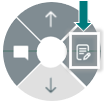
• hover the cursor over the object of your choice and click:
• Properties  to display its properties to the right of the diagram
to display its properties to the right of the diagram• Open in a new tab  to display its properties in a new tab
to display its properties in a new tab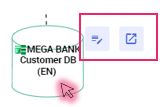
To display an object properties in a diagram in edit mode:
 When hovering the cursor over the object, the icons to access the properties pop up. Click:
• Properties to display its properties to the right of the diagram
to display its properties to the right of the diagram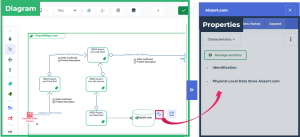
• Open in a new tab to display its properties in a new tab
to display its properties in a new tabDisplaying an object properties (report)
With reports, as with diagrams, you can display an object properties to the right of the report and/or in a new tab.
Displaying an object properties in a new tab
You may choose to display an object properties in a new tab, so as to access it at any time and perform other tasks simultaneously in HOPEX.
To display an object properties in a new tab:
Hover the cursor over of the object name and click Open in a new tab  .
.The object properties are displayed in a new tab.