Generating a Report on Permissions by Profile
Generating a report on permissions (Administration Desktop)
In the Web Administration desktop, you can generate the Profile Permissions comparison Report, which enables to compare the permissions of several profiles.
Report content
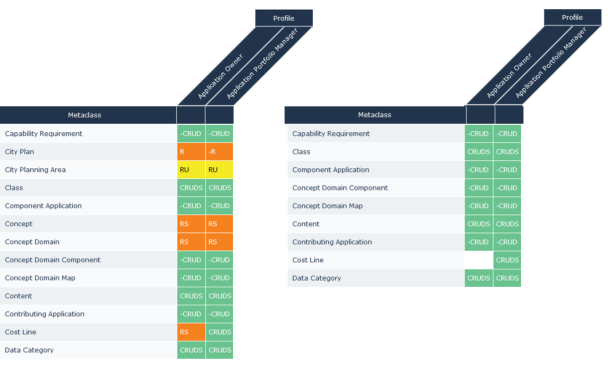
All MetaClasses of the selected metamodel appear in the report.
For each MetaClass, the report displays:
• (in rows) all MetaClasses, MetaAttributes of MetaClasses, MetaAssociationEnds of MetaClasses.
• (in columns) permissions for all selected profiles.
To generate an instant report on profile permission comparison:
1. Connect to the Administration desktop with HOPEX Administrator profile.
2. Access the Profiles management pages.
3. In the list of profiles, select the profiles for which you want to compare the permissions.
E.g.: Application Portfolio Manager and Application Owner.
4. In the list toolbar, click Instant Report.
5. Select Profile Permissions comparison Report.
6. Click OK.
7. In the Parameters section, in the Metamodel pane, click Connect and select the Metamodel associated with the profiles you want to compare.
E.g.: HOPEX IT Portfolio Management.
8. In the Parameters section, click  to reduce the section.
to reduce the section.9. Click Apply Parameters.
 Attention: when the report has already been generated (the last generation date and time is indicated) with other parameters, click
  to update the report with the new parameters.
The report is generated as a matrix.
 Generation can take some time, depending on the parameters you have selected.
10. (If needed) Filter the report according to permission values.
E.g.: you can display the rows with the "CRUD" value only.
Generating a report on permissions (HOPEX Studio)
In HOPEX Studio, the following Report Templates enable to generate permission related reports:
• Profile Permission report enables to generate the detail of permissions for a given profile.
• Profile Permissions comparison Report enables to compare permissions of several profiles.
• Workflow Permissions enables to generate the detail of permissions for a given workflow.
Report content
All MetaClasses of the selected metamodel appear in the report.
For each MetaClass, the report displays:
• (in rows) all MetaAttributes, Tools, MetaAssociations (and MetaAttributes of MetaAssociations) of the MetaClass.
• (in columns) permissions for all selected profiles.
To generate a report on permissions:
1. In your HOPEX Studio desktop (HOPEX Customizer profile), access your reports.
2. Click New  .
.
.3. (Optional) In the Local Name field, modify the default report name.
4. In the Report Template pane, select the report template concerned.
 Use the table filtering tool to easily access the report type.
5. Click Next.
6. Select the report parameters:
• in the Profile pane, click Connect and select the profiles concerned.
For a faster result, do not select a large number of profiles.• in the MetaModel pane, click Connect and select the metamodel concerned.
For the Workflow Permissions report template, in the Workflow field, click the arrow and select Connect Worflow Definition.7. Click OK.
The report is generated as a matrix.
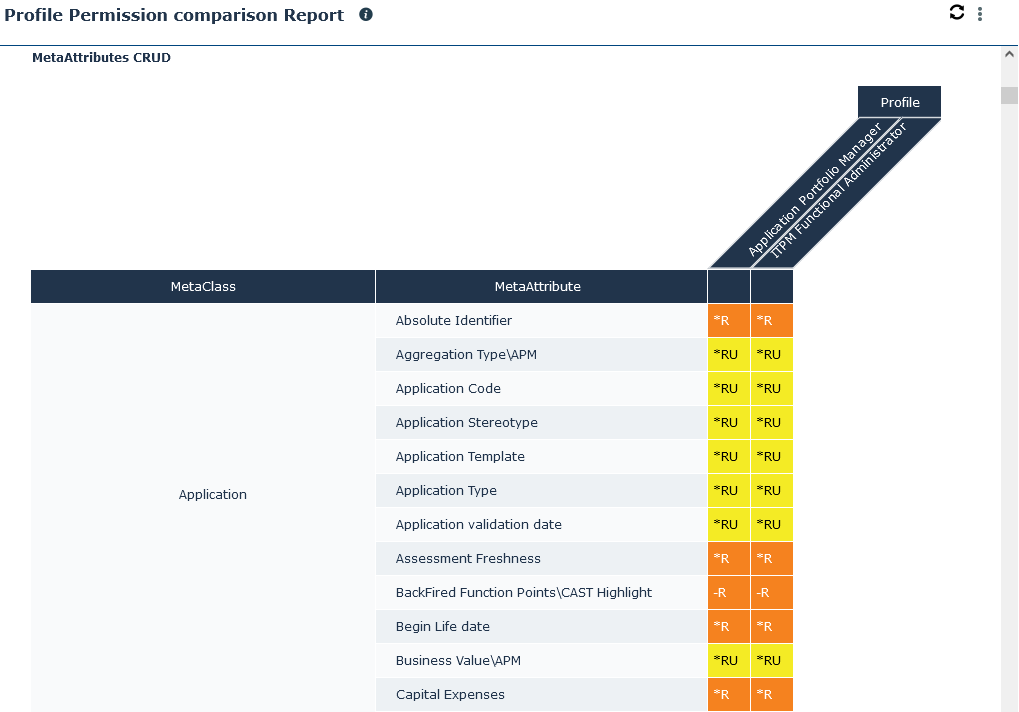
Generation can take some time, depending on the parameters you have selected.E.g. the permission comparison report of Application Portfolio Manager and ITPM Functional Administrator, here you can see the permissions of some of the MetaAttributes of Application MetaClass.
8. (If needed) Filter the report according to permission values.