Assessing risks directly
Direct assessment provides, at a given date, assessment of a risk on an entity of the organization.
In direct assessment, the values of the characteristics can be specified in two ways:
• in risk properties: Creating a Direct Assessment on a Risk
• globally, using a multiple assessment table: Assessing Multiple Risks Simultaneously
Direct assessment is carried out for all entities or applications available in the Scope section of the risk properties.
 See also: Starting an Assessment Campaign.
Direct Risk Assessment Templates
HOPEX IRM provides risk assessment templates in the context of the following objects:
• entity and process
• application
Assessed characteristics

Example of assessed characteristics:
• Impact
• Probability
• Control Level
• Residual risk
Respondents
Respondents can be:
• Risk Responsible users (on risks), or
• Risk Assessors (on entities or processes)
It is possible to define several respondents.For more details, see Prerequisites to Risk Assessment.Questionnaire
The questionnaire relates to characteristics to be assessed for all risks determined as objects of assessment:
• Impact
• Probability
• Control Level
Creating a Direct Assessment on a Risk
You can create new assessments to assess a risk on all objects of the organization to which it is connected.
This is an "expert view" assessment.
To create a direct assessment on a risk:
1. Select the risk and open its properties.
2. Select the Evaluation page.
3. Click New Assessment.
A page offering to select context(s) appears if several contexts are available for the risk concerned.4. Assign characteristics values for the risk being assessed:
• Impact: the impact of the risk when it occurs.
• Likelihood: the probability that the risk will occur.
If the risk has already been assessed, impact and likelihood values from the last assessment are suggested. You can modify these values for the new assessment.• Control Level
If the risk has already been assessed, a Control Level value is also suggested. For more information, see Risk Control Level.5. Specify the Assessment Date if necessary.
6. Click OK.
An assessment is created.
Assessing Multiple Risks Simultaneously
Through the multiple assessment table you can specify the same value for several assessment nodes of different risks.
To assess several risks simultaneously:
1. From the navigation menu, select Assessment > Direct Assessment > Risk Multiple Assessment Table.
2. Click Launch Multiple Assessment.
3. In the window that appears, select the Assessment template:
• "Risk Assessment by Entity and Process"
• "Risk Assessment by Application"
4. In the displayed tree, select the objects that define the assessment context (entity or application, depending on the selected template).
A risk is assessed in the context of elements of the branch from the risk up to the root.To help you choose the risks to be assessed, the following information is displayed in columns:
• Last Assessment
• Residual Risk
• Open Incidents
• Forecast Risk
This information is also available in the risk dashboard. For more details, see Risk Dashboard. 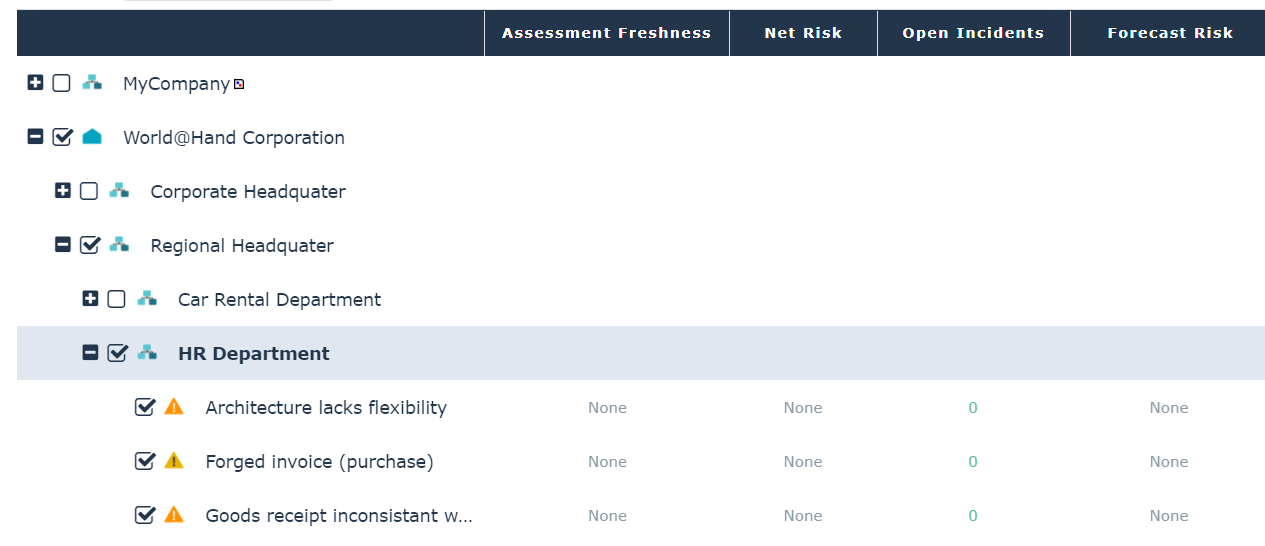
In the above example, if you select the "HR Department" entity, all risks and context objects located at a lower level are selected, as well as all parent context objects up to the tree root.
If you deselect a node of a branch, only the child elements of this branch are deselected.5. Click OK.
6. For each assessed object, select values:
• Impact: characterizes impact of the risk when it occurs.
• Likelihood: characterizes probability that the risk will occur.
Values entered for impact and likelihood during the last assessment are displayed. • Control Level: gives an overall assessment of risk control level.
7. When you have finished, click OK.
Validation automatically creates an assessment in the Assessment page of the control properties. For more details, see Displaying Risk Assessment Results.