Managing Report DataSets
Introduction to Report DataSets
Report DataSet
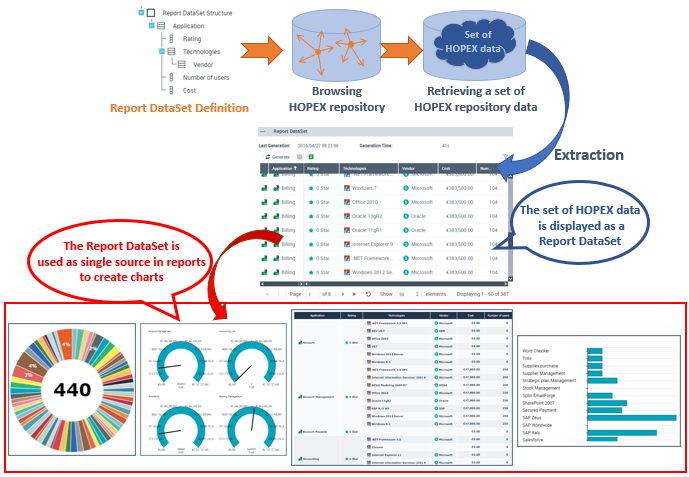
A Report DataSet is a set of data extracted from HOPEX repository.
This set of data is presented in a tabular form and defined by a Report DataSet Definition.
 To create a Report DataSet, Report DataSet definitions are available.
This set of data shown in a tabular form is used as a source of data in reports. Data can then be used and shown in different graphical formats.
Report DataSet Definiton
A Report DataSet Definition describes how to build a Report DataSet from the HOPEX repository data.
Accessing Report DataSets
Access to Report DataSets gets done the same way in all HOPEX Solutions.
Report DataSets are listed in two pages:
• public Report DataSets
• my Report DataSets
Each Report DataSet is listed with the following characteristics:
• its confidentiality (public/private)
• the Report DataSet Definition on which it is based
• the date and time it was last generated
• its generation time
• its owner container
To access a Report DataSet preview, see Accessing a Report DataSet properties.
To access Report DataSets:
1. Click the navigation menu, then Reports > Other Reports.
2. In the edit area, click My Report DataSets tile.
Your Report DataSets are listed.
In this page, you can create a Report DataSet and access its properties.
See also Configuring and Using a Report DataSet.3. To access your Report DataSets, in My Report DataSets drop-down menu, select Public Report DataSets.
The public Report DataSets (including yours) are listed.
Accessing a Report DataSet properties
To access the properties of a Report DataSet:
1. Access Report DataSets.
2. In the Report DataSet list, access the Report DataSet needed.
To access the Report DataSet, you can use the list filtering tool, see Filtering a list data.3. Roll the mouse over the Name column and click Properties  .
.
. The properties of the Report DataSet are displayed in full page in the edit area.
Displaying a Report DataSet properties in a new tab
You can display the Report DataSet properties in a new browser tab. You can thus easily access the Report DataSet properties and in parallel work in your HOPEX desktop.
To display a Report DataSet properties in a new browser tab:
1. Access the Report DataSet properties.
2. In the title bar of the Report DataSet properties, click Open in a new tab  .
.
.The Report DataSet properties are displayed in a new browser tab.
Properties of a Report DataSet
A Report DataSet is created from objects of the HOPEX repository.
In the Report DataSet properties, the Characteristics section specifies the characteristics of the Report DataSet:
• Report DataSet Definition is the definition on which the Report DataSet is based
• #Tags shows the tags of the Report DataSet
• Sharing defines the confidentiality mode of the Report DataSet:
• public: the Report DataSet is shared with the other users
• private: the Report DataSet is confidential to the user who created it.
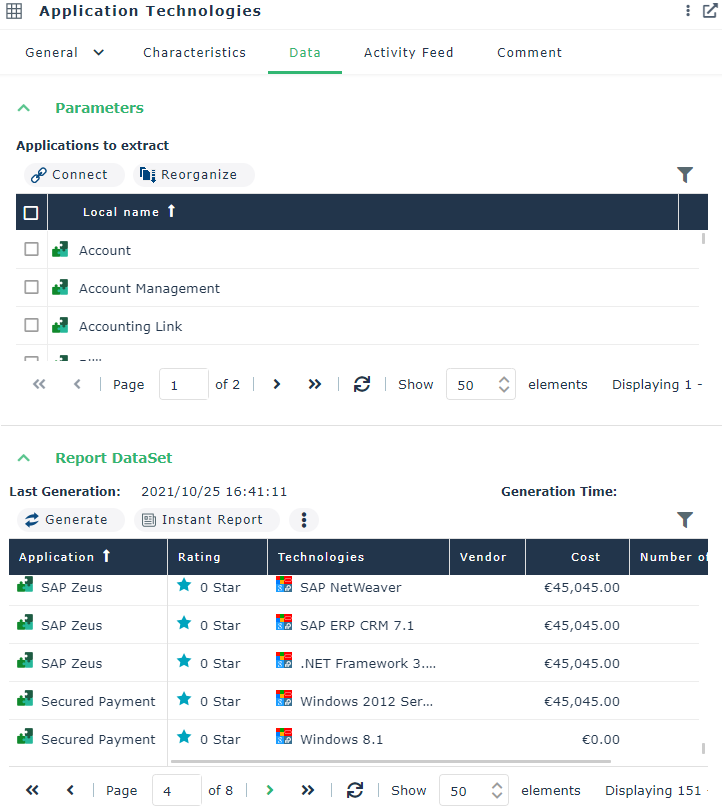
In the Report DataSet properties, the Data page contains the following sections:
• Parameters, which defines the objects to be extracted from the HOPEX repository.
• Report DataSet, which shows the Report DataSet data in a tabular form.
The data displayed is read-only.
For example, a Report DataSet with the "Application Technologies" definition contains the following data for each application selected (objects to be extracted):
- "Application"
- "Rating"
- "Technologies"
- “Vendor” (of the technologies)
- "Cost"
- "Number of Users".
From the Data properties page, you can:
• perform the following operations:
This is only valid regarding the display: when you launch an instant report, the instant report is performed on all data. You can filter the data in the instant report, see: Defining and Customizing the Data of a Table-type Instant Report (Report DataSet).• launch an instant report
• launch several instant reports in parallel