Generating a Web Site
Every HOPEX product enables generation of a Web site from objects of the repository. This allows simple distribution of the content of the HOPEX repository via an Intranet. Users can consult the objects of a project (e.g.: processes) in the form of HTML pages.
 To create and configure your own Web site, you must have the HOPEX Power Studio technical module. See the HOPEX Power Studio documentation.Web site creation is only available with Windows Front-End, but you can generate a Web site with Web Front-End.
Web Site Generation Prerequisites
To be able to generate a Web site with HOPEX Web Front-End, you must first:
• Configure email sending at the installation level
• Identify a HOPEX recipient and specify an e-mail
• make sure that there is an existing and ready-to-be generated web site in HOPEX Windows Front-End.
Managing and Scheduling Web Site Generation
To generate a Web site with HOPEX Web Front-End, you must define its generation date and time.
HOPEX Windows Front-End enables also to immediately generate the Web site.To generate a Web site:
1. Connect to HOPEX (with the “Enterprise Architect” profile for example).
See Accessing HOPEX.2. Access the Web site you want to generate via the search by object type "Web Site".
3. Right-click the Web site and select Generate in background.
4. (If needed) In the generation scheduling window, click Connect  to add recipients to the email reception regarding the Web site generation information.
to add recipients to the email reception regarding the Web site generation information.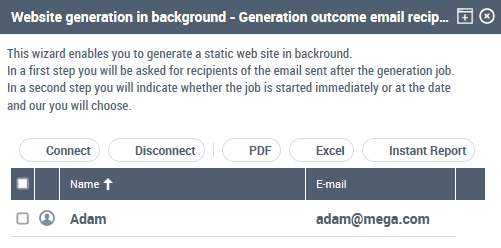
5. Click Next.
The Scheduling windows opens.
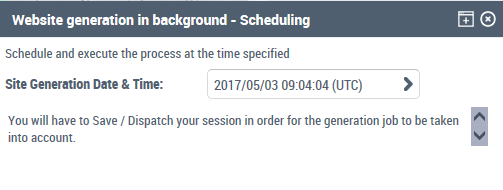
6. In the Site generation Date Time, click the arrow to define the Web site generation date and time.
7. Click Finish.
You must save and dispatch your work for generation to be taken into account.At the Web site generation, the recipients specified step 4 receive an email including a link to download the Web site.
Accessing the generated web site
To access the generated web site from the informative email received:
1. Click the link and connect to HOPEX Web Front-End.
2. Right-click the business document which is displayed and click Open.
A zip file is downloaded. It contains the generated pages of the static web site.
To consult later the generated Web site, right-click the Web site name and select Open.Web Site Folders and Files
Files supplied as standard and those resulting from generation are located in the following folder: <environment path>\Intranet.
In the “Intranet” folder of the environment or in the sub-folder corresponding to the Web site you will find:
• the following files:
• “STANDARD”, containing the standard images provided for use when generating the Web site;
• “PAGES”, containing the generated files (“.htm extension);
• “IMAGES”, containing the generated diagrams;
• files corresponding to the Home Page and Site Map.
To view or modify the location of web site files, open the properties of the web site in HOPEX Windows Front-End.